

HomeArvia: AI Home Design
SUMMIT CORE TECHNOLOGIES LLC Graphics & Design iPhoneiPadiPod touch
HomeArvia: AI Home Design is a free Graphics & Design app for iPhone and iPad by SUMMIT CORE TECHNOLOGIES LLC. Requires iOS 16.4. Updated October 7, 2026.
- Price
- Free
- on the App Store
- Size
- 73 MB
- Age 4+
- Updated
- Oct 7
- 2026 · v1.1
Screenshots

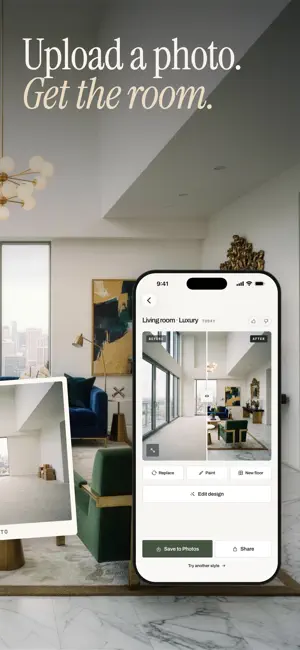


About HomeArvia: AI Home Design
Snap a photo of your room and see it redesigned by AI in seconds — then change exactly the part you want: swap the sofa, repaint a wall, lay a new floor or clear the clutter. Everything you don't touch stays as it is. HomeArvia is an AI interior design app and home planner in one. Redesign a room, the front of your house or your garden from a single photo. 9 AI TOOLS • Interior design — pick from 17 styles (Japandi, Scandinavian, Modern, Boho, Mid-Century, Mediterranean, Art Deco and more) or describe your own. • Replace objects — tap a piece and say what goes there instead, or add a photo of a piece you saw in a shop and see that exact one in your room. • Paint — recolour a wall or any area; the light and texture stay real. • New floor — oak, walnut, herringbone, marble, concrete, terracotta tiles or carpet, with your furniture left in place. • Clean up — brush over the mess and see the room cleared. • Layout boost — your own furniture, moved into a better arrangement. • Design from a reference — bring the look of a room you love into yours. • Exterior design — give your house front a new architectural style and colours. • Garden design — from a bare yard to a Japanese, Mediterranean or cottage garden. MADE FOR YOUR REAL ROOM • AI select finds the sofa, the floor or the walls for you — or paint the area yourself. • Keep what you love: your room's walls, windows and layout stay recognisable. • Choose a colour palette, or tap Surprise me. • Compare before and after with a swipe, save in full resolution and share. • Works for living rooms, bedrooms, kitchens, bathrooms, offices, kids' rooms, dining rooms, balconies and more. YOUR DESIGNS GO WITH YOU Sign in with Apple or Google and your designs are backed up and restored on a new phone. Or use HomeArvia without an account. FREE TO TRY Start with free designs. HomeArvia Premium unlocks unlimited designs and edits, every style and exports without a watermark. Premium is an auto-renewing weekly or yearly subscription; the price for your country is shown in the app before you buy. It renews unless cancelled at least 24 hours before the end of the period — manage it anytime in Settings > Apple ID > Subscriptions. Need only a few? A one-time design pack is available too. PRIVATE BY DESIGN Your photos are used only to create your designs — never for advertising and never to train AI models. Delete your account and data anytime inside the app. Terms of Use (EULA): https://www.apple.com/legal/internet-services/itunes/dev/stdeula/ Privacy Policy: https://ebahaadr.github.io/casavia-legal/privacy.html Questions? [email protected]
What’s new
Version 1.1 · Updated October 7, 2026
The biggest HomeArvia update yet: • Replace objects — tap a piece and say what goes there, or add a photo of a piece you like • Paint any wall or area • New floor: oak, marble, herringbone, tiles and more • Clean up the clutter with a brush • Layout boost — your furniture, better arranged • Exterior and garden design • AI select finds the sofa, floor or walls for you • 17 interior styles, your own custom style and Surprise me palettes • Your designs are backed up and restored on a new phone • Now in 10 languages
App privacy
The developer, SUMMIT CORE TECHNOLOGIES LLC, reported these privacy practices to Apple.
Data Linked to You
The following data, which may be collected and linked to your identity, may be used for the following purposes:
- Purchases: Purchase History
- Contact Info: Email Address, Name
- User Content: Photos or Videos
- Identifiers: User ID
Used for: Analytics, App Functionality
Alternatives to HomeArvia: AI Home Design
Looking for apps like HomeArvia: AI Home Design? Here are 6 similar apps on the App Store. The highest rated is AI RevivePhoto for Seniors (5.0/5), and all 6 are free to download.
-
 DomAI: AI Interior Home Design
-
 AI RevivePhoto for Seniors
5.0
AI RevivePhoto for Seniors
5.0
-
 AI Home Exterior Designer 3D
-
 Room Design AI: Home Interior
4.0
Room Design AI: Home Interior
4.0
-
 AI Home Design & Interior Plan
4.0
AI Home Design & Interior Plan
4.0
-
 HomeAI: AI Home Photo Redesign
5.0
HomeAI: AI Home Photo Redesign
5.0
| App | Rating | Price | Last updated | Compare |
|---|---|---|---|---|
| HomeArvia: AI Home Design | – | Free | October 7, 2026 | |
| DomAI: AI Interior Home Design | – | Free | Aug 25, 2026 | Compare |
| AI RevivePhoto for Seniors | 5.0 / 5 (2) | Free | May 11, 2026 | Compare |
| AI Home Exterior Designer 3D | – | Free | Jul 22, 2026 | Compare |
| Room Design AI: Home Interior | 4.0 / 5 (2) | Free | Oct 28, 2026 | Compare |
| AI Home Design & Interior Plan | 4.0 / 5 (3) | Free | Oct 3, 2026 | Compare |
| HomeAI: AI Home Photo Redesign | 5.0 / 5 (1) | Free | May 6, 2026 | Compare |