

Addmein AI
Addmein, Inc. Productivity iPhoneiPadiPod touch
Addmein AI is a free Productivity app for iPhone and iPad by Addmein, Inc. Requires iOS 16.4. Updated September 17, 2026.
- Price
- Free
- on the App Store
- Size
- 60 MB
- Age 4+
- Updated
- Sep 17
- 2026 · v1.3.2
Screenshots



About Addmein AI
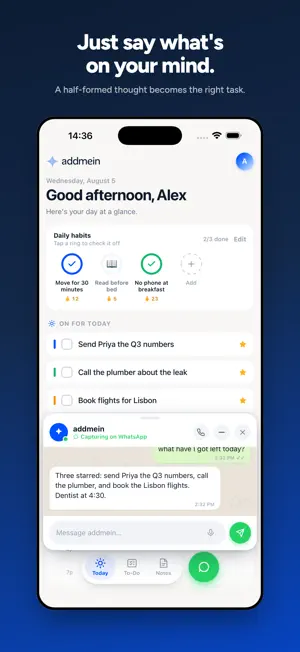
Your brain has better things to do. Tell addmein what's on your mind — type it or just say it — and it sorts the mess into tasks, notes and habits. You get on with the rest of your day. MADE FOR THE WAY YOU ACTUALLY THINK Most to-do apps make you do the filing. Addmein doesn't. Give it a half-formed thought — "call the dentist about Thursday, and I keep forgetting to take the bins out" — and it becomes a task with a due date and a habit that repeats. THREE SCREENS. THAT'S IT. • Today — what you're doing now: your starred tasks and the habits you're building • To-Do — everything else, grouped into categories you name • Notes — for the things that aren't tasks TALK TO IT Call addmein from inside the app and think out loud. It captures what matters, answers questions about your own list, and reads your day back to you. No menus, no forms. HABITS THAT STICK Habits reset every morning and build a streak. Miss a day and it doesn't lecture you. IT REMEMBERS Addmein keeps track of the people, places and details that keep coming up, so you never have to explain yourself twice. REMINDERS THAT ARRIVE Due dates become notifications. Habits you haven't done yet get a nudge, not a nag. YOUR DATA IS YOURS Delete your account and everything in it from inside the app, at any time. Your tasks and conversations are never used to train AI models.
What’s new
Version 1.3.2 · Updated September 17, 2026
Record a voice note with one hold, sign in with Google on iPhone, and drop a task onto any category. • Hold the green capture button to record a voice note. Let go to send it, or slide left first to throw it away. A tap still opens the chat. • Sign in with Google on iPhone, as well as with Apple. • While you drag a task, every one of your categories shows up as a place to drop it. • Set a task's type, like Calls, Errands or Computer, yourself from its options. Your choice sticks. • Warmer, more encouraging wording on Today and across the app. • Ticking off your last starred task no longer risks ticking off the task that moves up into its place.
App privacy
The developer, Addmein, Inc., reported these privacy practices to Apple.
Data Linked to You
The following data, which may be collected and linked to your identity, may be used for the following purposes:
- Identifiers: User ID, Device ID
- Contact Info: Email Address, Name, Phone Number
- User Content: Photos or Videos, Audio Data, Customer Support, Other User Content
- Diagnostics: Other Diagnostic Data
Used for: Analytics, App Functionality
Alternatives to Addmein AI
Looking for apps like Addmein AI? Here are 6 similar apps on the App Store. The highest rated is StrideFlow AI: Goal Planner (5.0/5), and 5 of the 6 are free to download.
-
 Scrini
-
 Velumo
1.0
Velumo
1.0
-
 Finale Habits: Daily Tracker
4.7
Finale Habits: Daily Tracker
4.7
-
 StrideFlow AI: Goal Planner
5.0
StrideFlow AI: Goal Planner
5.0
-
 Greyer - Smart AI Assistant
3.9
Greyer - Smart AI Assistant
3.9
-
 AM GPT
| App | Rating | Price | Last updated | Compare |
|---|---|---|---|---|
| Addmein AI | – | Free | September 17, 2026 | |
| Scrini | – | Free | Sep 24, 2026 | Compare |
| Velumo | 1.0 / 5 (1) | Free | Aug 26, 2026 | Compare |
| Finale Habits: Daily Tracker | 4.7 / 5 (231) | 1.99 USD | Aug 6, 2026 | Compare |
| StrideFlow AI: Goal Planner | 5.0 / 5 (5) | Free | Oct 15, 2026 | Compare |
| Greyer - Smart AI Assistant | 3.9 / 5 (14) | Free | Oct 15, 2026 | Compare |
| AM GPT | – | Free | Sep 28, 2026 | Compare |
Compare Addmein AI with the top alternatives: ratings, updates, ASO score and keyword gaps →