

Limitto: Screen Time Blocker
Perdus Labs Utilities iPhoneiPadiPod touch
Limitto: Screen Time Blocker is a free Utilities app for iPhone and iPad by Perdus Labs. Requires iOS 17.0. Updated August 18, 2026.
- Price
- Free
- on the App Store
- Size
- 21 MB
- Age 4+
- Updated
- Aug 18
- 2026 · v1.2
Screenshots

About Limitto: Screen Time Blocker
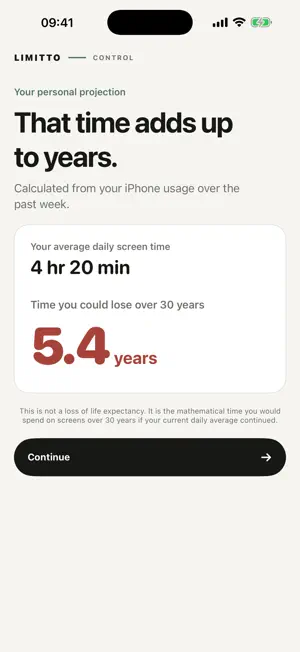
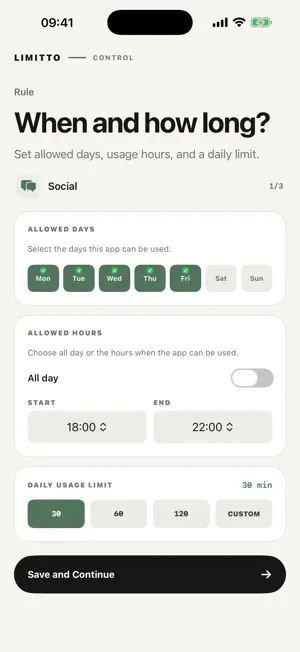
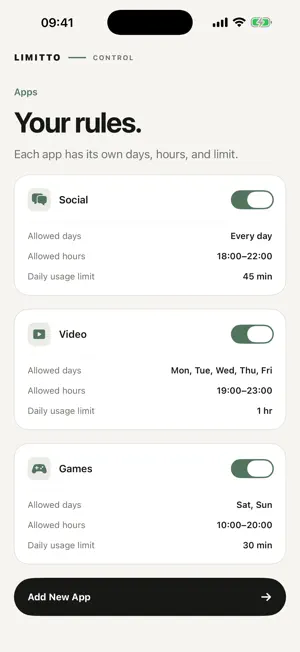
Limitto is a screen time app and app blocker for iPhone. Set a daily limit for each app, and Limitto locks it automatically when the time is up. No willpower required. See your recent screen time pattern, understand how those hours add up over the years, and set a realistic personal target. Choose allowed days, allowed hours, and a daily limit for every app separately. Need a quick break from one app? Start Focus Now for 15 minutes to 8 hours. The block lifts automatically when the session ends. Highlights: • A separate daily limit for each app • Rules for selected days of the week • All-day or custom allowed hours • One-time Focus Now sessions • Reminders before an app locks • Today and weekly usage summaries • Optional six-digit PIN to protect settings • Light and Dark Mode, no account required Privacy by design: Your app selections stay on device as privacy-protected Apple tokens. Screen Time usage is shown inside Apple's protected reporting environment and is never sent to Limitto servers. Limitto Pro offers auto-renewing weekly and annual plans. Eligible new subscribers may receive a 3-day free trial. Trial eligibility, localized price, billing period, and renewal terms are shown on the App Store purchase sheet before you confirm. Subscriptions can be managed or canceled in your Apple Account. Important limitation: Limitto uses individual Screen Time authorization. The device owner can delete the app or revoke Screen Time access in system settings. This version does not provide remote child-device management or Family Sharing child-account management. Terms of Use (Apple Standard EULA): https://www.apple.com/legal/internet-services/itunes/dev/stdeula/
What’s new
Version 1.2 · Updated August 18, 2026
A new onboarding step shows the apps you use most, so you can choose what to limit in seconds. Faster launch, smoother animations, and refreshed wording throughout.
App privacy
The developer, Perdus Labs, reported these privacy practices to Apple.
Data Used to Track You
The following data may be used to track you across apps and websites owned by other companies:
- Identifiers: Device ID
Data Linked to You
The following data, which may be collected and linked to your identity, may be used for the following purposes:
- Identifiers: Device ID
Used for: Developer’s Advertising or Marketing, Analytics, App Functionality
Data Not Linked to You
The following data, which may be collected but is not linked to your identity, may be used for the following purposes:
- Purchases: Purchase History
- Other Data: Other Data Types
- Diagnostics: Crash Data
Used for: Analytics, App Functionality
Alternatives to Limitto: Screen Time Blocker
Looking for apps like Limitto: Screen Time Blocker? Here are 6 similar apps on the App Store.
-
 Brickr: Tap to Focus
-
 快捷闹钟
快捷闹钟
-
 FoxTime: Screen Time Blocker
-
 TrueFocus: Screen Time Control
-
 Bookmark & Read Later BukuMaku
-
 AirFind: Find Lost Earbuds
| App | Rating | Price | Last updated | Compare |
|---|---|---|---|---|
| Limitto: Screen Time Blocker | – | Free | August 18, 2026 | |
| Brickr: Tap to Focus | – | Free | Aug 18, 2026 | Compare |
| 快捷闹钟 | – | Free | Sep 20, 2026 | Compare |
| FoxTime: Screen Time Blocker | – | Free | Sep 3, 2026 | Compare |
| TrueFocus: Screen Time Control | – | Free | Oct 1, 2026 | Compare |
| Bookmark & Read Later BukuMaku | – | Free | Oct 8, 2026 | Compare |
| AirFind: Find Lost Earbuds | – | Free | Jul 31, 2026 | Compare |