

Earned Time
Payam Khaninejad Productivity iPhoneiPadiPod touch
Earned Time is a free Productivity app for iPhone and iPad by Payam Khaninejad. Requires iOS 18.0. Updated September 1, 2026.
- Price
- Free
- on the App Store
- Size
- 2 MB
- Age 4+
- Updated
- Sep 1
- 2026 · v1.5
Screenshots

About Earned Time
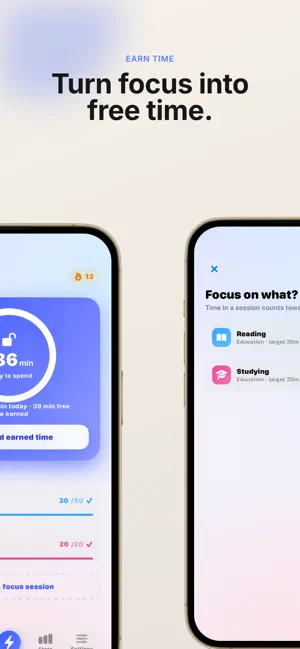
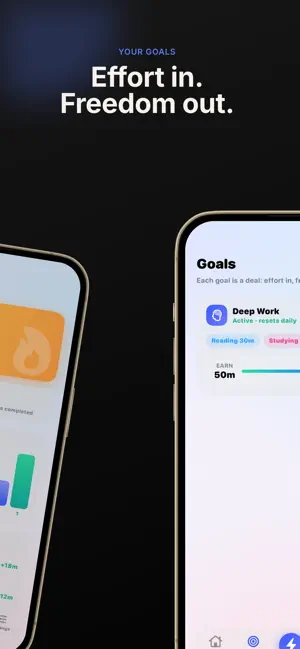
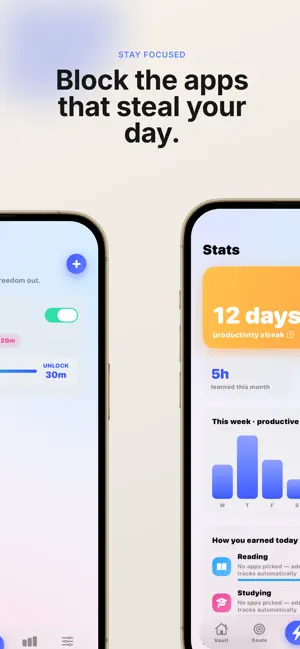
Earned Time flips the deal on screen time. Instead of guilt-tripping you with a weekly usage report, it pauses your distracting apps until you've done something that actually matters to you. HOW IT WORKS 1. Choose the apps you want paused — social, games, whatever pulls you in. 2. Set up goals from the activities you want to do more of: reading, studying, language practice, anything. 3. Pick which apps count as productive for each activity. 4. Time you spend in those apps is tracked automatically and converts into unlock minutes. 5. Spend your earned minutes whenever you want. Your paused apps come back for exactly that long, then lock again on their own. WHY IT'S DIFFERENT No shaming. No arbitrary limits you'll disable in a weak moment. You set the exchange rate between effort and freedom, and the app just holds you to it. FEATURES • Automatic tracking — productive app time becomes unlock minutes with no timers to start and no sessions to remember • Focus sessions for offline work that no app can measure • Roll over unused minutes so a strong day can fund a slow one • See exactly how you earned: which activity, which apps, how many minutes • Anti-bypass controls — confirmation delays, a daily cap on manual unlocks, or hide the escape hatch entirely • Streaks and achievements • Daily or weekly goals PRIVATE BY DESIGN There is no account, no sign-up, and no server. Earned Time makes no network connections at all. Your Screen Time data and your goals never leave your iPhone.
What’s new
Version 1.5 · Updated September 1, 2026
Days off — and support for iOS 18. Some days aren't about willpower. You're sick, you're on a plane, you've handed your phone to a kid. Earned Time now handles that properly. • Take the day off — everything unlocks until midnight • Costs none of your earned minutes • Doesn't count against your daily unlock limit • Your streak is held, not broken • One per week by default, adjustable from 0 to 3 in Settings Find it at the bottom of the unlock sheet, or turn it off entirely in Settings if you'd rather not have the option. Apps relock on their own at midnight, so you wake up back on track. Earned Time now also runs on iOS 18 and later, instead of requiring the newest release — so it works on considerably more iPhones.
App privacy
The developer, Payam Khaninejad, reported these privacy practices to Apple.
Data Not Collected
The developer does not collect any data from this app.
Alternatives to Earned Time
Looking for apps like Earned Time? Here are 6 similar apps on the App Store. The highest rated is Steward: Home Maintenance (5.0/5), and 5 of the 6 are free to download.
-
 HabitBlocker: Earn Screen Time
-
 Steward: Home Maintenance
5.0
Steward: Home Maintenance
5.0
-
 Rebalance: Control Scroll Time
-
 MyScanner: Scan PDF & QR Code
5.0
MyScanner: Scan PDF & QR Code
5.0
-
 Minua: Earn Screen Time
-
 Earned - Screen Time
| App | Rating | Price | Last updated | Compare |
|---|---|---|---|---|
| Earned Time | – | Free | September 1, 2026 | |
| HabitBlocker: Earn Screen Time | – | 1.99 USD | Jul 21, 2026 | Compare |
| Steward: Home Maintenance | 5.0 / 5 (2) | Free | Aug 11, 2026 | Compare |
| Rebalance: Control Scroll Time | – | Free | Feb 3, 2026 | Compare |
| MyScanner: Scan PDF & QR Code | 5.0 / 5 (6) | Free | Oct 19, 2026 | Compare |
| Minua: Earn Screen Time | – | Free | Oct 10, 2026 | Compare |
| Earned - Screen Time | – | Free | Jun 23, 2026 | Compare |
Compare Earned Time with the top alternatives: ratings, updates, ASO score and keyword gaps →