

TableSage: AI Menu Translator
Mobile Tech Media, LLC Food & Drink iPhoneiPadiPod touch
TableSage: AI Menu Translator is a free Food & Drink app for iPhone and iPad by Mobile Tech Media, LLC. Requires iOS 16.4. Updated October 17, 2026.
- Price
- Free
- on the App Store
- Size
- 118 MB
- Age 12+
- Updated
- Oct 17
- 2026 · v1.2.0
Screenshots

About TableSage: AI Menu Translator
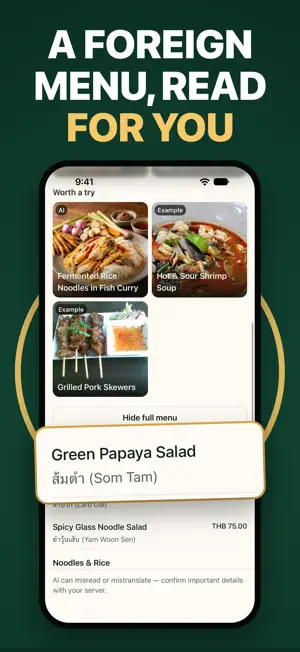
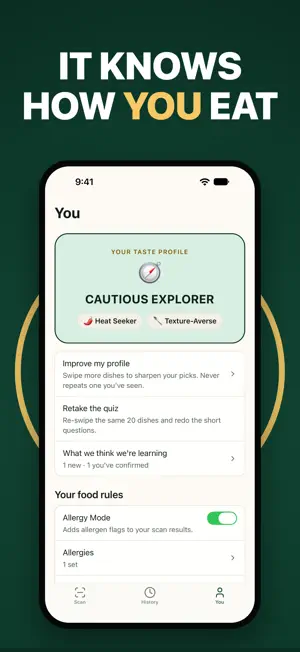
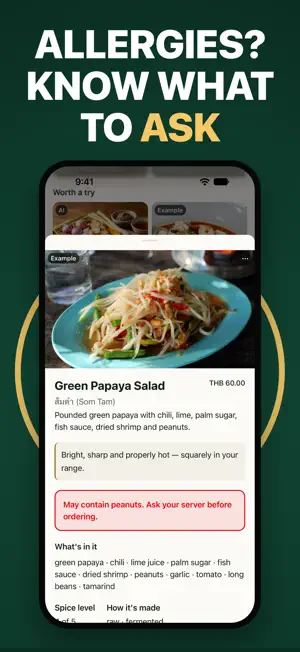
Snap the menu. Get three dishes you'll actually like. TableSage learns your taste in a short quiz, then reads any menu — in any language — and picks the dishes that fit YOU, not a crowd average. Every meal you rate makes the next pick sharper. HOW IT WORKS 1. Build your taste profile. A quick quiz and a swipe deck: the flavors you chase, the textures you avoid, how adventurous you're feeling today. 2. Scan the menu. Point your camera at it, in any language. Add up to five pages for a long one. 3. Get your picks. Three dishes, each with a plain-language reason it suits you — plus the name translated, what's in it, how spicy it is, and the price converted to your currency. 4. Rate the meal. Loved it, fine, or never again. Three taps, and the profile learns. FOR PICKY EATERS If you order the same thing everywhere because the rest of the menu is a gamble, this is built for you. Tell TableSage what you won't eat — cilantro, gristle, anything slimy — and it stops putting those dishes in front of you. It also offers one gentle stretch pick when it thinks you're ready to try something new. Ignore it if you're not. FOR TRAVELERS A menu in Japanese, Greek, or Thai stops being a coin flip. Every item translated, every dish explained, every price converted. Going away for a week? A Trip Pass covers the trip and ends by itself — no subscription to forget. ALLERGIES AND DIETS — EXACTLY WHAT WE DO Turn on Allergy Mode and TableSage flags dishes that MAY contain what you avoid, so you know what to ask your server about. It reads menus. It does not inspect kitchens. Menus leave things out, recipes change, and AI can misread. Always confirm with staff before you order. The same is true for gluten-free, vegetarian, vegan, dairy-free, halal and kosher: we flag what is worth asking about. We never certify a dish as safe. WOULD I LIKE IT? Point the camera at a plate instead of a menu and get the same read — what's in it, whether it fits you, and what to check before you commit. HOW THE AI IS USED An AI model reads your menu photo and returns dish names, translations, ingredients and flavor notes. Dish descriptions and the reason behind each pick are AI-generated, and they can be wrong. Safety warnings are never written by the AI — those come from a fixed set of wordings the app controls. BUILT TO BE READ TO YOU TableSage turns a photo of a menu you can't read into structured text your phone can read aloud. VoiceOver labels throughout, Dynamic Type support, and reduced motion respected. YOUR DATA STAYS YOURS No accounts. No email address. No location, ever. Your taste profile and your meal history live on your device. A scan is processed and its job record is deleted automatically within 30 days — the photo itself is never stored on our servers. Settings, then Delete my data, clears everything, on the phone and off it. BEFORE YOU PAY The taste quiz, your profile, a guided sample menu, and one scan of a real menu are all yours before you're asked for anything. After that, TableSage is a paid app. PRICING Premium Annual — one payment a year, our best value. Includes a 7-day free trial. Premium Monthly — billed each month. Includes a 7-day free trial. Trip Pass — 7, 14 or 30 days. One payment, no renewal, nothing to cancel. Subscriptions renew automatically unless cancelled at least 24 hours before the end of the current period. Manage or cancel in your Apple ID account settings. Snap the menu. Order something you'll love. Terms of Use: https://tablesage.app/terms Privacy Policy: https://tablesage.app/privacy Support: [email protected]
What’s new
Version 1.2.0 · Updated October 17, 2026
See your picks before you order. - Your top picks now show an image of what that kind of dish usually looks like - Images are examples, never photos from the restaurant; AI images are labeled - Tap an image for its credit, or report one that looks wrong - Scans are faster and recover better from hard-to-read menus - Fixes and polish throughout Questions or feedback? [email protected]
App privacy
The developer, Mobile Tech Media, LLC, reported these privacy practices to Apple.
Data Linked to You
The following data, which may be collected and linked to your identity, may be used for the following purposes:
- Identifiers: User ID
Used for: Analytics, App Functionality
Data Not Linked to You
The following data, which may be collected but is not linked to your identity, may be used for the following purposes:
- Usage Data: Product Interaction
- Diagnostics: Crash Data, Performance Data, Other Diagnostic Data
- Purchases: Purchase History
- User Content: Photos or Videos
Used for: Analytics, App Functionality
Alternatives to TableSage: AI Menu Translator
Looking for apps like TableSage: AI Menu Translator? Here are 6 similar apps on the App Store. The highest rated is VikSchewa: Menu Translator App (5.0/5), and all 6 are free to download.
-
 Less Please
-
 TravelTaste: Menu Translator
-
 VikSchewa: Menu Translator App
5.0
-
 Menu Translator: Travel & Food
-
 Menuly: VIsual Menu Translator
-
 Pick and Cheers
| App | Rating | Price | Last updated | Compare |
|---|---|---|---|---|
| TableSage: AI Menu Translator | – | Free | October 17, 2026 | |
| Less Please | – | Free | Feb 5, 2026 | Compare |
| TravelTaste: Menu Translator | – | Free | Oct 18, 2026 | Compare |
| VikSchewa: Menu Translator App | 5.0 / 5 (1) | Free | Sep 21, 2026 | Compare |
| Menu Translator: Travel & Food | – | Free | Oct 8, 2026 | Compare |
| Menuly: VIsual Menu Translator | – | Free | Jan 26, 2026 | Compare |
| Pick and Cheers | – | Free | Sep 3, 2026 | Compare |