

PosePal: AI Photo Pose Guide
Sattvik Tripathy Photo & Video iPhoneiPadiPod touch
PosePal: AI Photo Pose Guide is a free Photo & Video app for iPhone and iPad by Sattvik Tripathy. Rated 3.7/5 from 3 ratings. Requires iOS 18.0.
- Rating
- 3.7
- 3 ratings
- Price
- Free
- on the App Store
- Size
- 62 MB
- Age 12+
- Updated
- Sep 25
- 2026 · v1.1
Screenshots


About PosePal: AI Photo Pose Guide
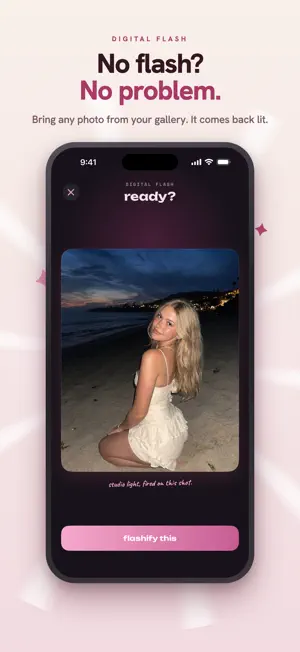
Ever stood in front of a camera and just… froze? You know the shot you want. Your body just doesn't know how to make it. PosePal is a pose coach that lives in your camera — plus the AI studio that finishes the photo afterwards. POSES — never guess again 330+ pose guides sorted by vibe: casual, selfies, dating profile, fitness, couple, honeymoon, flirty and group. Pick one and a live overlay appears right in your viewfinder showing you exactly where to put your hands, hips and feet. Line yourself up. Shoot. Done. OVERLAY — copy any photo you've saved Got a shot you love? Ghost it over your own viewfinder, line yourself up against it, and take your version. Pinch, turn and slide it until it sits exactly where you want. DIGITAL FLASH — no flash? no problem Shot in bad light? Pick that photo from your gallery and Digital Flash relights it. Studio-grade light in one tap — no ring light, no golden hour, no reshoot. AI RETOUCH — one tap, studio skin Even tone, less shine — while your pores, freckles and features stay exactly yours. This is retouch, not a face swap. You'll still look like you, just rested. BACKGROUND REMOVER — photobombers, painted gone Paint over a bin, a sign, a stranger. The scene heals itself like they were never there. FILM LAB — 15 real film looks True film-emulation LUTs, not slider presets. Warm 35mm, moody noir, clean digicam. Dial the strength to taste. THE EDITOR Crop, straighten, light and colour. Precision retouch for glow, blemishes and under-eye shadows. Full-resolution export, no watermark, ever. WHY POSEPAL IS DIFFERENT Most photo apps smooth you into a stranger. We built the opposite. Digital Flash and AI Retouch run a face safeguard that blends your real features back in, while Background Remover preserves everything outside the area you brush. Anti-filter. Just rested, lit, and unmistakably you. YOUR PRIVACY Your photo library stays on your device. A photo leaves the device only when you deliberately run Digital Flash, AI Retouch or Background Remover, and only after you agree to an in-app consent screen that names the processor. Those three tools send that one photo to Google's Gemini API, which acts solely as a data processor: it makes the edit, returns it, keeps no copy, and does not use your photo to train its models. You can withdraw consent at any time in Profile > Cloud AI processing. PosePal does not use TrueDepth face tracking or collect a 3D face mesh. We measure which features get used so we know what to improve — never your photos, and never anything measured from a face. We also keep the answers you give at setup: what you want fixed in your photos, whether you want poses for women, men or everyone, and the interests you tap. You can switch that off any time after setup in Profile > Product analytics. — POSEPAL PRO Unlocks every pose, every AI tool, all 15 film looks, and full-resolution export with no watermark. • Annual — best value, billed once a year • Monthly — billed every month Payment is charged to your Apple Account at confirmation of purchase. Your subscription renews automatically unless auto-renew is turned off at least 24 hours before the end of the current period. Your account is charged for renewal within 24 hours prior to the end of the current period. Manage or cancel anytime in Settings › Apple Account › Subscriptions. Terms of Use: https://www.apple.com/legal/internet-services/itunes/dev/stdeula/ Privacy Policy: https://posepal-privacy.vercel.app
What’s new
Version 1.1 · Updated September 25, 2026
• The camera now has three modes: overlay, normal and poses. Overlay puts a photo you've saved over your viewfinder so you can copy the shot. Poses puts a pose guide there instead. • A new slider above the shutter makes the overlay more or less see-through. • Pinch, drag and turn the overlay freely. It snaps straight and centred when you get close, and it can't slide off the screen any more. • 330+ poses, including a new selfies category. Waist-up and portrait poses now fill the frame properly. • Plus lots of small fixes and polish.
App privacy
The developer, Sattvik Tripathy, reported these privacy practices to Apple.
Data Linked to You
The following data, which may be collected and linked to your identity, may be used for the following purposes:
- Usage Data: Other Usage Data, Product Interaction
- Purchases: Purchase History
- Contact Info: Email Address, Name
- User Content: Photos or Videos
- Identifiers: User ID
Used for: Analytics, App Functionality
Data Not Linked to You
The following data, which may be collected but is not linked to your identity, may be used for the following purposes:
- Purchases: Purchase History
- Identifiers: User ID
- Usage Data: Product Interaction
Used for: Analytics
Alternatives to PosePal: AI Photo Pose Guide
Looking for apps like PosePal: AI Photo Pose Guide? Here are 6 similar apps on the App Store. The highest rated is PoseStudio: AI Photo Guide (5.0/5), and all 6 are free to download.
-
 Poseful: Pose Camera
-
 PosePanda: Poses & Filters
4.5
PosePanda: Poses & Filters
4.5
-
 PoseStudio: AI Photo Guide
5.0
PoseStudio: AI Photo Guide
5.0
-
 PerPic - Photo Timer Camera
4.4
PerPic - Photo Timer Camera
4.4
-
 PoseCam - Pose Guide Camera AI
4.6
PoseCam - Pose Guide Camera AI
4.6
-
 Reve Photographer
3.7
Reve Photographer
3.7
| App | Rating | Price | Last updated | Compare |
|---|---|---|---|---|
| PosePal: AI Photo Pose Guide | 3.7 / 5 (3 ratings) | Free | September 25, 2026 | |
| Poseful: Pose Camera | – | Free | Oct 6, 2026 | Compare |
| PosePanda: Poses & Filters | 4.5 / 5 (67) | Free | Feb 24, 2026 | Compare |
| PoseStudio: AI Photo Guide | 5.0 / 5 (2) | Free | Jul 11, 2026 | Compare |
| PerPic - Photo Timer Camera | 4.4 / 5 (31) | Free | Oct 6, 2026 | Compare |
| PoseCam - Pose Guide Camera AI | 4.6 / 5 (16) | Free | Aug 15, 2026 | Compare |
| Reve Photographer | 3.7 / 5 (32) | Free | Sep 14, 2026 | Compare |