

iiStudio Creator
Ali Al Muqarshi Photo & Video iPhoneiPadiPod touch
iiStudio Creator is a free Photo & Video app for iPhone and iPad by Ali Al Muqarshi. Rated 4.5/5 from 21 ratings. Requires iOS 26.0.
- Rating
- 4.5
- 21 ratings
- Price
- Free
- on the App Store
- Size
- 105 MB
- Age 4+
- Updated
- Nov 6
- 2026 · v1.5.2
Screenshots


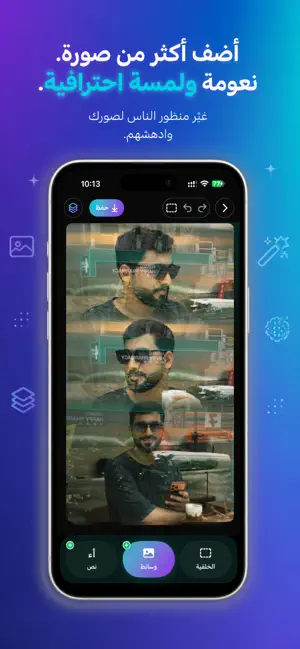

About iiStudio Creator
iiStudio — design and edit, right on your iPhone. Turn your photos and videos into posts, stories and reels that look professionally made — no computer, no learning curve. Built Arabic-first, with full right-to-left support. DESIGN - Place your photos and videos inside realistic device frames - Ready-made templates for stories and posts - Add text, images and video as separate layers - Filters, plus fine control over exposure, contrast, saturation, warmth and more EDIT - Multi-track timeline: video, overlays, text and audio - Trim, split, duplicate and reorder in a tap - Transitions, speed, opacity and keyframes - Chroma key, background removal and face blur SOUND - Large, clear waveforms — see every beat - Beat markers on the ruler, so your cuts land on the music - Extract audio from any clip and remove silent gaps automatically - Volume fades and keyframes FINISH - Export in high quality - Saved straight into an iiStudio album in your Photos - Share to Instagram and anywhere else Available in 10 languages.
Ratings & reviews
4.5
21 ratings
What’s new
Version 1.5.2 · Updated November 6, 2026
- iPhone Duo, both screens — designed for the small and the large screen, fold and unfold without losing a thing, and every screen rotates to portrait and landscape - Duo split at the fold — on the inner screen held sideways, the preview takes one half and the timeline the other, with a divider you can drag - Tap to jump, tap to select — in the montage, tap any item and it glides smoothly under the playhead; tap it again to select it with a clear colored frame - A sleek playback capsule — play controls and time in one capsule, leaving more room for your video in landscape and on the Duo's outer screen - Timeline at the bottom — in landscape, the timeline and tools sit at the bottom, with a bigger preview - Filters in design — filters in the design editor, with your saved filters and LUT files - New stickers — guides, stars, and arrows and shapes you can edit - A «+» hint for stickers — after your first addition to a design, a gentle one-time hint shows you the stickers and shapes under «+» - A stronger video stabilizer — Auto, Smooth, Steady and Tripod, with rolling-shutter correction - «Nudge» tool — move text and images step by step to place them exactly where you want - Your fonts and filters in iCloud — they travel with your projects across your devices - Lighter, faster montage — lighter and cooler on your phone, and it opens faster - Text «Stretch» in the montage — stretch the letters of your montage text, and they export exactly as you see them - Smoother time-lapse scrubbing — move the playhead across time-lapses and heavy clips with ease - Split templates stay one work — go back, edit the template and tap «Done» again: the same work updates, and everything you added stays - Video in «Soft blend» — video clips in soft-blend template cells now show whole and in place, just like photos - Your Ray-Ban Meta label stays — videos shot on Ray-Ban Meta glasses keep their «Ray-Ban Meta» label on Instagram after editing in the montage - «Travel Vlog» coming soon — a new template for your trips is on its way - Performance improvements and fixes for a smoother experience.
App privacy
The developer, Ali Al Muqarshi, reported these privacy practices to Apple.
Data Linked to You
The following data, which may be collected and linked to your identity, may be used for the following purposes:
- Purchases: Purchase History
- Contact Info: Email Address, Name
- User Content: Audio Data, Other User Content
- Identifiers: User ID
Used for: Analytics, App Functionality
Data Not Linked to You
The following data, which may be collected but is not linked to your identity, may be used for the following purposes:
- Location: Coarse Location
- Identifiers: Device ID
- Usage Data: Product Interaction
Used for: Analytics
Alternatives to iiStudio Creator
Looking for apps like iiStudio Creator? Here are 6 similar apps on the App Store. The highest rated is Shadow Studio (5.0/5), and 5 of the 6 are free to download.
-
 Shadow Studio
5.0
-
 Madd | مَدّ
5.0
-
 Velura Studio
5.0
-
 DualCamera Recorder - Dualcam
4.4
-
 Video Upscaler
4.7
-
 CreatorGrade
3.8
| App | Rating | Price | Last updated | Compare |
|---|---|---|---|---|
| iiStudio Creator | 4.5 / 5 (21 ratings) | Free | November 6, 2026 | |
| Shadow Studio | 5.0 / 5 (8) | Free | Apr 28, 2026 | Compare |
| Madd | مَدّ | 5.0 / 5 (4) | Free | Aug 4, 2026 | Compare |
| Velura Studio | 5.0 / 5 (3) | Free | Jul 15, 2026 | Compare |
| DualCamera Recorder - Dualcam | 4.4 / 5 (18) | Free | Oct 6, 2026 | Compare |
| Video Upscaler | 4.7 / 5 (74) | 4.99 USD | Jul 21, 2026 | Compare |
| CreatorGrade | 3.8 / 5 (11) | Free | Oct 22, 2026 | Compare |
Compare iiStudio Creator with the top alternatives: ratings, updates, ASO score and keyword gaps →