

Vault Docs: Secure File Vault
Oleksii Krychevskyi Productivity iPhoneiPadiPod touch
Vault Docs: Secure File Vault is a free Productivity app for iPhone and iPad by Oleksii Krychevskyi. Requires iOS 18.0. Updated August 1, 2026.
- Price
- Free
- on the App Store
- Size
- 11 MB
- Age 4+
- Updated
- Aug 1
- 2026 · v1.1.0
Screenshots


About Vault Docs: Secure File Vault
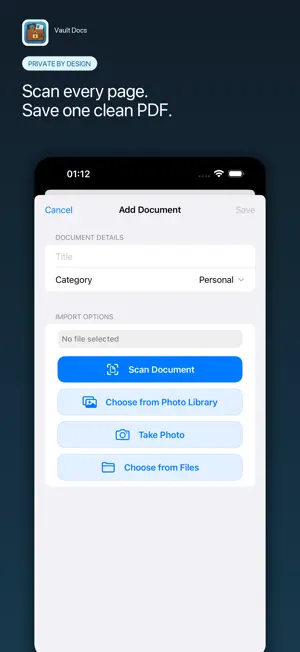
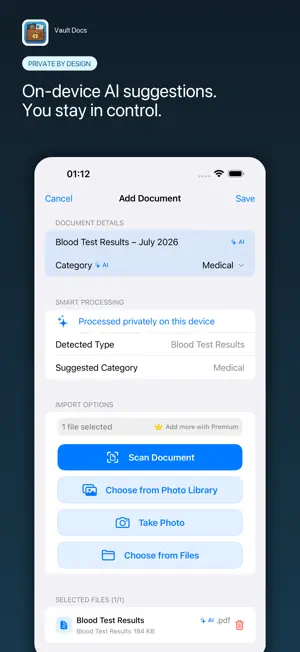
Scan paper documents and get editable AI-assisted suggestions for what they contain—processed privately on your device. Document images and recognized text are not sent to an external AI service. Vault Docs is a private document scanner and organizer for iPhone and iPad. It turns scans and imported files into editable, organized records while keeping you in control of every suggestion. SCAN. UNDERSTAND. ORGANIZE. • Scan multiple paper pages into one PDF with automatic edge detection • Import PDFs, images, photos, text, Word, and Excel files • Get on-device suggestions for document type, concise title, category, and file names • Review detected page groups and optionally split a mixed PDF into separate files • Keep the original PDF unchanged unless you choose to split it • Edit every suggestion before saving PRIVATE BY DESIGN. Smart Processing runs on your device. Document images and recognized text are not sent to an external AI service. Saved files stay local by default. If you enable iCloud Sync, Vault Docs encrypts document contents and metadata before storing private copies in your personal iCloud database. No separate Vault Docs account is required. PROTECT AND FIND WHAT MATTERS. • AES-256-GCM encryption and secure key storage • Face ID, Touch ID, app passcode, and automatic locking • Built-in and custom categories for identity, medical, finance, home, travel, and more • Search by document title or file name • Zoom image previews, export files, and share when needed • English, Ukrainian, and German interface HOW IT WORKS 1. Scan pages or import existing files. 2. Review the suggested type, title, category, file names, and page groups. 3. Save locally or enable encrypted iCloud Sync across your Apple devices. Some features require a Premium subscription. Premium allows up to 10 files per document and removes ads. The free version may display ads. Download Vault Docs and turn everyday paperwork into an organized, protected document vault. Terms of Use: https://www.apple.com/legal/internet-services/itunes/dev/stdeula/
What’s new
Version 1.1.0 · Updated August 1, 2026
Scan multi-page paper documents with automatic edge detection and save every page in one PDF. Smart Processing now considers document meaning across pages to suggest concise titles, categories, document types, and meaningful file names. When one PDF contains several documents, you can review detected page groups and split them while keeping the original unchanged. You can also import Word and Excel files, zoom image previews, and share directly from the file viewer. All recognition runs on your device. Suggestions remain editable, and document images and recognized text are not sent to an external AI service.
App privacy
The developer, Oleksii Krychevskyi, reported these privacy practices to Apple.
Data Linked to You
The following data, which may be collected and linked to your identity, may be used for the following purposes:
- Location: Coarse Location
- Identifiers: Device ID
- Usage Data: Product Interaction, Advertising Data, Other Usage Data
- Purchases: Purchase History
Used for: Third-Party Advertising, Analytics
Data Not Linked to You
The following data, which may be collected but is not linked to your identity, may be used for the following purposes:
- Diagnostics: Performance Data, Other Diagnostic Data, Crash Data
Used for: Third-Party Advertising, Analytics, App Functionality
Alternatives to Vault Docs: Secure File Vault
Looking for apps like Vault Docs: Secure File Vault? Here are 6 similar apps on the App Store. The highest rated is PDF Vault - Document App (5.0/5), and all 6 are free to download.
-
 WhatSaying
-
 Vault PDF - create, edit
-
 Document Vault - Vault
-
 My Documents: Secure Vault
-
 Smart Calendars AI – Scheduler
4.5
Smart Calendars AI – Scheduler
4.5
-
 PDF Vault - Document App
5.0
PDF Vault - Document App
5.0
| App | Rating | Price | Last updated | Compare |
|---|---|---|---|---|
| Vault Docs: Secure File Vault | – | Free | August 1, 2026 | |
| WhatSaying | – | Free | Jan 8, 2026 | Compare |
| Vault PDF - create, edit | – | Free | Jul 10, 2026 | Compare |
| Document Vault - Vault | – | Free | Jun 18, 2026 | Compare |
| My Documents: Secure Vault | – | Free | Sep 28, 2026 | Compare |
| Smart Calendars AI – Scheduler | 4.5 / 5 (11) | Free | Oct 14, 2026 | Compare |
| PDF Vault - Document App | 5.0 / 5 (3) | Free | Oct 15, 2026 | Compare |