

SpotPocket: Save Places to Go
DAISUKE EMOTO Travel iPhoneiPadiPod touch
SpotPocket: Save Places to Go is a free Travel app for iPhone and iPad by DAISUKE EMOTO. Requires iOS 17.0. Updated October 19, 2026.
- Price
- Free
- on the App Store
- Size
- 10 MB
- Age 4+
- Updated
- Oct 19
- 2026 · v1.9.0
Screenshots
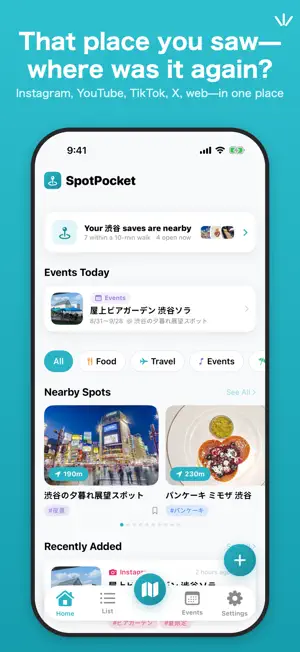


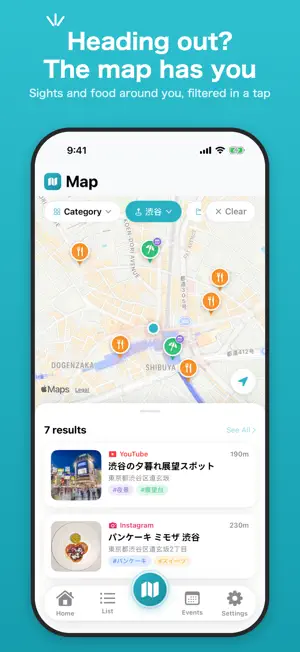
About SpotPocket: Save Places to Go
Instagram, YouTube, TikTok, X, Tabelog, Google Maps, the open web — the places you want to visit end up scattered across every app you use. SpotPocket lets you save any "place to go" with one tap from each app's native Share Sheet, so everything you discover across social platforms lives in one organized place. ■ Who it's for - People who keep finding great restaurants and spots through Instagram posts or YouTube Shorts - Anyone tired of hunting through separate apps to find a place they saved weeks ago - Travelers who want to organize saved spots by scene and area to plan their next outing ■ Key features - Save from the Share Sheet — one tap from Instagram, YouTube, TikTok, X, Tabelog, Google Maps, or any website - Automatic titles & thumbnails — fetched in the background the next time you open the app - Scenes — organize places by what you'll do there, like lunch, drinks, or shopping - Areas — assign spots to areas you define, like "Shibuya" or "Kyoto", and browse them on the area shelf in the List tab; areas can be set anytime after saving, with suggestions based on the spot's address - Visited tracking — mark spots as "been there" and filter down to just the places you still want to go, on the map and in lists - Right-here mode — when saved spots are within a 10-minute walk, a card appears on Home with a walking-distance list and an "open now" filter - Trip plans — arrange saved spots into Day 1 / Day 2 / Undecided lanes; set a cover and departure date to get a countdown in your plan list - Plan & area sharing — show a plan or an area's spot list as an image, or hand it over as a file that opens only in SpotPocket; recipients import it straight into their own app (a one-way share with no server involved). Visited spots can be shared as a square "Been There" photo card - Facilities & events — save limited-time events with their dates and venue; the map badges venues with ongoing or upcoming events - Event calendar & reminders — scan event dates on a monthly calendar in the Events tab, get a local notification when an event starts, and see "Events Today" on Home - Home Screen widget — the countdown to your next plan's departure date and your saved-spot count, right on your Home Screen - Tags & notes — add your own tags, plus automatic hashtag detection from captions - Map view — see every place with location data on one map - Search & filter — by title, note, tag, scene, area, place name, or source app; saved spots also show up in iPhone's Spotlight search - Duplicate detection — get notified if you try to save the same link twice - Works offline — save instantly with no connection; details fill in automatically later - Backup — export everything you've saved to a file and restore it later, for phone upgrades and peace of mind ■ Privacy first Everything you save is stored only on your device, and there's no account or sign-in required. The app shows ads, but only non-personalized ones — no interest-based targeting, and you'll never be asked for tracking permission. You can also watch one video ad to hide all ads for 24 hours. Build your "places to go" list with a warm, journal-inspired design, like keeping a travel diary of everywhere you want to explore.
What’s new
Version 1.9.0 · Updated October 19, 2026
- Added a "Try it" step to the first-run guide: open a practice page in Safari and save it through the Share Sheet to see how it works — the guide confirms once your spot is saved - Improved place matching for Instagram posts: when the name in a post differs slightly from the official map listing (such as an added area name), SpotPocket now uses the address to find the venue's location, address, and phone number - Added a one-time prompt to rate the app after you've saved five spots
App privacy
The developer, DAISUKE EMOTO, reported these privacy practices to Apple.
Data Not Linked to You
The following data, which may be collected but is not linked to your identity, may be used for the following purposes:
- Identifiers: Device ID
- Location: Coarse Location
- Usage Data: Product Interaction, Advertising Data
- Diagnostics: Crash Data, Performance Data
Used for: Third-Party Advertising, Developer’s Advertising or Marketing, Analytics, App Functionality
Alternatives to SpotPocket: Save Places to Go
Looking for apps like SpotPocket: Save Places to Go? Here are 6 similar apps on the App Store.
-
 Trip Picks
-
 行きたい場所を集めるアプリ - いこっか。
-
 JourneyChronicle
-
 Toco - Places to Visit
-
 Goshuin Map
-
 Japan Events & Festivals EVECO
| App | Rating | Price | Last updated | Compare |
|---|---|---|---|---|
| SpotPocket: Save Places to Go | – | Free | October 19, 2026 | |
| Trip Picks | – | Free | Sep 2, 2026 | Compare |
| 行きたい場所を集めるアプリ - いこっか。 | – | Free | Sep 24, 2026 | Compare |
| JourneyChronicle | – | Free | Mar 29, 2026 | Compare |
| Toco - Places to Visit | – | Free | Oct 16, 2026 | Compare |
| Goshuin Map | – | Free | Oct 2, 2026 | Compare |
| Japan Events & Festivals EVECO | – | Free | Jun 28, 2026 | Compare |