

TapDone: Chore Tracker
HuddleCoach Productivity iPhoneiPadiPod touch
TapDone: Chore Tracker is a free Productivity app for iPhone and iPad by HuddleCoach. Requires iOS 16.4. Updated August 12, 2026.
- Price
- Free
- on the App Store
- Size
- 52 MB
- Age 4+
- Updated
- Aug 12
- 2026 · v1.1
Screenshots

About TapDone: Chore Tracker
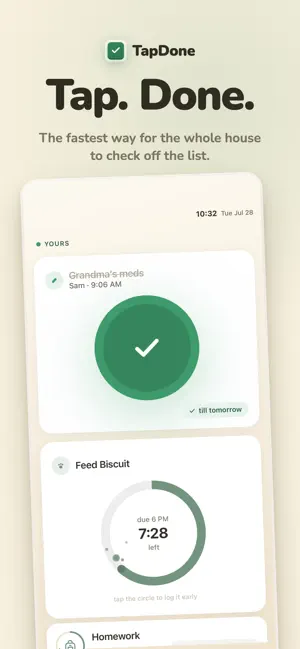
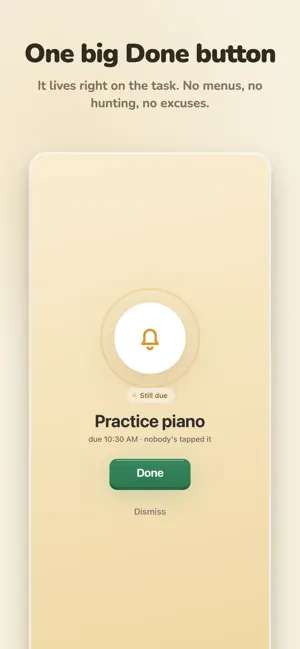
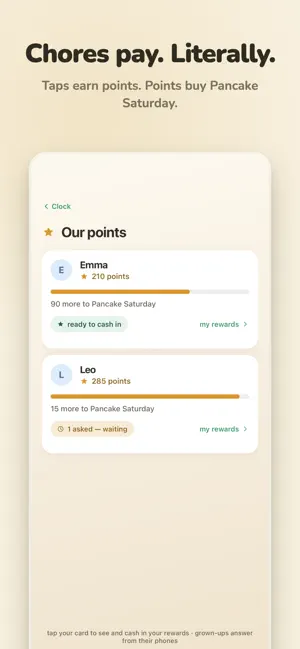
TapDone turns an old phone into a Done button you hang on the wall. When someone finishes a chore, they walk up and tap it — the ring fills green, the points land, and it shows on every phone in the house a second later. It isn't only kids' chores. One shared board keeps feeding the dog, watering the plants and Grandma's evening meds visible to everyone. Green means done. That's pretty much the whole interface. Each task is a dial whose ring drains as the deadline gets closer, so a five-year-old and a grandparent can both read the board from across the room. At night it settles into a clock with the last task still in view. POINTS, STREAKS AND REWARDS YOU WRITE YOURSELF Screen time, a movie pick, pancake Saturday. Each child has their own running total and works toward the rewards that matter to them. IT CAN TELL WHO TAPPED Face match is optional. Recognition runs entirely on the phone — it reads a frame, works out who's there, and discards it right away. No video, nothing recorded or streamed. Remove one face, or wipe every face in the house, in a single tap. A quick name tap works if you'd rather skip it. SCHEDULES IN PLAIN LANGUAGE Daily, weekdays, every six days, twice a day, or a window that opens at 7 PM. Away mode pauses everything while you're gone — except the meds. A DISPLAY PER ROOM Kitchen, hallway, bedside: each device shows the tasks for its spot, while your phone sees the whole house. Setup takes about three minutes. Add your chores, pair the old phone with a QR code, and stand it where the job actually happens. A tap, not screen time — tapping done takes about three seconds and sends everyone back to their day.
App privacy
The developer, HuddleCoach, reported these privacy practices to Apple.
Data Linked to You
The following data, which may be collected and linked to your identity, may be used for the following purposes:
- Contact Info: Email Address, Name
- User Content: Photos or Videos, Other User Content
- Identifiers: User ID, Device ID
- Sensitive Info: Sensitive Info
- Other Data: Other Data Types
Used for: App Functionality
Alternatives to TapDone: Chore Tracker
Looking for apps like TapDone: Chore Tracker? Here are 6 similar apps on the App Store. The highest rated is Family Huddle tasks (5.0/5), and all 6 are free to download.
-
 Family Huddle tasks
5.0
Family Huddle tasks
5.0
-
 Chore Check :By Jet
5.0
Chore Check :By Jet
5.0
-
 CleanNest Chore Planner
-
 Slotmark: Reminder & To Do
5.0
Slotmark: Reminder & To Do
5.0
-
 NoDi: Lofi Pomodoro Timer
5.0
NoDi: Lofi Pomodoro Timer
5.0
-
 Cleaning Schedule AI: Routine
5.0
Cleaning Schedule AI: Routine
5.0
| App | Rating | Price | Last updated | Compare |
|---|---|---|---|---|
| TapDone: Chore Tracker | – | Free | August 12, 2026 | |
| Family Huddle tasks | 5.0 / 5 (1) | Free | Jun 25, 2026 | Compare |
| Chore Check :By Jet | 5.0 / 5 (1) | Free | Oct 24, 2026 | Compare |
| CleanNest Chore Planner | – | Free | Jun 4, 2026 | Compare |
| Slotmark: Reminder & To Do | 5.0 / 5 (18) | Free | Sep 3, 2026 | Compare |
| NoDi: Lofi Pomodoro Timer | 5.0 / 5 (14) | Free | Aug 10, 2026 | Compare |
| Cleaning Schedule AI: Routine | 5.0 / 5 (8) | Free | Nov 13, 2025 | Compare |