

Stepwise Timer
Wei Chen Hung Productivity iPhoneiPadiPod touch
Stepwise Timer is a free Productivity app for iPhone and iPad by Wei Chen Hung. Requires iOS 18.0. Updated September 28, 2026.
- Price
- Free
- on the App Store
- Size
- 4 MB
- Age 4+
- Updated
- Sep 28
- 2026 · v1.1.0
Screenshots


About Stepwise Timer
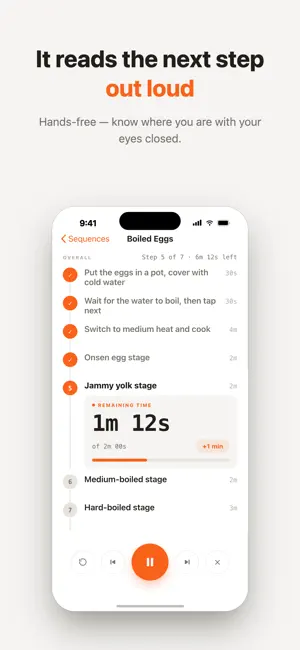
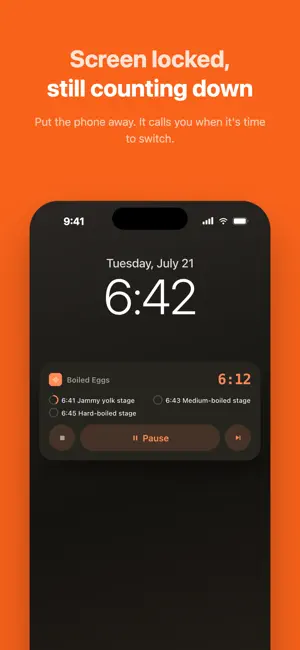
Chain a few timed steps into a "sequence", press play, and Stepwise walks you through it — one step at a time. Each step counts down on its own. When it ends, the next one starts automatically with a sound and a spoken announcement of what's coming up. You never have to look at your phone mid-routine. ■ Made for · Morning routines: stretch, meditate, write down today's three things · Focus work: Pomodoro, with automatic repeat rounds · Workouts and stretching: one set after another, no stopwatch fiddling · Cooking and pour-over coffee: bloom, pour, brew · Winding down: breathe, stretch, lights out ■ What it does · Sequence timing: set a duration per step; auto-advance or wait for your confirmation · Spoken announcements: hear the next step's name, eyes closed · Adjust while running: skip, go back, restart a step, or add +1 minute · Repeat rounds: run the whole sequence a few more times automatically · Finish signal: end the last step with a chime or your own spoken message · Live Activity: see the countdown on the Lock Screen, pause or continue right there · Home Screen widget: start a specific sequence with one tap · Usage stats: a diary of every run, with a 7-day rhythm chart, a calendar and streaks · Folders: keep your sequences organized · Share: import via QR code, or export CSV as a backup · Design with AI: paste the prompt from our support page into your favorite AI, then import the CSV it creates · Fully offline: no account, no ads, no data collection ■ Free vs Premium The free version includes every feature above, with up to 5 sequences and the last 30 days of stats. Premium unlocks unlimited sequences and your full stats history (records are always kept — upgrading brings them all back). ■ Premium subscription · Monthly or yearly plan (price shown on the purchase screen) · First month free for new subscribers; billing starts automatically when the trial ends · Subscriptions renew automatically unless cancelled at least 24 hours before the period ends · Payment is charged to your Apple Account at confirmation of purchase · Manage or cancel anytime in Settings → Apple Account → Subscriptions · Terms of Use (EULA): https://jacobhung.com/stepwisetimer/privacy/ · Privacy Policy: https://jacobhung.com/stepwisetimer/privacy/
What’s new
Version 1.1.0 · Updated September 28, 2026
New • “Repeat” on the finish screen: need a little more time on the last step (say, one more stretch)? Extend it right away without restarting the whole sequence. Stats are merged into the same session. Fixes & improvements • Fixed the Bell and Chime sounds playing silently; background notifications now use each step’s chosen sound • Sequences with the same name no longer open the wrong one or mix their stats • Deleting a sequence while it’s playing now stops its timer properly • Restore Purchases now shows the actual reason when it fails • Better battery life during countdowns
App privacy
The developer, Wei Chen Hung, reported these privacy practices to Apple.
Data Not Collected
The developer does not collect any data from this app.
Alternatives to Stepwise Timer
Looking for apps like Stepwise Timer? Here are 6 similar apps on the App Store. The highest rated is OneTask ADHD Focus Timer (5.0/5), and all 6 are free to download.
-
 Remind Tools
-
 Routine Tracker - Daily Flow
-
 DoneYet: Task Tracker
-
 Next Step – Sequential Timers
-
 OneTask ADHD Focus Timer
5.0
OneTask ADHD Focus Timer
5.0
-
 BrainDump: Voice Tasks & Focus
2.3
BrainDump: Voice Tasks & Focus
2.3
| App | Rating | Price | Last updated | Compare |
|---|---|---|---|---|
| Stepwise Timer | – | Free | September 28, 2026 | |
| Remind Tools | – | Free | May 27, 2026 | Compare |
| Routine Tracker - Daily Flow | – | Free | Apr 7, 2026 | Compare |
| DoneYet: Task Tracker | – | Free | Jul 23, 2026 | Compare |
| Next Step – Sequential Timers | – | Free | Mar 25, 2026 | Compare |
| OneTask ADHD Focus Timer | 5.0 / 5 (1) | Free | Mar 9, 2026 | Compare |
| BrainDump: Voice Tasks & Focus | 2.3 / 5 (3) | Free | Apr 2, 2026 | Compare |
Compare Stepwise Timer with the top alternatives: ratings, updates, ASO score and keyword gaps →