

ChessLab
Thierry Maeder Games iPhoneiPadiPod touch
ChessLab is a free Games app for iPhone and iPad by Thierry Maeder. Requires iOS 18.0. Updated October 14, 2026.
- Price
- Free
- on the App Store
- Size
- 169 MB
- Age 4+
- Updated
- Oct 14
- 2026 · v1.9.0
Screenshots
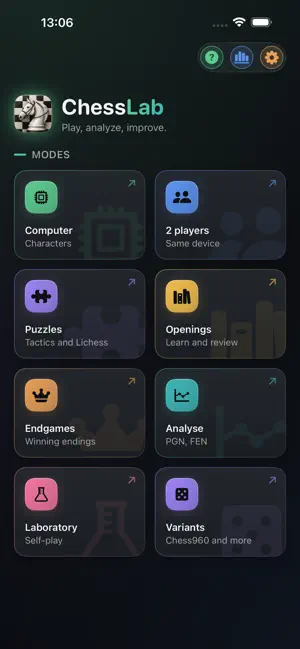
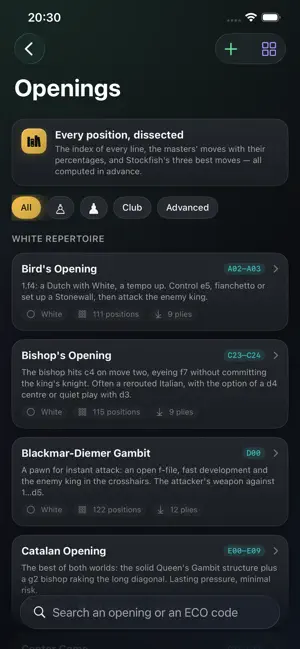


About ChessLab
ChessLab is a complete chess companion for iPhone and iPad: play, analyze, train and experiment, with the Stockfish engine built in and without ever leaving the app. HUMAN OPPONENTS Nine characters played by Maia-3, a network trained on millions of human games: it does not look for the best move, it plays the one a human of that level would play, blunders included. Each has a style, a repertoire, a temperament, a portrait, and an adjustable level on the human scale. Or take on Stockfish itself, from beginner (~900 Elo) to maximum (~3190 Elo). With or without a clock. Hints, a warning before risky moves, and an evaluation bar can all be toggled on demand. TWO PLAYERS Play locally on the same device, with a "pass-and-play" mode that flips the pieces so both players read the board comfortably. ANALYZE Run a game or a position through Stockfish: move-by-move classification (inaccuracy, mistake, blunder, brilliant move…), an evaluation graph, best-move and opponent-threat arrows, and auto-play through the moves. Import by PGN, FEN, position editor, or photo scanner. OPENINGS Pick an opening and step through it move by move: every move is explained, the alternatives are offered, and colored arrows link the board to the move list. 58 hand-written openings (bilingual), all reviewed by the engine, with simplified spaced-repetition training to memorize them. THE ENDGAME CORNER 78 courses proven by endgame tablebases — the exact mathematical verdict: no taught move gives up a win, no recommended defence loses a draw. Nine families, from the opposition to famous studies. And free training: finish the position against best defence, where any move that preserves the verdict is accepted — not just the lesson's move. VARIANTS Chess960 (Fischer Random Chess): a randomly drawn starting position, one chosen by number, or one you compose yourself, with a full post-game analysis just like "Play" mode. Eleven more variants against the computer, each with its own analysis: King of the Hill, Three-Check, Horde, Racing Kings, Atomic, Antichess, Crazyhouse, Stolen Move (a token every 7 moves lets you play twice in a row), Duck Chess, Barricades and Random Barricades. YOUR OWN REPERTOIRES Import your openings as PGN, variations included, and drill them with the same system. Share a repertoire as a single file — no account, no server. What you already know about a position counts right away in the imported repertoire. PUZZLES Over 100,000 tactics puzzles from the Lichess database, filterable by rating and theme, plus puzzles generated automatically from your own mistakes in analysis. Spaced repetition and progress tracking included. LABORATORY Pit two Stockfish configurations against each other over a series of games to compare their strength, with an estimated Elo gap and confidence interval. EDITOR AND SCANNER Set up a position by hand, or scan it from a screenshot or a photo — review and correct the recognized position before playing or analyzing it. BUILT FOR IPAD Full-size board with move list, graph and MultiPV visible at once, keyboard and trackpad support, polished portrait and landscape layouts. iCLOUD SYNC (optional) Turn on iCloud sync in Settings so your games follow you across all your devices, via your private iCloud. No account to create, no ChessLab server. Off by default: the app works fully offline. PRIVACY Offline by default: no ChessLab server, no analytics, no ads. Your games and settings stay on your device. iCloud sync, if you enable it, uses your own private iCloud — your data is never shared with the developer. Fully bilingual, French and English. ChessLab embeds the Stockfish engine (GPLv3 license), the University of Toronto's Maia-3 network (AGPLv3 license) and free vector piece sets — cburnett (GPLv2+/CC BY-SA), chessnut (Apache 2.0) and merida (GPLv2+). Full source code and license notices are available from within the app (Settings → Licenses).
What’s new
Version 1.9.0 · Updated October 14, 2026
CHESSLAB UNFOLDS WITH IPHONE DUO Closed, the outer display shows ChessLab as you know it on iPhone, with toolbars standing vertically below the status bar. Open, the large display takes the iPad layout — sidebar of modes and detail column — and the board gets all the room it deserves. A BOARD SIZED FOR THE OPEN DISPLAY In a game, an analysis or a training session, the sidebar steps aside on its own whenever it would take the board's room, and comes back as soon as you return to the lists; its button brings it back at any time. Controls move to the right of the board whenever the display is wider than tall, and the board takes the full height: against the computer, in analysis, in the twelve variants, in training and in the Laboratory. EVERY POSE OF THE DEVICE Open, ChessLab follows the device when you turn it, and picks its layout from the actual room on screen. Closed, it stays in portrait, like on any iPhone. ALSO Endgame free training now fills the whole screen on iPad in landscape, with no black bands on the sides.
App privacy
The developer, Thierry Maeder, reported these privacy practices to Apple.
Data Not Collected
The developer does not collect any data from this app.
Alternatives to ChessLab
Looking for apps like ChessLab? Here are 6 similar apps on the App Store. The highest rated is ChessLab Puzzle - 90 Million+ (5.0/5), and 5 of the 6 are free to download.
-
 ChessLab Puzzle - 90 Million+
5.0
ChessLab Puzzle - 90 Million+
5.0
-
 MaiChess AI
-
 AI Chess - Andromida
-
 Awale Kingdom: Mancala Oware
5.0
Awale Kingdom: Mancala Oware
5.0
-
 Chess Premium+
5.0
Chess Premium+
5.0
-
 PVGo Premium
| App | Rating | Price | Last updated | Compare |
|---|---|---|---|---|
| ChessLab | – | Free | October 14, 2026 | |
| ChessLab Puzzle - 90 Million+ | 5.0 / 5 (3) | Free | Jan 20, 2026 | Compare |
| MaiChess AI | – | Free | Oct 2, 2026 | Compare |
| AI Chess - Andromida | – | Free | Aug 20, 2026 | Compare |
| Awale Kingdom: Mancala Oware | 5.0 / 5 (2) | Free | Sep 28, 2026 | Compare |
| Chess Premium+ | 5.0 / 5 (2) | Free | Jul 13, 2026 | Compare |
| PVGo Premium | – | 0.99 USD | Oct 7, 2026 | Compare |
Compare ChessLab with the top alternatives: ratings, updates, ASO score and keyword gaps →