

CantierePro · Site Photos
fabio carrozzo Productivity iPhoneiPadiPod touchMac
CantierePro · Site Photos is a free Productivity app for iPhone and iPad by fabio carrozzo. Requires iOS 17.0. Updated October 22, 2026.
- Price
- Free
- on the App Store
- Size
- 15 MB
- Age 4+
- Updated
- Oct 22
- 2026 · v1.2.0
Screenshots



About CantierePro · Site Photos
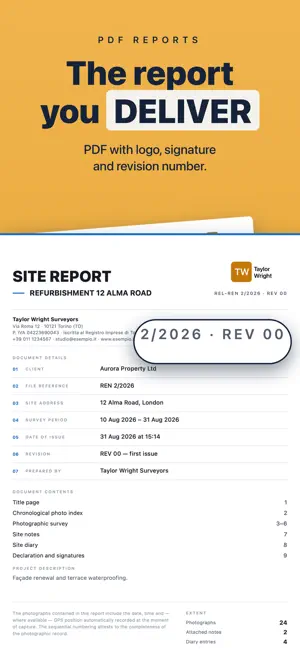
Document the site with your phone and hand your client a report that holds up. Every photo is stamped with the date, time, GPS coordinates and address: when you need to prove what the wall looked like before the render, or when the waterproofing went down, you already have the evidence. PHOTOS THAT STAND AS PROOF • Date, time, coordinates and address printed onto the shot • Every photo lands in the right job: no sorting afterwards • Spirit level and grid to line the shot up straight • Voice notes on your shots: speak while you work instead of typing with gloves on • Video and timelapse when a photo isn't enough THE SITE DIARY • Works started, suspensions with the reason, resumed and finished • The day's notes, one dated line after another • The site diary goes into the report you hand over • Recording entries is free for everyone THE REPORT YOU HAND OVER • PDF with your logo, your letterhead and your signature • Numbered photographs, in date order, with coordinates and address • Site notes and the diary attached to the document • A single file to email to the client YOUR JOBS • Client, value, reference, site address and handover date • Cover photo: a shot of the site fronts the job • Job contacts with role, phone and email: call and write from there • Job status at a glance, with deadlines highlighted • Reminders before the handover date • CIG and CUP codes for public works COSTS AND PROGRESS • Hours and hourly rate per person, month by month • Progress claims with amounts and approval status • Subcontracts: supply and installation or installation only, lump sum or hourly • Purchases with the delivery note scanned and kept inside the job • Variations and handover extensions, with reason and days • Projected margin, overhead share and profit target • Certified work, labour and remaining balance worked out for you • Export the full analysis to Excel, and your list of shots — date, coordinates and address — to CSV NOTEBOOKS AND NOTES • Pads for notes, measurements and sketches • Write by hand with Apple Pencil on iPad, with the keyboard on iPhone and Mac • Typed text and drawing on the same sheet • Squared, ruled or plain paper ON ALL YOUR DEVICES • iPhone, iPad and Mac with the same Apple ID • With the subscription your data syncs by itself through iCloud YOUR DATA STAYS YOURS We run no servers: your photos and jobs live on your device and, if you turn syncing on, in your own private iCloud. We collect nothing, profile nobody, and sell nothing to anyone. And the app locks with Face ID, Touch ID or a passcode. BACKUP • Full backup of your archive, exportable whenever you want • Encrypted with a password you choose, if you want • A job archives into one file, comes back in, and deletes for real • It also reads archives from CantierePro for Android and for Windows FREE PLAN Up to 3 jobs, one subcontract and one purchase per job, unlimited photos. The PDF report is generated and readable on screen with a watermark, but sharing or saving it needs Pro. Site diary, contacts, cover photo, reminders, notebooks, delivery-note scanning and restoring backups are free for everyone. CANTIEREPRO PRO • Reports without the watermark, with your logo, letterhead and signature • The site diary printed in the report • Unlimited jobs • Unlimited subcontracts and purchases, analysis and Excel and CSV export • Voice notes, video and time-lapse • iCloud sync and automatic backup • 7-day free trial, then €9.99/month or €79.99/year • Cancel whenever you like from your Apple ID settings For construction firms, surveyors, tradespeople and anyone who actually works on site. Terms of Use (EULA): https://application.hylogix.net/Application/CantierePro%20APP/termini.html?r=8#en Privacy Policy: https://application.hylogix.net/Application/CantierePro%20APP/privacy.html?r=8#en
What’s new
Version 1.2.0 · Updated October 22, 2026
READY FOR IPHONE DUO Folded, it's a phone; unfolded, it has the room of a tablet: the screens adapt. On iPad and on the unfolded Duo, a project can also open in its own window: keep it in view while you look at another. WORK CALENDAR, EXPERIMENTAL From Home and from a project, you create appointments with alerts and save them in the calendar you choose, including your Gmail or Outlook one. With Pro, the “Calendar” screen also shows the appointments you didn't create with CantierePro. It's an experimental feature: some options aren't available on every platform yet and will arrive in upcoming updates. A MORE FAITHFUL CAMERA • It opens at 1×, and the preview shows everything that ends up in the photo • 0.5× is now also available on non-Pro iPhones with two rear cameras • A video in progress isn't lost when you switch tabs • The photo is saved as soon as it's taken, even if the network is slow to find the address • With the phone lying flat, for floors and ceilings, the level becomes a crosshair THE SAME NOTEBOOK ON EVERY SCREEN A page remembers the width it was drawn at: on another device the marks stay next to the right words. AND ALSO • If an encrypted archive can't be opened, the app says so before asking you for the password • “What's new in this version” keeps the history: 1.2.0 on top, 1.1 below • “Write a review”, in Settings • Fixed an issue where the app could quit unexpectedly with iCloud sync on, after you deleted something • Privacy policy updated to cover calendar access
App privacy
The developer, fabio carrozzo, reported these privacy practices to Apple.
Data Not Collected
The developer does not collect any data from this app.
Alternatives to CantierePro · Site Photos
Looking for apps like CantierePro · Site Photos? Here are 6 similar apps on the App Store.
-
 DataVo: AI Business Manager
-
 PlanPhoto Localise tes photos
-
 Penumi: Notes & Sketches
-
 Construction Site Manager AI
-
 Whiteboard: Draw & Plan
-
 Assist24
| App | Rating | Price | Last updated | Compare |
|---|---|---|---|---|
| CantierePro · Site Photos | – | Free | October 22, 2026 | |
| DataVo: AI Business Manager | – | Free | Aug 27, 2026 | Compare |
| PlanPhoto Localise tes photos | – | Free | Sep 3, 2026 | Compare |
| Penumi: Notes & Sketches | – | Free | Oct 22, 2026 | Compare |
| Construction Site Manager AI | – | Free | Jun 24, 2026 | Compare |
| Whiteboard: Draw & Plan | – | Free | Oct 20, 2026 | Compare |
| Assist24 | – | Free | Nov 14, 2025 | Compare |