

Lachlan: Screen Time Control
ND Enterprises Productivity iPhoneiPadiPod touch
Lachlan: Screen Time Control is a free Productivity app for iPhone and iPad by ND Enterprises. Rated 5.0/5 from 7 ratings. Requires iOS 26.0.
- Rating
- 5.0
- 7 ratings
- Price
- Free
- on the App Store
- Size
- 35 MB
- Age 9+
- Updated
- Oct 19
- 2026 · v1.4.1
Screenshots
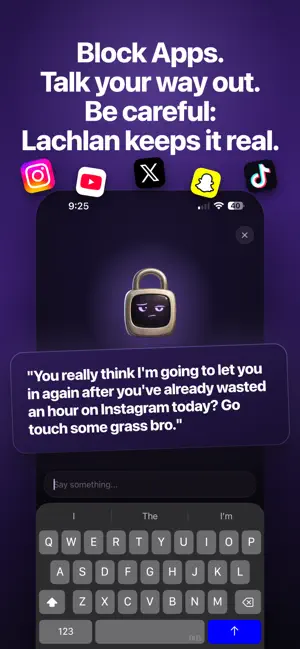


About Lachlan: Screen Time Control
Every app blocker is one tap from off. This one asks why. Lachlan is a small, deeply opinionated padlock who blocks your most distracting apps on a schedule you set, and then makes you explain yourself before he lets you back in. WHY THIS WORKS WHEN NOTHING ELSE HAS Most blockers are a wall you learn to climb in about three seconds. Lachlan is a conversation you have to have with a character who remembers what you said you wanted, and wants to know why you're doing this instead. Most of the time, you find you don't have a good reason to get into these distracting apps. HOW IT WORKS 1. Pick your problem apps. Social media, games, news, whatever's eating your time 2. Set a schedule, time limit, location, or timer to block your apps the way you want. 3. Try to open a blocked app and you'll hit the shield instead. 4. Open Lachlan and make your case. Depending on how good your reason is, he'll grant you 5, 15, or 30 minutes. 5. He keeps score. The fourth unlock of the day does not go like the first. HE ACTUALLY REMEMBERS YOU When you set up, Lachlan asks why you're cutting back and what you'd do with the time you got back. Then he brings it up. "You said you wanted to finish studying" lands very differently at 11pm than a generic productivity notification. He knows your name, your reasons, and exactly how many times you've caved today. Most blockers are stateless. Lachlan is not, and that's the whole difference. ALSO INCLUDED - Trends tab showing you screen time history - Streak system to keep you engaged each day - A home screen widget showing Lachlan's current mood - Custom block screens - Works offline, on a plane, in a tunnel, anywhere Subscription is required for access to the above features. https://www.apple.com/legal/internet-services/itunes/dev/stdeula/
Ratings & reviews
5.0
7 ratings
What’s new
Version 1.4.1 · Updated October 19, 2026
We always keep Lachlan as up to date as possible. This version includes: - Bug fixes - Offline support
App privacy
The developer, ND Enterprises, reported these privacy practices to Apple.
Data Not Linked to You
The following data, which may be collected but is not linked to your identity, may be used for the following purposes:
- Purchases: Purchase History
- Identifiers: User ID
- Usage Data: Product Interaction, Other Usage Data
Used for: Analytics, App Functionality
Alternatives to Lachlan: Screen Time Control
Looking for apps like Lachlan: Screen Time Control? Here are 6 similar apps on the App Store. The highest rated is Display Share (5.0/5), and all 6 are free to download.
-
 Kiwi PDF: Editor & Scanner
-
 Legacy Echelon Ag
4.0
-
 CADA/CASL Events
4.6
-
 Lifetime: Life Progress
4.6
-
 Display Share
5.0
-
 Yapay Zeka
4.6
| App | Rating | Price | Last updated | Compare |
|---|---|---|---|---|
| Lachlan: Screen Time Control | 5.0 / 5 (7 ratings) | Free | October 19, 2026 | |
| Kiwi PDF: Editor & Scanner | – | Free | Aug 11, 2026 | Compare |
| Legacy Echelon Ag | 4.0 / 5 (27) | Free | Oct 30, 2025 | Compare |
| CADA/CASL Events | 4.6 / 5 (16) | Free | Apr 1, 2026 | Compare |
| Lifetime: Life Progress | 4.6 / 5 (15) | Free | Jun 9, 2025 | Compare |
| Display Share | 5.0 / 5 (2) | Free | Sep 1, 2025 | Compare |
| Yapay Zeka | 4.6 / 5 (24) | Free | Oct 8, 2026 | Compare |