

My Wireless Display-screencast
Miyuki Kikuchi Utilities iPhoneiPadiPod touch
My Wireless Display-screencast is a free Utilities app for iPhone and iPad by Miyuki Kikuchi. Requires iOS 17.6. Updated August 19, 2026.
- Price
- Free
- on the App Store
- Size
- 10 MB
- Age 4+
- Updated
- Aug 19
- 2026 · v1.1
Screenshots


About My Wireless Display-screencast
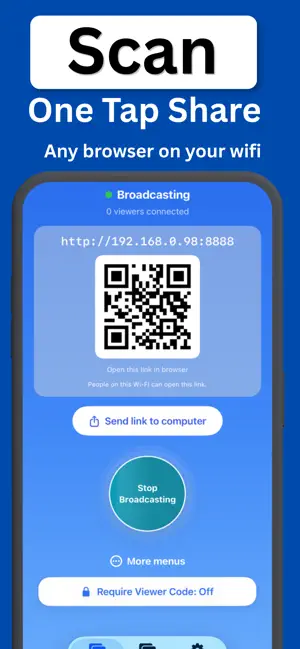
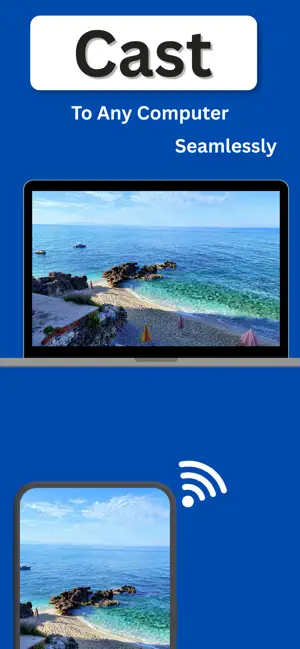
Put your screen on the big screen — in seconds. My Wireless Display mirrors your phone or tablet to a computer on your Wi-Fi. No cable. No software to install on the computer. Just scan a code or open a link in a browser, and your screen appears. MIRROR IN 3 STEPS 1. Tap Start Broadcasting 2. Scan the QR code or share the link with the viewer 3. Watch your screen appear in their browser WORKS WHERE THERE'S A BROWSER Laptops, desktops, tablets — if it can open a web page on your Wi-Fi, it can show your screen. Perfect for presentations, teaching, sharing photos with family, or showing your work on a bigger display. YOUR PRIVACY, PROTECTED - Crop out notifications — hide the top of your screen so private messages never appear - Crop Custom — trim any edge of the stream, like editing a photo - Viewer passcode — only people with your 4-digit code can watch - Your screen never touches the internet. Everything streams inside your own Wi-Fi. No cloud, no account, no uploads. CAST PHOTOS & VIDEOS — WITHOUT SHOWING YOUR SCREEN Want to share vacation photos without your whole screen visible? Cast mode streams only the files you choose: - Pick photos from your albums — viewers see just those - Play a video on the computer - Cast PDFs and files as a slideshow WHY PEOPLE CHOOSE MY WIRELESS DISPLAY - Nothing to install on the computer — works instantly in a browser - One-tap link sharing to send the viewing address - Stays on your local network — private by design - Simple enough for classrooms, meetings, and living rooms PREMIUM Upgrade to My Wireless Display Premium for unlimited mirroring time, Full HD quality, multi-device viewing, viewer passcode, and no ads. - Premium Weekly: $2.99 per week, with a 3-day trial - Premium Yearly: $24.99 per year - Payment will be charged to your App Store account at confirmation of purchase - Subscription automatically renews unless auto-renew is turned off at least 24 hours before the end of the current period - Your account will be charged for renewal within 24 hours prior to the end of the current period - You can manage and cancel your subscriptions in your account settings after purchase - Any unused portion of a trial period will be forfeited when you purchase a subscription Privacy Policy: https://my-wireless-display.netlify.app/ Terms of Use: https://www.apple.com/legal/internet-services/itunes/dev/stdeula/ Questions? Contact us at [email protected]
What’s new
Version 1.1 · Updated August 19, 2026
Improved subscription experience and minor fixes.
App privacy
The developer, Miyuki Kikuchi, reported these privacy practices to Apple.
Data Used to Track You
The following data may be used to track you across apps and websites owned by other companies:
- Location: Coarse Location
Data Linked to You
The following data, which may be collected and linked to your identity, may be used for the following purposes:
- Location: Coarse Location
- Identifiers: Device ID
- Usage Data: Advertising Data
Used for: Third-Party Advertising
Data Not Linked to You
The following data, which may be collected but is not linked to your identity, may be used for the following purposes:
- Diagnostics: Crash Data, Performance Data
Used for: Analytics
Alternatives to My Wireless Display-screencast
Looking for apps like My Wireless Display-screencast? Here are 6 similar apps on the App Store.
-
 CodeForge: QR Code Maker
-
 GR TECH
-
 Eng - Luxembourgish Translator
-
 Giot - Smart Home & EV System
-
 BeamRight: Mirror & Cast TV
-
 Clean Secure+
| App | Rating | Price | Last updated | Compare |
|---|---|---|---|---|
| My Wireless Display-screencast | – | Free | August 19, 2026 | |
| CodeForge: QR Code Maker | – | Free | Jun 25, 2026 | Compare |
| GR TECH | – | Free | Nov 8, 2024 | Compare |
| Eng - Luxembourgish Translator | – | Free | Oct 26, 2026 | Compare |
| Giot - Smart Home & EV System | – | Free | Sep 21, 2026 | Compare |
| BeamRight: Mirror & Cast TV | – | Free | Aug 2, 2026 | Compare |
| Clean Secure+ | – | Free | Sep 3, 2026 | Compare |