
TimerFit: Interval Timer
KWANG ROK KIM Health & Fitness iPhoneiPadiPod touchApple Watch
TimerFit: Interval Timer is a free Health & Fitness app for iPhone and iPad by KWANG ROK KIM. Requires iOS 17.0. Updated September 28, 2026.
- Price
- Free
- on the App Store
- Size
- 12 MB
- Age 4+
- Updated
- Sep 28
- 2026 · v1.8.0
Screenshots

About TimerFit: Interval Timer
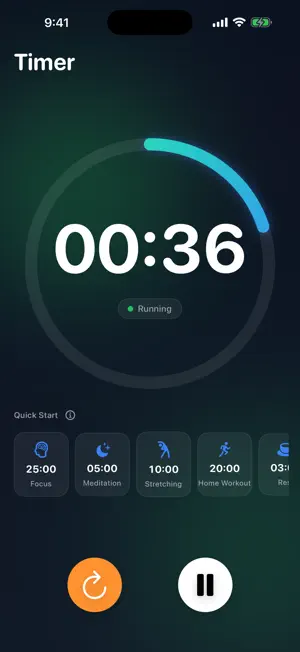
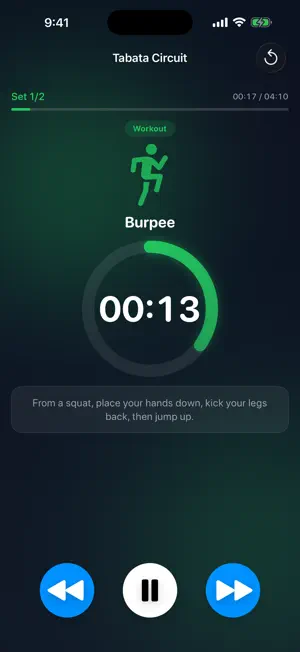
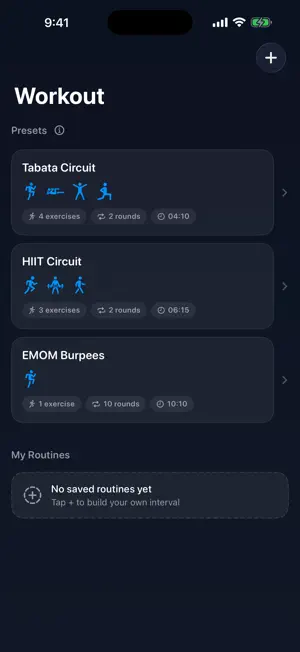
Just what you need for your workout — nothing more. TimerFit started from one simple idea: a beautiful timer you flip on and off while you train. It grew into a clean, focused interval timer for real workouts. ■ Two timers, one app • Simple Timer — set the time and go. A big, clear progress ring shows time at a glance, and your go-to durations are one tap away under "Recent." • Interval Circuit Timer — prepare → work → rest → next round, all handled automatically. Hands-free flow from start to finish. ■ A different move each round — follow along Burpees, mountain climbers, jumping jacks, squats… each work interval shows the movement and a short form cue, big and clear. No more "what's next?" — just move. ■ Ready-to-go presets • Tabata (20s work / 10s rest) • HIIT (40s work / 20s rest) • EMOM Burpees Tap and start. Perfect for beginners. ■ Build your own routine Set work/rest durations and rounds your way. Add your own exercises with a custom icon, name, and form cue. Your routines are saved for next time. ■ Signals you won't miss Sound and haptics on every interval change, plus a 3-2-1 countdown before each one ends. Stay on track without staring at the screen. ■ A glance at your Lock Screen • Lock your phone — the current interval and time left stay on the Lock Screen and Dynamic Island. • Tap a Home Screen widget to start your go-to routine instantly. ■ Right on your wrist with Apple Watch • Start from the watch alone — no phone needed. Presets and the routines you build on iPhone sync straight over. • Drop your wrist and let the screen sleep; the timer keeps running. • A tap on the wrist at every interval change, so you never lose the flow. ■ Stay motivated with history Completed workouts stack up in the History tab — see your total count, total time, and this week's activity at a glance. ■ Clean by design • Dark mode by default, easy on the eyes (Light mode too) • No ads · No account • Keeps the screen awake during workouts • iPhone, iPad & Apple Watch · English/Korean Home workouts, CrossFit, core, stretching — or just a 3-minute timer. For every moment that needs one. Start light. Start now.
What’s new
Version 1.8.0 · Updated September 28, 2026
TimerFit now opens dark from the very first moment. • On iPhones set to Light Mode, a white screen flashed briefly before the dark app appeared. It now opens dark straight away • Fixed one internal measurement we use to understand which features are actually used. Only values such as counts and durations are recorded — nothing you type, like routine names, is ever included Prefer a lighter look? Change it anytime in Settings > Appearance.
App privacy
The developer, KWANG ROK KIM, reported these privacy practices to Apple.
Data Not Linked to You
The following data, which may be collected but is not linked to your identity, may be used for the following purposes:
- Identifiers: Device ID
- Usage Data: Product Interaction
- Diagnostics: Crash Data, Performance Data, Other Diagnostic Data
Used for: Analytics
Alternatives to TimerFit: Interval Timer
Looking for apps like TimerFit: Interval Timer? Here are 6 similar apps on the App Store. The highest rated is Rep Repeat (5.0/5), and all 6 are free to download.
-
 루틴 타이머 - 인터벌 운동 타이머
-
 Rep Repeat
5.0
Rep Repeat
5.0
-
 Workout Tracker: Timer & Log
-
 Routine Interval Timer - DDANG
-
 WODit Workout Interval Timer
5.0
WODit Workout Interval Timer
5.0
-
 TimerFit - Workout Planner
4.7
TimerFit - Workout Planner
4.7
| App | Rating | Price | Last updated | Compare |
|---|---|---|---|---|
| TimerFit: Interval Timer | – | Free | September 28, 2026 | |
| 루틴 타이머 - 인터벌 운동 타이머 | – | Free | Sep 10, 2026 | Compare |
| Rep Repeat | 5.0 / 5 (4) | Free | Feb 17, 2026 | Compare |
| Workout Tracker: Timer & Log | – | Free | Oct 6, 2026 | Compare |
| Routine Interval Timer - DDANG | – | Free | Oct 3, 2026 | Compare |
| WODit Workout Interval Timer | 5.0 / 5 (2) | Free | Sep 13, 2026 | Compare |
| TimerFit - Workout Planner | 4.7 / 5 (3) | Free | Jul 1, 2024 | Compare |