

TransPlay: Emulator Translator
LittleBig AdConsulting Utilities iPhoneiPadiPod touch
TransPlay: Emulator Translator is a free Utilities app for iPhone and iPad by LittleBig AdConsulting. Requires iOS 26.0. Updated October 25, 2026.
- Price
- Free
- on the App Store
- Size
- 90 MB
- Age 12+
- Updated
- Oct 25
- 2026 · v2.6
Screenshots

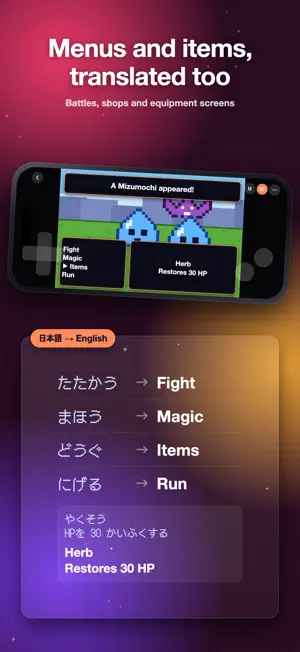


About TransPlay: Emulator Translator
The retro classics you gave up on because you couldn't read them — play them and read them. The app reads the dialogue as it appears and lays the translation over it, in place. No dictionary in the other hand, no walkthrough on a second screen. Twelve consoles, from Game Boy Advance to Dreamcast and PSP, in one app. ■ 12 CONSOLES, ONE APP — STILL FOCUSED ON ONE GAME · Pick a console on the first screen and get a screen made for it alone: core, aspect ratio, controls, translation area and game packs tuned to that console, and a library of only its games. · Switch any time from the top-left button; the app reopens on the console you played last. Imported games are sorted onto the right console automatically. ■ TRANSLATION, RIGHT ON THE SCREEN · Text is recognized where it stands, and the translation covers it — you never leave the game. · Japanese and English source text into 14 languages. · Pick how it translates: Basic (free, on your device), On-device AI (Pro, a model you download), or Advanced (Pro, a dedicated server, under a second). · Set a translation area per game. Mark the dialogue box and HUD numbers stop getting translated. · Freeze & Translate — when dialogue runs past too fast, hold the frame and read it at your pace. · 601 game packs — per-title glossaries of names, tone and plot, so translations land close to the original. ■ SUPPORTED CONSOLES · Game Boy Advance — .gba · Game Boy — .gb, .gbc · NES · Famicom — .nes · SNES · Super Famicom — .sfc, .smc · Mega Drive · Genesis — .md, .gen, .smd, .cue, .chd · PlayStation · PS1 — .cue, .chd, .pbp, .exe, .m3u · Sega Saturn — .cue, .chd, .m3u · Dreamcast — .cue, .gdi, .chd, .cdi · PlayStation Portable · PSP — .iso, .cso, .pbp, .chd · PC Engine · TurboGrafx-16 — .pce, .sgx, .cue, .chd · WonderSwan — .ws, .wsc · Game Gear — .gg, .sms, .sg · PlayStation, Sega Saturn and Dreamcast need a console BIOS file; Mega Drive and PC Engine only for CD games. BIOS files are copyrighted and not included — dump them from hardware you own. · Fast-forward up to 10× (4× on PS1, Saturn, Dreamcast and PSP) · Snapshots at any moment · Runs on iPhone, iPad, Mac, Apple TV and Apple Vision Pro. ■ ALSO INSIDE · Time Machine — auto-saves as you play (every minute by default) so you can jump back to the moment you missed. · Box-art library — your games shown by their covers, fetched automatically. · Wi-Fi import from your computer's browser. No cable, no iTunes. · Bluetooth gamepads with button mapping per pad and per game; a movable, resizable on-screen controller. · Turbo buttons — the ones you pick fire repeatedly while held. · Cloud backup, plus direct transfer from your other iPhone, iPad or Mac on the same Wi-Fi. · Play statistics — what you played, and for how long. ■ APP LANGUAGES English · 한국어 · 日本語 · 简体中文 · 繁體中文 · Español · Français · Deutsch · Italiano · Português (Brasil) · ไทย ■ PRO SUBSCRIPTION · Solo — every Pro feature for one console, one console at a time. · All-Pass — Pro on all 12 consoles. · Your first subscription starts with a 7-day free trial (once per account). · Prices are shown in your local currency inside the app. · Subscriptions renew automatically at the same price unless cancelled at least 24 hours before the current period ends. Manage or cancel any time in your account settings. · Terms of Use (EULA): https://www.apple.com/legal/internet-services/itunes/dev/stdeula/ · Privacy Policy: https://transplay-web.web.app/en/privacy/ ■ PLEASE READ · This app ships with no game files (ROMs or disc images) and does not point you to any. Use only files you legally own. · Not affiliated with, endorsed by, or sponsored by any console maker or game publisher. All trademarks are the property of their respective owners.
What’s new
Version 2.6 · Updated October 25, 2026
TransPlay 2.6 · Lock to landscape: the game screen stays landscape with a controller and your phone standing in a holder (Settings → Display, or the ⋯ menu in a game). In iPhone Mirroring on a Mac, widen the mirroring window for landscape · Your first subscription now starts with a 7-day free trial on the single-console plan too (once per account) · Redeem promo codes: Settings → Pro Subscription → Redeem Promo Code · Pad buttons are shown by the names printed on your pad (ZR and + on a Switch controller) · Mac: "Translating…" appears over each line being translated; Settings → Controller → Functions on Pad Buttons Something wrong? Tell us on the support page and we'll fix it.
App privacy
The developer, LittleBig AdConsulting, reported these privacy practices to Apple.
Data Not Linked to You
The following data, which may be collected but is not linked to your identity, may be used for the following purposes:
- User Content: Other User Content
Used for: App Functionality
Alternatives to TransPlay: Emulator Translator
Looking for apps like TransPlay: Emulator Translator? Here are 6 similar apps on the App Store. The highest rated is BitPrism (5.0/5), and all 6 are free to download.
-
 BitPrism
5.0
-
 Indigo: Retro Game Emulator
5.0
-
 RetroOne: GBA Emulator
5.0
-
 Family Track: Parental Control
-
 Lambda - Retro with Friends
5.0
-
 Tinbox: Game Emulator
5.0
| App | Rating | Price | Last updated | Compare |
|---|---|---|---|---|
| TransPlay: Emulator Translator | – | Free | October 25, 2026 | |
| BitPrism | 5.0 / 5 (1) | Free | Jul 20, 2026 | Compare |
| Indigo: Retro Game Emulator | 5.0 / 5 (2) | Free | Sep 23, 2026 | Compare |
| RetroOne: GBA Emulator | 5.0 / 5 (2) | Free | Oct 20, 2026 | Compare |
| Family Track: Parental Control | – | Free | Oct 27, 2026 | Compare |
| Lambda - Retro with Friends | 5.0 / 5 (1) | Free | Oct 15, 2026 | Compare |
| Tinbox: Game Emulator | 5.0 / 5 (2) | Free | Oct 1, 2026 | Compare |