

PicWhisk
梅 李 Photo & Video iPhoneiPadiPod touch
PicWhisk is a paid Photo & Video app for iPhone and iPad by 梅 李. Rated 5.0/5 from 4 ratings. Requires iOS 17.0. Updated October 8, 2026.
- Rating
- 5.0
- 4 ratings
- Price
- 0.99 USD
- on the App Store
- Size
- 5 MB
- Age 4+
- Updated
- Oct 8
- 2026 · v2.2
Screenshots


About PicWhisk
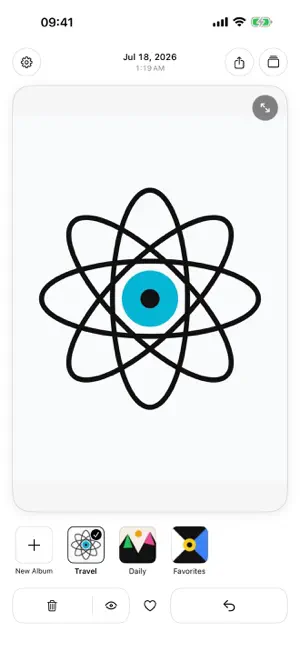
Swipe through your photos, swipe up to mark what you no longer need, then review and confirm your deletions together. Organize photos, videos, Live Photos, and GIFs in your iPhone or iPad library. Keep your favorites, clear out unwanted items, and sort the rest into albums in Photos. Features: • Search image content and text on your device, such as “cat” or “order”, then open the results to continue sorting • Use Unreviewed Photos to track progress from swiping, marking for deletion, and sorting into albums • Use the app on iPhone and iPad, with layouts that adapt to iPad orientation and window size • Scroll the thumbnail strip to change the current photo; browse in order, in reverse, or shuffled • Review pending deletions, keep individual items, or clear all deletion marks at once • Turn on classification mode and drag photos or videos down onto album covers to add them • Create empty albums, reorder album covers, rename albums, and delete regular albums • Filter the overview by album, Favorites, Videos, or Screenshots, and jump to the newest item • Tap the expand icon or double-tap for a full-screen view, then pinch to zoom and drag to explore • Crop still photos freely or use 1:1, 4:3, 16:9, or 9:16, with undo during the current session • Toggle Live Photo autoplay from the Live icon, or hold to play the current Live Photo • Videos start muted; changing the sound control sets your preference for subsequent videos • Sync Favorites with Photos and share through the system share sheet • Adjust browsing and classification in a compact settings panel, with language and dark-mode controls After you grant Photos access, the app gradually prepares search on your device. The first scan takes time; you can keep sorting elsewhere in the app while recognition continues. Progress is saved for your next visit. Recognition may miss some matches. Image recognition and the search index stay on your device and are not uploaded. No account is required, there are no ads, and the developer runs no online service for the app. Your media and usage records are not uploaded automatically. When you choose to share, iOS passes the selected content to the app or recipient you choose. If an original is stored only in iCloud, the system Photos service may download it. Swiping up only marks an item. Nothing is deleted until you confirm in the iOS system prompt. Confirmed items normally move to Recently Deleted and remain recoverable during the system retention period. Support: [email protected] Xiaohongshu: Asa阿洒
What’s new
Version 2.2 · Updated October 8, 2026
1. Added on-device photo search by image content or text, with results you can open and organize. 2. Added Unreviewed Photos to help you continue sorting. 3. Search preparation starts after Photos access is granted, continues while you use other screens in the app, and saves its progress. 4. Added iPad support with layouts that adapt to window size. 5. Improved overview zoom, returning to the current photo, and video and Live Photo playback. 6. Improved loading messages and added a swipe-up tip when you tap Delete with no pending items.
App privacy
The developer, 梅 李, reported these privacy practices to Apple.
Data Not Collected
The developer does not collect any data from this app.
Alternatives to PicWhisk
Looking for apps like PicWhisk? Here are 6 similar apps on the App Store. The highest rated is CamFusion - Dual Camera 视频抽帧截图 (5.0/5), and all 6 are free to download.
-
 CamFusion - Dual Camera 视频抽帧截图
5.0
CamFusion - Dual Camera 视频抽帧截图
5.0
-
 Paji Cam
4.7
Paji Cam
4.7
-
 Gloam 相机
5.0
Gloam 相机
5.0
-
 Colorby: AI Color Editor & Cam
4.9
Colorby: AI Color Editor & Cam
4.9
-
 OnePhoto: Photo Cleaner
5.0
OnePhoto: Photo Cleaner
5.0
-
 Photo Cleaner:Photo Organizer
4.7
Photo Cleaner:Photo Organizer
4.7
| App | Rating | Price | Last updated | Compare |
|---|---|---|---|---|
| PicWhisk | 5.0 / 5 (4 ratings) | 0.99 USD | October 8, 2026 | |
| CamFusion - Dual Camera 视频抽帧截图 | 5.0 / 5 (253) | Free | Oct 14, 2026 | Compare |
| Paji Cam | 4.7 / 5 (23) | Free | Oct 2, 2026 | Compare |
| Gloam 相机 | 5.0 / 5 (7) | Free | Oct 2, 2026 | Compare |
| Colorby: AI Color Editor & Cam | 4.9 / 5 (134) | Free | Oct 11, 2026 | Compare |
| OnePhoto: Photo Cleaner | 5.0 / 5 (6) | Free | Oct 15, 2026 | Compare |
| Photo Cleaner:Photo Organizer | 4.7 / 5 (41) | Free | Oct 9, 2026 | Compare |
Compare PicWhisk with the top alternatives: ratings, updates, ASO score and keyword gaps →