

What Do I Do - Todo List
HyunWoo Lee Productivity iPhoneiPadiPod touch
What Do I Do - Todo List is a free Productivity app for iPhone and iPad by HyunWoo Lee. Requires iOS 17.0. Updated October 17, 2026.
- Price
- Free
- on the App Store
- Size
- 4 MB
- Age 4+
- Updated
- Oct 17
- 2026 · v2.0.0
Screenshots



About What Do I Do - Todo List
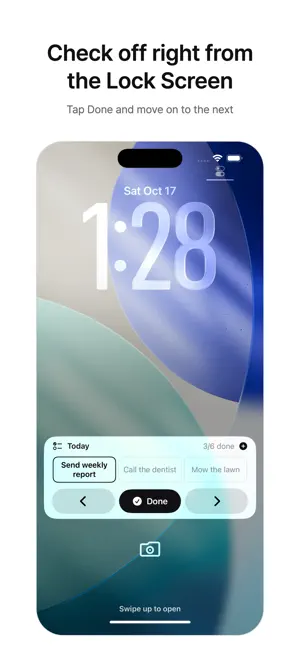
The trouble with to-do apps is simple: you have to open them to see anything. What Do I Do puts today's to-dos on your Lock Screen and in the Dynamic Island. Every time you glance at your phone, you see what's next, and you can check it off right from the Lock Screen. How it works • Open the app and today's to-dos appear on the Lock Screen and in the Dynamic Island • Tap once on the Lock Screen to finish a task — no need to open the app • 10 Lock Screen layouts: large rows, a two-column grid, a progress bar, multiple cards and more • A circular Lock Screen widget that shows how many are left • Type in the field at the bottom of Home, and pick a date and a repeat (daily, weekdays, weekly) • Repeating tasks don't pile up when you miss a day — you see how many days behind you are • Jot down ideas as memos • 6 themes, all free • 15 languages What Do I Do Pro (one-time purchase) • iCloud Sync — the same tasks on all your devices • Notion sync — two-way with your Notion task database; Lock Screen checks show up in Notion • No limit on tasks (free: add up to 3 a day saved on this device) Built to be trusted • No sign-up, no account. Tasks are saved on this device by default • We don't store your tasks on our own servers — only on your device, your iCloud and your Notion • Check things off offline; they reach Notion once you're back online Note: iOS shows the Lock Screen and Dynamic Island display for up to 8 hours at a time. We'll let you know 5 minutes before it ends. Notion is a trademark of Notion Labs, Inc. This app is independent and is not affiliated with or sponsored by Notion Labs, Inc.
What’s new
Version 2.0.0 · Updated October 17, 2026
Islet is now What Do I Do. • 10 Lock Screen layouts and a circular widget for what's left • 6 themes, all free • 15 languages; pick one in Settings • Type in the field at the bottom of Home; drag to reorder • Repeating tasks no longer pile up when you skip a day • What Do I Do Pro: iCloud Sync across devices, Notion sync, unlimited tasks, and recording finished tasks in When'd I • Free: add up to 3 tasks a day saved on this device Removed: completion calendar, morning session alert, file export, adding lists, Home Screen widgets. Your saved tasks and memos stay as they are.
App privacy
The developer, HyunWoo Lee, reported these privacy practices to Apple.
Data Not Collected
The developer does not collect any data from this app.
Alternatives to What Do I Do - Todo List
Looking for apps like What Do I Do - Todo List? Here are 6 similar apps on the App Store. The highest rated is lazeelog (5.0/5), and 5 of the 6 are free to download.
-
 다이브: 할일 관리, 투두리스트, 일정, 루틴
-
 Ahead Island
-
 lazeelog
5.0
lazeelog
5.0
-
 TaskWidget
-
 Vist: Social Checklists
-
 Tasktastic: Daily and Beyond.
| App | Rating | Price | Last updated | Compare |
|---|---|---|---|---|
| What Do I Do - Todo List | – | Free | October 17, 2026 | |
| 다이브: 할일 관리, 투두리스트, 일정, 루틴 | – | 2.99 USD | Aug 24, 2026 | Compare |
| Ahead Island | – | Free | Jul 14, 2026 | Compare |
| lazeelog | 5.0 / 5 (1) | Free | Aug 5, 2026 | Compare |
| TaskWidget | – | Free | Jul 28, 2026 | Compare |
| Vist: Social Checklists | – | Free | Jun 2, 2026 | Compare |
| Tasktastic: Daily and Beyond. | – | Free | May 20, 2026 | Compare |