

SmileClock
Hangzhou Miqi Guangzhi Technology Co., Ltd. Utilities iPhoneiPadiPod touch
SmileClock is a free Utilities app for iPhone and iPad by Hangzhou Miqi Guangzhi Technology Co., Ltd. Requires iOS 17.0. Updated August 14, 2026.
- Price
- Free
- on the App Store
- Size
- 13 MB
- Age 4+
- Updated
- Aug 14
- 2026 · v2.1
Screenshots



About SmileClock
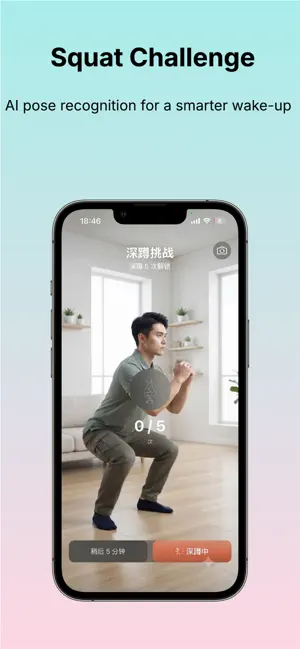
Start your day with a smile. SmileClock is a task-based alarm clock that wakes you up with fun, interactive challenges. Complete a task to turn off the alarm — no more tapping blindly and oversleeping. 7 WAKE-UP TASKS • Smile — Smile for 2 seconds to dismiss. A positive way to start your day. • Shake — Shake your phone to wake up your body. • Math — Solve a quick math problem to engage your brain. • OK Gesture — Make an OK sign to the camera. • Eye Open — Open your eyes wide and look at the screen. • Walk — Take a few steps to get moving. • Squat — Do a squat to get your blood flowing. WHY SMILECLOCK Smile to Wake — The first alarm clock with smile detection. Start your morning with positivity, not punishment. While other apps force you through painful tasks, SmileClock rewards you with a smile. Privacy First — All task verification happens locally on your device using Vision, ARKit, and CoreMotion. No data ever leaves your phone. Works completely offline. Rock-Solid Reliability — Dual-system integration ensures your alarm always rings. iOS 26+ AlarmKit support with lock screen fullscreen, Dynamic Island, and always-on display. Plus background keep-alive technology and three-layer cold-start recovery — your alarm rings even if the app is closed. 6 WIDGETS Beautiful lock screen and home screen widgets: • Next Alarm countdown • Today's completion status • Monthly calendar with streak density • Streak counter • Today's progress ring • Inline next alarm Always know when your next alarm is at a glance. SMILECLOCK PRO • 7-day free trial — Try all features risk-free. Cancel anytime. • Monthly, Yearly, and Lifetime options. • Full alarm scheduling, all 7 tasks, all alarm sounds, snooze settings, multiple alarm management, and complete achievement history. New users get 7 days of full Pro access upon creating their first alarm. No commitment — cancel anytime. Wake up differently. Smile, don't suffer. Terms of Use: https://www.apple.com/legal/internet/services/itunes/dev/stdeula/ Privacy Policy: https://delicious-bear-05d.notion.site/SmileClock-Privacy-Policy-3a7dbc0ec01481398ac1da84f302b146
What’s new
Version 2.1 · Updated August 14, 2026
fix: repeat alarm
App privacy
The developer, Hangzhou Miqi Guangzhi Technology Co., Ltd., reported these privacy practices to Apple.
Data Linked to You
The following data, which may be collected and linked to your identity, may be used for the following purposes:
- User Content: Photos or Videos
- Usage Data: Product Interaction
- Sensitive Info: Sensitive Info
- Other Data: Other Data Types
Used for: Product Personalization, App Functionality
Alternatives to SmileClock
Looking for apps like SmileClock? Here are 6 similar apps on the App Store.
-
 AlarmX - Anti Snooze Clock
-
 DanXing: Wake Mission Alarm
-
 PopWake – Alarm Clock
-
 Mission Alarm Clock: Wake Up
-
 Mission Alarm Clock: Tasks
-
 Mission: Loud Alarm Clock
| App | Rating | Price | Last updated | Compare |
|---|---|---|---|---|
| SmileClock | – | Free | August 14, 2026 | |
| AlarmX - Anti Snooze Clock | – | Free | Aug 6, 2026 | Compare |
| DanXing: Wake Mission Alarm | – | Free | Aug 8, 2026 | Compare |
| PopWake – Alarm Clock | – | Free | May 26, 2026 | Compare |
| Mission Alarm Clock: Wake Up | – | Free | Jun 15, 2026 | Compare |
| Mission Alarm Clock: Tasks | – | Free | Sep 17, 2026 | Compare |
| Mission: Loud Alarm Clock | – | Free | Sep 1, 2026 | Compare |
Compare SmileClock with the top alternatives: ratings, updates, ASO score and keyword gaps →