

LingoCam AI: Scene Talk
Uorder Education iPhoneiPadiPod touch
LingoCam AI: Scene Talk is a free Education app for iPhone and iPad by Uorder. Requires iOS 17.6. Updated September 13, 2026.
- Price
- Free
- on the App Store
- Size
- 17 MB
- Age 4+
- Updated
- Sep 13
- 2026 · v1.0.1
Screenshots

About LingoCam AI: Scene Talk
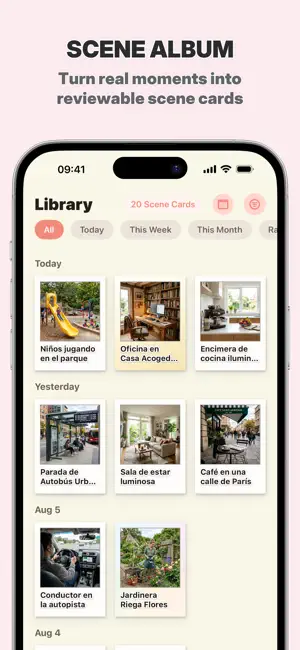
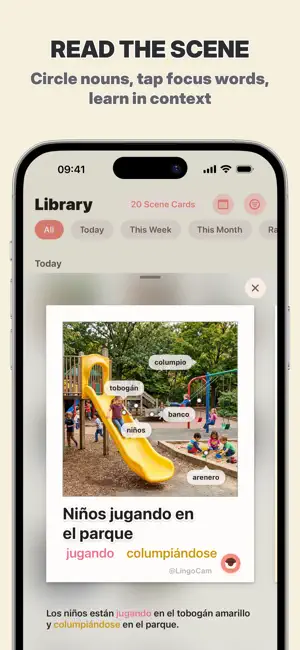
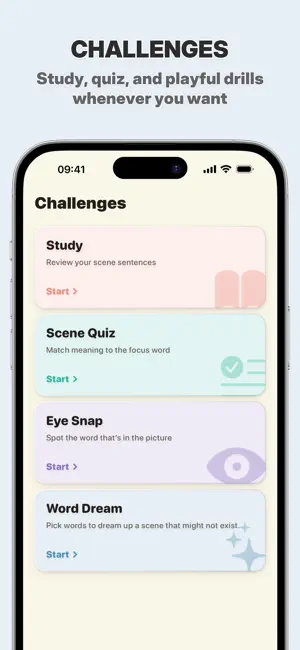
LingoCam AI turns everyday scenes into sentence photo cards. Point your camera at a park, a cafe table, or a street corner. One tap creates a scene card with a natural target-language sentence, a clear translation, and noun highlights on what the sentence actually mentions — not a pile of disconnected flashcards. HOW IT WORKS 1. Frame a scene and capture 2. Cloud AI writes one grounded sentence for your level preference 3. Nouns from that sentence are circled on the photo 4. Study the full sentence, then practice with cloze quizzes (verbs & adjectives) 5. Replay with light scene games when you want a quick challenge WHY IT FEELS DIFFERENT • Scene → one sentence — learn usable language, not sticker word lists • Visual anchors — remember what you saw, not abstract glossary rows • Cloze practice — fill the blank with the right verb or adjective • LingoCam Pro (in-app purchase) — download and save scene cards to Photos • Cloud-only AI — no on-device model download required • Built for curiosity — parents, travelers, and self-learners LANGUAGES Study with support for major world languages (UI and learning pairs vary by setting). Pick your native language and the language you want to grow. IN-APP PURCHASES The free app includes capture, study, and quizzes, with daily scan limits. Optional LingoCam Pro is an auto-renewable subscription sold as an in-app purchase. It increases scan and game limits and unlocks saving scene cards to the Photos app. A purchase is not required to use the core experience. Prices are shown in the app; manage or cancel in your Apple ID settings. PRIVACY FIRST No account required for the core experience. Your card library stays on your device. Photos are sent only for ephemeral cloud recognition — we do not keep a server-side user library. Terms of Use (EULA): https://lingocam-ai.web.app/terms.html Privacy Policy: https://lingocam-ai.web.app/privacy.html
What’s new
Version 1.0.1 · Updated September 13, 2026
• Clearer capture, study, and home camera-eye guidance • Profile calendar now shows daily study time and weekly accuracy • System permission prompts are localized • Bug fixes and small UI polish
App privacy
The developer, Uorder, reported these privacy practices to Apple.
Data Not Collected
The developer does not collect any data from this app.
Alternatives to LingoCam AI: Scene Talk
Looking for apps like LingoCam AI: Scene Talk? Here are 6 similar apps on the App Store.
-
 SnapWord VIRL
-
 SnapWords: First Words Flash
-
 Learn English: Snaplang
-
 language learning AI: snapword
-
 SnapWord: Visual Vocabulary
-
 LinguaSnap: Language Classroom
| App | Rating | Price | Last updated | Compare |
|---|---|---|---|---|
| LingoCam AI: Scene Talk | – | Free | September 13, 2026 | |
| SnapWord VIRL | – | Free | Jun 12, 2026 | Compare |
| SnapWords: First Words Flash | – | Free | Apr 17, 2026 | Compare |
| Learn English: Snaplang | – | Free | Sep 9, 2026 | Compare |
| language learning AI: snapword | – | Free | Oct 13, 2025 | Compare |
| SnapWord: Visual Vocabulary | – | Free | Aug 24, 2026 | Compare |
| LinguaSnap: Language Classroom | – | Free | Nov 2, 2025 | Compare |