

Orchestrator.Inc
Prateek Karnal Developer Tools iPhoneiPadiPod touch
Orchestrator.Inc is a free Developer Tools app for iPhone and iPad by Prateek Karnal. Requires iOS 16.4. Updated October 28, 2026.
- Price
- Free
- on the App Store
- Size
- 55 MB
- Age 4+
- Updated
- Oct 28
- 2026 · v2.2.0
Screenshots

About Orchestrator.Inc
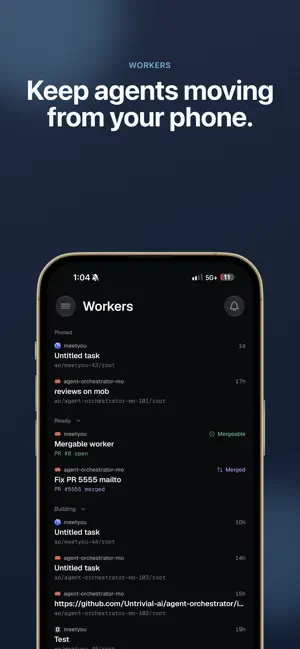
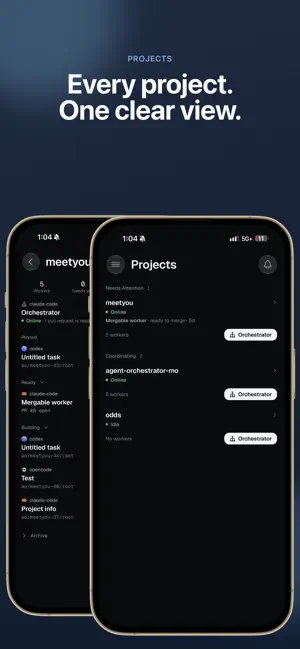
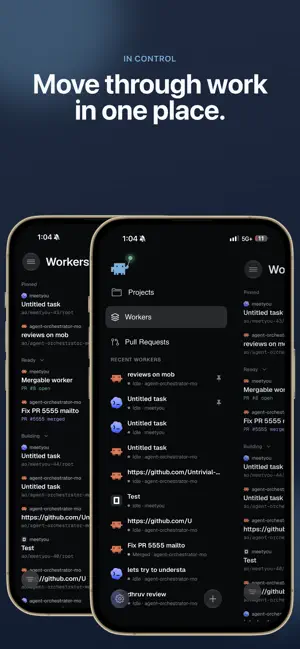
Orchestrator is the companion app for Orchestrator, the desktop workspace for agent-driven development. Your agents keep working while you step away from your desk. AO Mobile keeps you in the loop see what every worker is doing, answer the ones that are blocked, and keep work moving from your phone. REQUIRES THE Orchestrator DESKTOP APP AO Mobile is a thin client. It connects directly to Agent Orchestrator running on your own computer, over your local network or your Tailscale network. There is no cloud service and no account to create. Your code, conversations, and repositories never leave your machine. WHAT YOU CAN DO • Live Kanban — every worker session on one board, grouped by what needs your attention: working, needs you, in review, ready to merge. • Get notified when an agent stops — a push notification arrives the moment a session needs your input, and tapping it opens that exact conversation. • Chat with any agent — full conversation history, streaming responses, approvals, model and provider switching, file attachments, and voice input for when typing is impractical. • Follow pull requests — open and draft PRs with their checks, CI status, and review state. • Talk to the orchestrator — your project-level planning agent, for thinking through direction and delegating new work. • Drop into the terminal — attach to a session's live terminal when you need the raw view. • Preview running work — open a worker's browser preview to see what it built. BUILT FOR TRUST The desktop's connection to your phone is opt-in and off by default. When you enable it, AO opens a separate local listener protected by a rotating password, and pairing happens by scanning a QR code shown on your desktop. Turning it off closes the connection immediately. GETTING STARTED 1. Install Agent Orchestrator on your Mac, Windows, or Linux machine. 2. Turn on Connect Mobile in the desktop app. 3. Scan the pairing QR code with this app. Agent Orchestrator is open source. Learn more at aoagents.dev.
What’s new
Version 2.2.0 · Updated October 28, 2026
• Paste images into chat: long-press the message box and tap Paste to attach a copied image. • Tables in agent replies now show as aligned grids, and wide tables scroll sideways. • Worker reports, PR updates and other AO messages in chat now look the way they do on desktop. Tap a report to see all of it. • Clearer connection status: the app tells you when your phone is offline or the connection is slow, instead of saying your machine is down. Fixes • Messages from the terminal composer now reach the agent as plain text. • The model picker no longer disappears on chats that were asleep. • Scanning another machine's pairing code while reconnecting now connects that machine. • The Notifications switch in Settings is the right size.
App privacy
The developer, Prateek Karnal, reported these privacy practices to Apple.
Data Not Linked to You
The following data, which may be collected but is not linked to your identity, may be used for the following purposes:
- Identifiers: Device ID
- Usage Data: Product Interaction
Used for: Analytics
Alternatives to Orchestrator.Inc
Looking for apps like Orchestrator.Inc? Here are 6 similar apps on the App Store. The highest rated is Heeler for herdr (5.0/5), and all 6 are free to download.
-
 Flonno
-
 Heeler for herdr
5.0
Heeler for herdr
5.0
-
 herdrup: agents in your pocket
5.0
herdrup: agents in your pocket
5.0
-
 Codync
5.0
Codync
5.0
-
 Digger DNS lookup
-
 Paradev (formerly Superset)
5.0
Paradev (formerly Superset)
5.0
| App | Rating | Price | Last updated | Compare |
|---|---|---|---|---|
| Orchestrator.Inc | – | Free | October 28, 2026 | |
| Flonno | – | Free | Oct 13, 2026 | Compare |
| Heeler for herdr | 5.0 / 5 (13) | Free | Oct 25, 2026 | Compare |
| herdrup: agents in your pocket | 5.0 / 5 (3) | Free | Oct 28, 2026 | Compare |
| Codync | 5.0 / 5 (6) | Free | Oct 30, 2026 | Compare |
| Digger DNS lookup | – | Free | Sep 1, 2026 | Compare |
| Paradev (formerly Superset) | 5.0 / 5 (26) | Free | Oct 26, 2026 | Compare |
Compare Orchestrator.Inc with the top alternatives: ratings, updates, ASO score and keyword gaps →