

Pacibook: Ebook Reader
Prashant Mishra Book iPhoneiPadiPod touch
Pacibook: Ebook Reader is a free Book app for iPhone and iPad by Prashant Mishra. Requires iOS 15.0. Updated October 5, 2026.
- Price
- Free
- on the App Store
- Size
- 44 MB
- Age 4+
- Updated
- Oct 5
- 2026 · v1.1.0
Screenshots


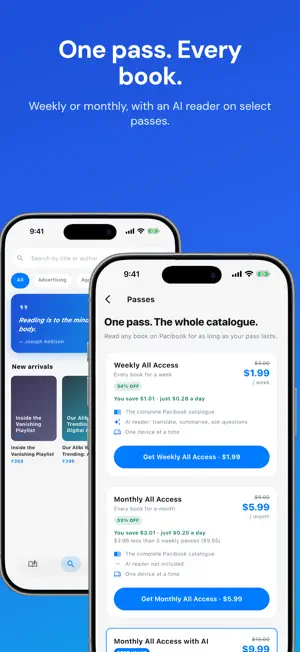

About Pacibook: Ebook Reader
Make more room for reading with Pacibook, a focused ebook reader for discovering titles, building a personal library, and enjoying every page wherever you are. Whether you read for curiosity, study, travel, or a few quiet minutes each day, Pacibook keeps discovery and reading together in one clean experience. Browse the catalogue before creating an account, open clear title details, and choose what you want to read without fighting a cluttered interface. DISCOVER YOUR NEXT READ • Browse a growing catalogue from Pacibook publishers and authors. • Search by title or author when you already know what you want. • Explore category filters when you want inspiration. • See recommendations that help you return to interesting literature. • Review useful title details before opening the reader. A READER BUILT FOR FOCUS Pacibook gives the page the attention it deserves. Turn pages naturally, zoom when text needs a closer look, and keep your place as you move through a publication. Light and dark themes help the interface fit your surroundings, while a simple navigation system keeps the catalogue, search, library, and account close at hand. READ OFFLINE Download eligible ebooks to your device and keep reading when your connection is unreliable or unavailable. Offline access is useful on commutes, flights, and anywhere a steady signal cannot be guaranteed. Downloaded content is protected on the device and stays available from your library while your access permits it. HIGHLIGHT IMPORTANT PASSAGES Mark useful sections directly on a page and return to a text with your private highlights intact. Highlights are stored locally so they remain useful during offline reading too. BUILD A CONSISTENT READING HABIT • Track reading time through a daily reading streak. • See current and longest streak information. • Choose a daily reminder at a time that suits you. • Share a streak card when you want to celebrate progress. Reminders are optional. Pacibook asks for notification permission only when you decide to enable them, never simply because the app was opened. OPTIONAL AI READING TOOLS Eligible access passes can include AI tools inside the reader. Translate selectable page text into supported languages, ask a question about the nearby reading context, or create a summary of the pages you are studying. Availability depends on the selected pass, the content, and connectivity. YOUR LIBRARY AND ACCOUNT Sign in to keep access tied to your account, manage purchases, view orders, check your coin balance, and download titles for offline use. Pacibook supports email sign-in and platform sign-in options where available. You can also raise a support request, review privacy and terms, sign out, or permanently delete your account from inside the app. FLEXIBLE ACCESS Read free content where offered, access individual titles with coins, or choose a fixed-duration catalogue pass. Store purchases are one-time purchases for the stated access period, not automatically renewing subscriptions. Payments in the iOS version are processed securely by the App Store. PRIVACY-CONSCIOUS BY DESIGN Pacibook does not request location, contacts, camera, photo-library, or tracking permission. Account and purchase data are sent over HTTPS. The app includes clear privacy information, in-app support, and account deletion controls. START SIMPLY A short, skippable walkthrough introduces the essentials on first launch. Then browse the catalogue, choose a title, and make reading part of your day with Pacibook.
What’s new
Version 1.1.0 · Updated October 5, 2026
Read in your language as you turn the pages. Switch on translation and every page you settle on is translated into any of 22 Indian languages, including scanned pages, with the next page ready before you reach it. Ask the AI reader about the whole book, not just the pages around you, and get illustrations, step-by-step diagrams and charts in the answers. Summaries now cover the entire book. Plus smoother purchases and small fixes.
App privacy
The developer, Prashant Mishra, reported these privacy practices to Apple.
Data Used to Track You
The following data may be used to track you across apps and websites owned by other companies:
- Purchases: Purchase History
- Identifiers: Device ID
- Usage Data: Product Interaction, Advertising Data
Data Linked to You
The following data, which may be collected and linked to your identity, may be used for the following purposes:
- Purchases: Purchase History
- Identifiers: Device ID, User ID
- Usage Data: Product Interaction, Advertising Data
- Contact Info: Email Address, Name, Phone Number
Used for: Developer’s Advertising or Marketing, Analytics, App Functionality
Alternatives to Pacibook: Ebook Reader
Looking for apps like Pacibook: Ebook Reader? Here are 6 similar apps on the App Store. The highest rated is Booklip — eBook Reader (5.0/5), and all 6 are free to download.
-
 Booklip — eBook Reader
5.0
Booklip — eBook Reader
5.0
-
 Sai Devotee
-
 Ebook Reader: Books & Library
-
 Sai Baba App
-
 iBookGuru - eBooks Library App
-
 Novel Ebook Reader
| App | Rating | Price | Last updated | Compare |
|---|---|---|---|---|
| Pacibook: Ebook Reader | – | Free | October 5, 2026 | |
| Booklip — eBook Reader | 5.0 / 5 (4) | Free | Oct 18, 2026 | Compare |
| Sai Devotee | – | Free | Nov 2, 2025 | Compare |
| Ebook Reader: Books & Library | – | Free | Jun 4, 2026 | Compare |
| Sai Baba App | – | Free | Sep 23, 2026 | Compare |
| iBookGuru - eBooks Library App | – | Free | Apr 4, 2026 | Compare |
| Novel Ebook Reader | – | Free | Mar 27, 2024 | Compare |