

QuickRead: PDF & Book Reader
Emrah Sinekli Book iPhoneiPadiPod touch
QuickRead: PDF & Book Reader is a free Book app for iPhone and iPad by Emrah Sinekli. Requires iOS 16.0. Updated August 5, 2026.
- Price
- Free
- on the App Store
- Size
- 8 MB
- Age 4+
- Updated
- Aug 5
- 2026 · v1.0.1
Screenshots


About QuickRead: PDF & Book Reader
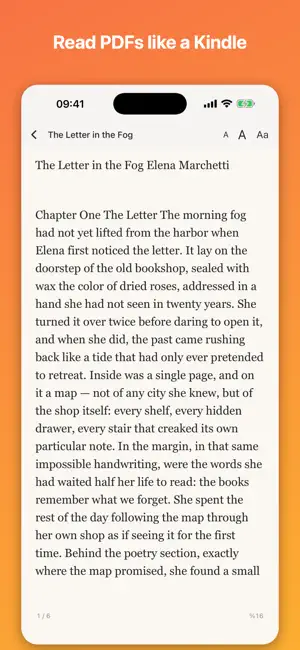
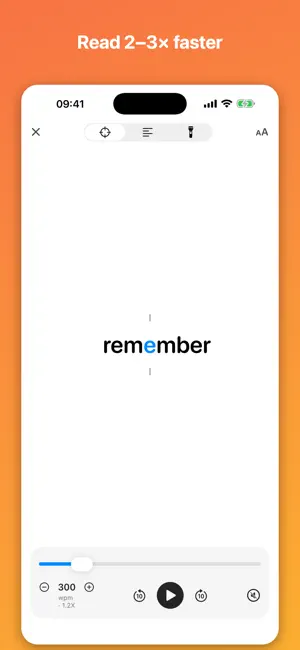
QuickRead turns your iPhone and iPad into the reading tool you always wanted: a beautiful PDF & book reader, a real notebook you can write on, and a speed-reading trainer — in one app that works 100% offline. READ PDFs LIKE A KINDLE • Any PDF reflows into clean book pages • Turn pages with a paper-curl animation or scroll continuously • Paper, sepia, light, dark and night themes • Adjustable font size — your page is always remembered A REAL NOTEBOOK ON YOUR PDFs • Draw with pen and marker in 7 colors • Highlight, underline or strike through any text • Add shapes, arrows and typed margin notes • Everything is saved INTO the PDF file itself — your marks travel with the document • Eraser and undo included TRAIN YOUR READING SPEED • Focus mode flashes words at the optimal eye position (RSVP) • Flow and Spotlight modes keep the whole page visible • 25–1200 words per minute, rhythm pauses at punctuation • Live statistics: words read, time, average WPM LISTEN IN ANY LANGUAGE • On-device voices read along, word-synced • The language is detected automatically IMPORT ANYTHING • PDF, ePub, Markdown, TXT, RTF, DOCX — or paste any text • Everything stays on your device: no account, no cloud, no tracking QUICKREAD PRO Free includes 3 documents and all reading modes. Pro unlocks unlimited documents and the full notebook toolkit — monthly, yearly, or one single lifetime purchase. Privacy: QuickRead collects no data. Your documents never leave your device. Terms of Use: https://www.apple.com/legal/internet-services/itunes/dev/stdeula/ Privacy Policy: https://quickreadmac.com/ios/privacy Terms of Use (EULA): https://quickreadmac.com/ios/terms Privacy Policy: https://quickreadmac.com/ios/privacy
What’s new
Version 1.0.1 · Updated August 5, 2026
A friendlier first run, and a clearer free plan. • Guided tour on first launch — every button explained in plain language. • First-time tips inside speed reading, book mode and the PDF notebook. • You can now see exactly how many of your 3 free imports are left. • Rate QuickRead straight from Settings, and reopen the tour any time. • Fixes and polish throughout.
App privacy
The developer, Emrah Sinekli, reported these privacy practices to Apple.
Data Not Linked to You
The following data, which may be collected but is not linked to your identity, may be used for the following purposes:
- Purchases: Purchase History
- Identifiers: User ID
Used for: App Functionality
Alternatives to QuickRead: PDF & Book Reader
Looking for apps like QuickRead: PDF & Book Reader? Here are 6 similar apps on the App Store. The highest rated is Yomu EBook Reader (4.8/5), and all 6 are free to download.
-
 PDF to Books
4.3
PDF to Books
4.3
-
 ePub Reader - eBook Opener
1.0
ePub Reader - eBook Opener
1.0
-
 scrolly: cute pdf ebook reader
4.7
scrolly: cute pdf ebook reader
4.7
-
 Readest - eBook Reader
4.5
Readest - eBook Reader
4.5
-
 Yomu EBook Reader
4.8
Yomu EBook Reader
4.8
-
 Epub Reader -read epub,chm,txt
4.5
Epub Reader -read epub,chm,txt
4.5
| App | Rating | Price | Last updated | Compare |
|---|---|---|---|---|
| QuickRead: PDF & Book Reader | – | Free | August 5, 2026 | |
| PDF to Books | 4.3 / 5 (3) | Free | Nov 19, 2025 | Compare |
| ePub Reader - eBook Opener | 1.0 / 5 (1) | Free | Apr 2, 2026 | Compare |
| scrolly: cute pdf ebook reader | 4.7 / 5 (20) | Free | Dec 10, 2024 | Compare |
| Readest - eBook Reader | 4.5 / 5 (195) | Free | Oct 14, 2026 | Compare |
| Yomu EBook Reader | 4.8 / 5 (1,625) | Free | Oct 22, 2026 | Compare |
| Epub Reader -read epub,chm,txt | 4.5 / 5 (11,356) | Free | Sep 24, 2026 | Compare |