

Scanbox: PDF Doc Scanner
SEONYONG LEE Productivity iPhoneiPadiPod touch
Scanbox: PDF Doc Scanner is a free Productivity app for iPhone and iPad by SEONYONG LEE. Requires iOS 15.5. Updated July 29, 2026.
- Price
- Free
- on the App Store
- Size
- 138 MB
- Age 4+
- Updated
- Jul 29
- 2026 · v1.0.5
Screenshots


About Scanbox: PDF Doc Scanner
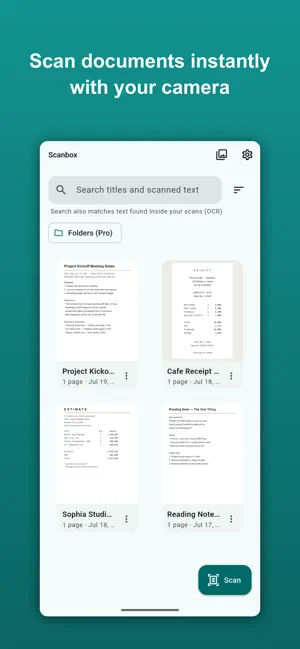
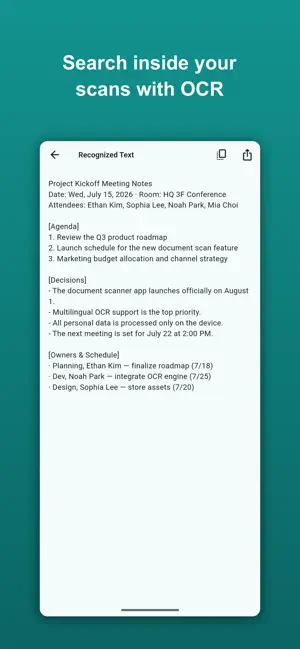
Scanbox turns your phone into a fast, private document scanner — and everything happens on your device. Scan any document with automatic edge detection, run OCR on-device, and export a searchable, watermark-free PDF. Your documents never leave your phone: no cloud uploads, no account. WHY SCANBOX • 100% on-device — capture, OCR and PDF all happen locally. Nothing is uploaded to a server. • No watermark, ever — free exports are clean and professional. • OCR is free — extract and search the text inside your scans, no paywall. • One-time purchase — no subscriptions, ever. FEATURES • Automatic edge detection and perspective correction • Crop, rotate, reorder and enhance pages • On-device OCR in Korean, English, Japanese and Chinese • Full-text search across your library — even text inside scans • Export a searchable PDF, JPEG or PNG • Share anywhere with the system share sheet • Clean, modern, distraction-free design PRO — one-time lifetime unlock (no subscription) • Remove ads • Batch-scan pages fast • Organize with folders • Password-lock your PDFs • Advanced export (quality, page size, compression) OCR, searchable PDF and watermark-free exports are FREE forever. Pro just adds more power and convenience with a single purchase. Great for receipts, contracts, IDs, whiteboards, notes, and any document you'd rather not upload to a cloud scanner.
What’s new
Version 1.0.5 · Updated July 29, 2026
Minor improvements and stability fixes.
App privacy
The developer, SEONYONG LEE, reported these privacy practices to Apple.
Data Used to Track You
The following data may be used to track you across apps and websites owned by other companies:
- Identifiers: Device ID
- Usage Data: Product Interaction, Advertising Data
Data Not Linked to You
The following data, which may be collected but is not linked to your identity, may be used for the following purposes:
- Identifiers: Device ID
- Usage Data: Product Interaction, Advertising Data
- Diagnostics: Crash Data, Performance Data
Used for: Third-Party Advertising, Analytics, App Functionality
Alternatives to Scanbox: PDF Doc Scanner
Looking for apps like Scanbox: PDF Doc Scanner? Here are 6 similar apps on the App Store.
-
 Sift: PDF Scanner & OCR
-
 Folio: Scanner ID & PDF Editor
-
 PDF Scan: Sign, OCR & Merge
-
 Scanner App Scan PDF & Docs
-
 Scanner PDF: Doc Scan & OCR
-
 ScanPro: PDF Scanner & QR Code
| App | Rating | Price | Last updated | Compare |
|---|---|---|---|---|
| Scanbox: PDF Doc Scanner | – | Free | July 29, 2026 | |
| Sift: PDF Scanner & OCR | – | Free | Aug 24, 2026 | Compare |
| Folio: Scanner ID & PDF Editor | – | Free | Sep 5, 2026 | Compare |
| PDF Scan: Sign, OCR & Merge | – | Free | Aug 19, 2026 | Compare |
| Scanner App Scan PDF & Docs | – | Free | Jul 23, 2026 | Compare |
| Scanner PDF: Doc Scan & OCR | – | Free | Sep 14, 2026 | Compare |
| ScanPro: PDF Scanner & QR Code | – | Free | Mar 17, 2026 | Compare |