

KeeKom: Translate Keyboard
M PHAN Utilities iPhoneiPadiPod touchMac
KeeKom: Translate Keyboard is a free Utilities app for iPhone and iPad by M PHAN. Requires iOS 18.0. Updated September 24, 2026.
- Price
- Free
- on the App Store
- Size
- 15 MB
- Age 17+
- Updated
- Sep 24
- 2026 · v1.0.4
Screenshots

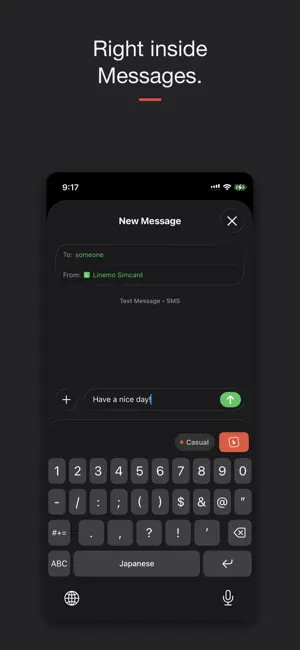


About KeeKom: Translate Keyboard
Think in your language. Communicate in theirs. KeeKom is a translation keyboard for iPhone. Type the way you naturally think, tap one key, and it goes out in their language, right inside LINE, WhatsApp, Messages, or anywhere you type. It sends what you mean, not a stiff word for word translation. 14 LANGUAGES Japanese, Korean, Chinese (Simplified and Traditional), Vietnamese, Tagalog, Nepali, Thai, Indonesian, Burmese, Portuguese, Spanish, French, and English. You type in your own language and KeeKom detects it automatically. You just pick who you are writing to. SET THE TONE Casual with friends, polite for work. Keigo in Japanese, usted in Spanish, vous in French. Switch it per message, or lock one tone in Settings. EMOJI AND KAOMOJI THAT READ THE ROOM As you type, KeeKom lines up the right emoji and kaomoji, from English or Japanese. Tap to drop one in. SEE WHAT YOU ARE SENDING Back translation shows what your message actually says before you send it, so you can trust it even in a language you cannot read. PRIVACY Works in every app. No account, no sign up, no ads. Nothing you type is stored. Only the text you translate is sent to convert it, then immediately discarded. Free plan: the full keyboard, all emoji and kaomoji, both tones, and 10 translations a day. KeeKom Spark removes the daily limit and lifts the length cap. KeeKom Blaze adds all 14 languages and back translation. Both are charged once a year, renew automatically, and can be cancelled any time in Settings. KeeKom Inferno adds blunt and flirty tones, 17+, as a one time add on that never expires. Terms of Use (EULA): https://www.apple.com/legal/internet-services/itunes/dev/stdeula/ Privacy Policy: https://getkeekom.com/privacy Payment is charged to your Apple Account at confirmation of purchase. A subscription renews automatically unless it is cancelled at least 24 hours before the end of the current period, and your account is charged for renewal within 24 hours before the period ends. You can manage or cancel your subscription in your Apple Account settings after purchase.
What’s new
Version 1.0.4 · Updated September 24, 2026
Autocorrect no longer learns your typos when you undo a correction, and it now favours common words. New in Settings: Learned words, to see or clear the words autocorrect leaves alone.
App privacy
The developer, M PHAN, reported these privacy practices to Apple.
Data Not Collected
The developer does not collect any data from this app.
Alternatives to KeeKom: Translate Keyboard
Looking for apps like KeeKom: Translate Keyboard? Here are 6 similar apps on the App Store. The highest rated is Earshot — Live Captions (5.0/5), and all 6 are free to download.
-
 Type Natural Korean: Keyboard
-
 Earshot — Live Captions
5.0
Earshot — Live Captions
5.0
-
 SayLy
SayLy
-
 OnDevice LLM - Offline AI Chat
4.0
OnDevice LLM - Offline AI Chat
4.0
-
 Live Screen & Voice Translate
3.0
Live Screen & Voice Translate
3.0
-
 Thai Keyboard + Translator
4.0
Thai Keyboard + Translator
4.0
| App | Rating | Price | Last updated | Compare |
|---|---|---|---|---|
| KeeKom: Translate Keyboard | – | Free | September 24, 2026 | |
| Type Natural Korean: Keyboard | – | Free | Oct 16, 2026 | Compare |
| Earshot — Live Captions | 5.0 / 5 (1) | Free | Aug 8, 2026 | Compare |
| SayLy | – | Free | Apr 15, 2026 | Compare |
| OnDevice LLM - Offline AI Chat | 4.0 / 5 (2) | Free | Oct 22, 2026 | Compare |
| Live Screen & Voice Translate | 3.0 / 5 (3) | Free | Oct 20, 2026 | Compare |
| Thai Keyboard + Translator | 4.0 / 5 (4) | Free | Mar 1, 2024 | Compare |