

CharaTalk: Talking Photo AI
Chaoyi Wang Photo & Video iPhoneiPadiPod touchMac
CharaTalk: Talking Photo AI is a free Photo & Video app for iPhone and iPad by Chaoyi Wang. Requires iOS 26.0. Updated October 23, 2026.
- Price
- Free
- on the App Store
- Size
- 1.2 GB
- Age 4+
- Updated
- Oct 23
- 2026 · v1.6.0
Screenshots


About CharaTalk: Talking Photo AI
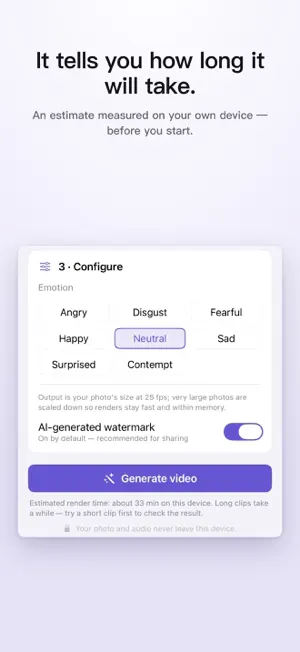
CharaTalk brings a portrait to life. Pick a photo, pick an audio file, and CharaTalk generates a video of that face speaking your audio — with natural lip-sync, head motion, and a selectable emotion. Everything happens on your own device. Nothing is ever uploaded. Fully on-device, genuinely private All AI models ship inside the app. CharaTalk has no network access at all — no accounts, no cloud, no analytics, no uploads. Your photos, audio, and videos never leave your device. That's why the privacy label says "Data Not Collected": there is nothing that could be collected. Simple flow, honest output • Choose a portrait from Photos or Files — a built-in check tells you up front if it will work well (front-facing, mouth closed, face large enough). • Choose any audio file; pick an emotion for the delivery. • Watch a live preview while the video renders. • Save the video to Photos or to Files at your portrait's own resolution (very large photos are scaled to about 2048 px so renders stay fast), 25 fps, H.264 or HEVC. Honest about time Generating video on-device is compute-heavy, and CharaTalk tells you what to expect before you start: an estimate measured on your own device that gets more accurate with every video you make. Very long videos ask for a confirmation first, and you are told when Low Power Mode or the battery level would get in the way. Interruptions are safe Keep CharaTalk on screen while it renders. If you switch away, the render pauses and the finished part is kept — come back and resume with one tap, even after the app was closed. Free to try, one purchase for everything Videos up to one minute are free — full quality, every feature, with a small CharaTalk mark. A single one-time in-app purchase, CharaTalk Full Version, removes the length limit and the mark — and covers every platform CharaTalk runs on. No subscription, no account. Responsible by design CharaTalk asks you to confirm you have the rights to the portrait and the consent of the person shown. Every video carries a visible "AI-generated" watermark by default. A clear content policy prohibits deceptive or non-consensual use. Requirements Runs on iPad models with an M1 chip or later, and on iPhone 15 Pro, iPhone 15 Pro Max, the iPhone 16 and 17 families, and iPhone Air. On iOS 27 it also runs on iPhone 13 Pro and the iPhone 14 and 15 families. Requires iOS 26 or iPadOS 26 or later. Languages: English, Spanish, Portuguese (Brazil), Japanese, Korean, Chinese (Simplified and Traditional), Russian, and Arabic.
What’s new
Version 1.6.0 · Updated October 23, 2026
• Record your voice right in the app: on Create, tap Choose Audio, then Record Voice. Say your line, play it back, record it again if you like, and use it. The recording stays on your device. • When you buy the full version, CharaTalk now confirms that it's unlocked.
App privacy
The developer, Chaoyi Wang, reported these privacy practices to Apple.
Data Not Collected
The developer does not collect any data from this app.
Alternatives to CharaTalk: Talking Photo AI
Looking for apps like CharaTalk: Talking Photo AI? Here are 6 similar apps on the App Store. The highest rated is AI Dubbing - Translate Video (5.0/5), and all 6 are free to download.
-
 Versely: AI UGC Ads & Avatars
-
 Talklo: AI Pet & Anime Videos
-
 AI Dubbing - Translate Video
5.0
AI Dubbing - Translate Video
5.0
-
 Dub Video: Voice Translator
5.0
Dub Video: Voice Translator
5.0
-
 TalkPix: AI Talking Photo
4.5
TalkPix: AI Talking Photo
4.5
-
 Meloria: AI Music & Video
| App | Rating | Price | Last updated | Compare |
|---|---|---|---|---|
| CharaTalk: Talking Photo AI | – | Free | October 23, 2026 | |
| Versely: AI UGC Ads & Avatars | – | Free | Oct 15, 2026 | Compare |
| Talklo: AI Pet & Anime Videos | – | Free | Sep 29, 2026 | Compare |
| AI Dubbing - Translate Video | 5.0 / 5 (1) | Free | Jun 29, 2026 | Compare |
| Dub Video: Voice Translator | 5.0 / 5 (1) | Free | Aug 28, 2026 | Compare |
| TalkPix: AI Talking Photo | 4.5 / 5 (8) | Free | Oct 11, 2026 | Compare |
| Meloria: AI Music & Video | – | Free | Sep 29, 2026 | Compare |