

FluencyCalc: Running Record
Neobile LLC Education iPhoneiPadiPod touch
FluencyCalc: Running Record is a free Education app for iPhone and iPad by Neobile LLC. Rated 5.0/5 from 4 ratings. Requires iOS 17.0.
- Rating
- 5.0
- 4 ratings
- Price
- Free
- on the App Store
- Size
- 2 MB
- Age 4+
- Updated
- Oct 27
- 2026 · v1.3.2
Screenshots

About FluencyCalc: Running Record
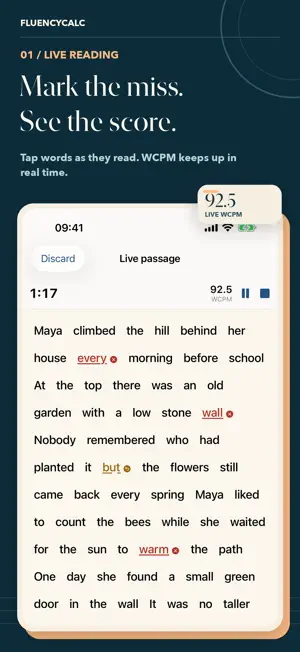
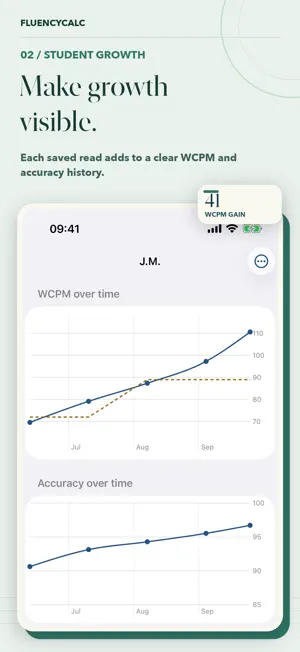
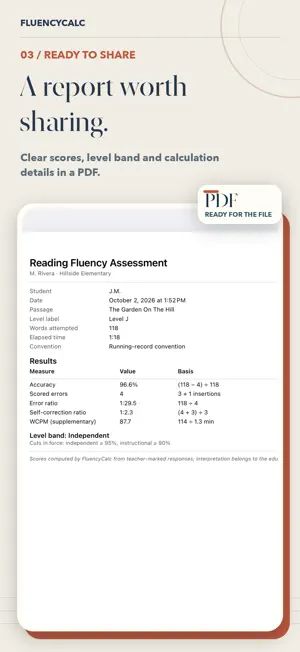
Time the read, tap the miscues, and the scores are done: WCPM, accuracy, error ratio, and self-correction ratio. Save each read to a student and watch the growth line climb, read after read. FluencyCalc is built for K–5 teachers, reading interventionists, tutors, and homeschool parents who run running records and oral reading fluency (ORF) checks every week. LIVE TAP-MARKING • Any passage you own becomes tappable words on screen • Start the timer and tap a word to mark an error or a self-correction • Long-press to set the last word read; the 60-second mode stops the clock and asks for the stopping word, just like the paper convention • Undo, an insertion counter, and a running WCPM preview • A short original practice passage is included, so you can run a live read in your first minute GROWTH FOR EVERY READER • Save each read under the student; initials are enough • WCPM and accuracy charts over time, with your benchmark line • A growth-chart card to share with families and colleagues REPORTS FOR THE FILE • A clean PDF report of any assessment, with your name and school in the header • CSV for one student, or a summary of the whole class • Your own passage library, ready for the next read QUICK CALCULATOR • Enter words, errors, self-corrections, and time: every score appears instantly • "How calculated" shows the arithmetic with your numbers in it TWO CONVENTIONS, CLEARLY LABELED • ORF/WCPM (curriculum-based measurement): insertions are not counted, self-corrections count as correct • Running record: insertions count as errors, self-corrections feed the SC ratio • Reading-level bands with cut-offs you set, printed on every report • Your own benchmark targets for comparison PRIVATE BY DESIGN • No accounts, no ads, no analytics, no network calls: everything stays on this device • Student fields are designed for initials or first names • Optional text scanning happens on-device; images are never stored • Optional app lock FluencyCalc computes the numbers; interpretation always belongs to the educator. It includes no published leveled passages and no norm tables: you bring your own materials and targets. Terms of Use (EULA): https://www.apple.com/legal/internet-services/itunes/dev/stdeula/
What’s new
Version 1.3.2 · Updated October 27, 2026
Fixed a few bugs and improved the performance.
App privacy
The developer, Neobile LLC, reported these privacy practices to Apple.
Data Not Linked to You
The following data, which may be collected but is not linked to your identity, may be used for the following purposes:
- Usage Data: Product Interaction
Used for: Analytics
Alternatives to FluencyCalc: Running Record
Looking for apps like FluencyCalc: Running Record? Here are 6 similar apps on the App Store. The highest rated is Spell Champ Texas: UIL A+ Prep (5.0/5), and 4 of the 6 are free to download.
-
 Spell Champ Texas: UIL A+ Prep
5.0
Spell Champ Texas: UIL A+ Prep
5.0
-
 InStrengths Insight™ Cards
-
 Syllable Count (Multi-User)
4.0
Syllable Count (Multi-User)
4.0
-
 toPhonetics IPA Keyboard
4.5
toPhonetics IPA Keyboard
4.5
-
 Reading Fluency - KidsRead
-
 South Glens Falls CSD NY
4.5
South Glens Falls CSD NY
4.5
| App | Rating | Price | Last updated | Compare |
|---|---|---|---|---|
| FluencyCalc: Running Record | 5.0 / 5 (4 ratings) | Free | October 27, 2026 | |
| Spell Champ Texas: UIL A+ Prep | 5.0 / 5 (1) | Free | Oct 26, 2026 | Compare |
| InStrengths Insight™ Cards | – | Free | Jan 12, 2026 | Compare |
| Syllable Count (Multi-User) | 4.0 / 5 (3) | 0.99 USD | Apr 20, 2024 | Compare |
| toPhonetics IPA Keyboard | 4.5 / 5 (4) | 3.99 USD | Jul 9, 2024 | Compare |
| Reading Fluency - KidsRead | – | Free | May 28, 2026 | Compare |
| South Glens Falls CSD NY | 4.5 / 5 (2) | Free | Dec 23, 2025 | Compare |