

SkyForge
Tyler Posey Weather iPhoneiPadiPod touchApple Watch
SkyForge is a free Weather app for iPhone and iPad by Tyler Posey. Rated 5.0/5 from 2 ratings. Requires iOS 15.1. Updated September 14, 2026.
- Rating
- 5.0
- 2 ratings
- Price
- Free
- on the App Store
- Size
- 46 MB
- Age 4+
- Updated
- Sep 14
- 2026 · v1.1.0
Screenshots
About SkyForge
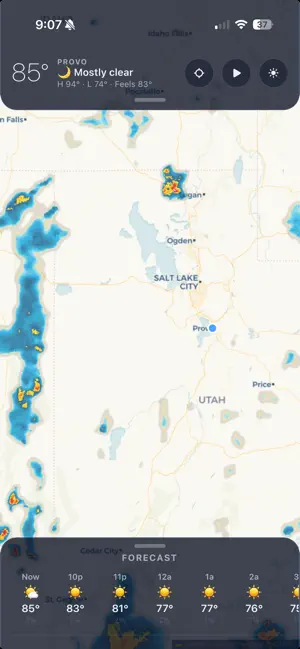
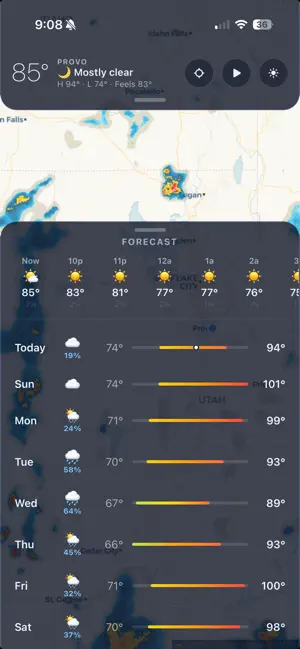
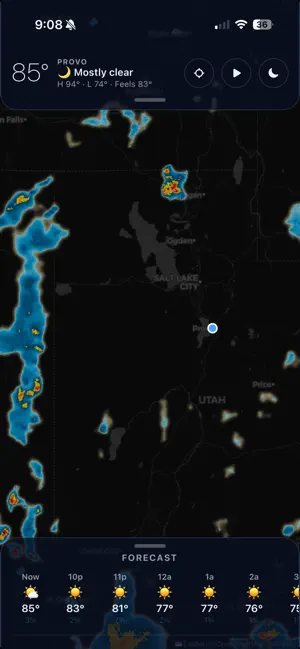
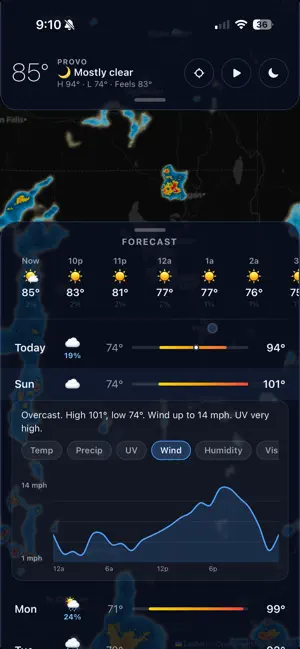
SkyForge makes the weather radar the whole app — a full-screen, buttery-smooth animated map is your home screen, and everything else floats cleanly on top. RADAR THAT MOVES • Precipitation radar with a silky continuous-dissolve animation • Radar HD — sharp, US-wide radar that steps in real 2-minute increments • Live wind streams — thousands of moving particles showing direction and speed • Temperature overlay with a color-graded legend • Zoom out far enough and the map becomes a spinning 3D globe A FORECAST WITH DEPTH • 10-day forecast — tap any day to expand a plain-English brief • Interactive charts for every day: temperature, precipitation, UV, wind, humidity, visibility, and pressure — drag to pinpoint any minute • Hourly forecast, current conditions, "feels like", and high/low • Air quality (US AQI), UV index, sunrise & sunset, dew point, and more BUILT FOR WHERE YOU ARE • Automatic radar and forecast for your current location • Save cities and reorder your list with a long-press • Dark and light map themes that remember your choice SEVERE WEATHER • Live watches, warnings, and advisories from the US National Weather Service, right at the top of your screen when they matter HONEST BY DESIGN • 100% free and ad-free • No account, no sign-up, no tracking • Your location is used only to fetch weather — never stored or sold Weather data from Open-Meteo, RainViewer, NOAA / National Weather Service, NASA GIBS, Iowa State Mesonet, and OpenWeatherMap.
What’s new
Version 1.1.0 · Updated September 14, 2026
APPLE WATCH SkyForge now has a watch app — Now, Radar, Hourly and 10-day — plus complications that show a warning triangle while a severe alert is active. SHARPER, FASTER RADAR • Over the US, radar now steps every 2 minutes instead of every 10. • Rebuilt tile pipeline: the radar stays smooth as you zoom in instead of breaking into blocks. • Fixed the "API key required" watermark that had started appearing across the map. NEW — FRONTS AND PRESSURE Warm, cold, stationary and occluded fronts with high and low centres, from the National Weather Service surface analysis. Switch it on in the pull-down panel. WIND Wind streams are denser and brighter, and now cover the whole map. AROUND THE APP • The map opens over your location at an angle, then settles overhead. • The locate button re-centres and restores north. • The map opens in light mode by default; your choice is remembered. • The large home-screen widget shows the map again. • Your location updates after you travel without restarting the app.
App privacy
The developer, Tyler Posey, reported these privacy practices to Apple.
Data Not Linked to You
The following data, which may be collected but is not linked to your identity, may be used for the following purposes:
- Location: Precise Location
Used for: App Functionality
Alternatives to SkyForge
Looking for apps like SkyForge? Here are 6 similar apps on the App Store. The highest rated is RawWeather (5.0/5), and all 6 are free to download.


| App | Rating | Price | Last updated | Compare |
|---|---|---|---|---|
| SkyForge | 5.0 / 5 (2 ratings) | Free | September 14, 2026 | |
| Downpour Weather | – | Free | Sep 8, 2026 | Compare |
| RawWeather | 5.0 / 5 (2) | Free | Jun 18, 2026 | Compare |
| Live Weather :Forecast & Radar | – | Free | Aug 27, 2026 | Compare |
| Sweather | – | Free | Aug 1, 2026 | Compare |
| ShadePilot | – | Free | Aug 19, 2026 | Compare |
| WeatherPermit | – | Free | Mar 31, 2026 | Compare |
Compare SkyForge with the top alternatives: ratings, updates, ASO score and keyword gaps →