

OMIRA: Pose Reference
Sarah Nkiruka Rossow Photo & Video iPhoneiPadiPod touch
OMIRA: Pose Reference is a free Photo & Video app for iPhone and iPad by Sarah Nkiruka Rossow. Requires iOS 16.0. Updated August 9, 2026.
- Price
- Free
- on the App Store
- Size
- 54 MB
- Age 4+
- Updated
- Aug 9
- 2026 · v1.0.1
Screenshots

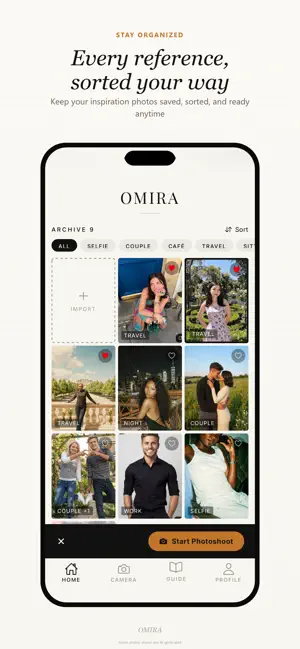

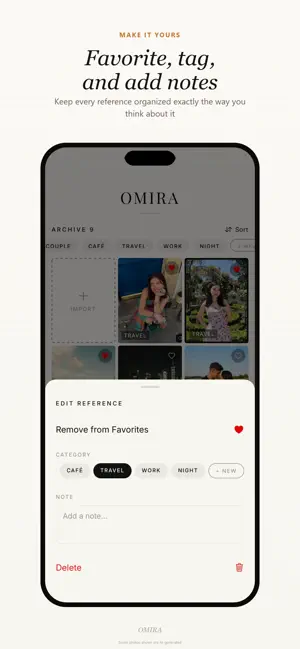
About OMIRA: Pose Reference
Ever seen the perfect photo and wondered how to recreate it? Or maybe you already know exactly how your shot should look — the pose, the angle, the framing. The problem is explaining that picture in your head to the person holding the camera. Something always gets lost in translation. OMIRA closes that gap. Import your reference image and see it placed live over your camera view. The person taking your picture sees exactly what you see: No more lengthy explanations, no more guesswork — just the perfect photo. HOW IT WORKS Import any photo from your gallery as your pose reference. Choose from multiple overlay modes to see exactly how to line up your shot: - Overlay — a soft, transparent version of your reference laid over the live camera - Cutout — see just the person from your reference, with the background removed - Face — an overlay with a face-shaped window so you can match head position precisely - Picture-in-picture (PIP) — a small floating window showing your reference photo beside the live view Adjust opacity, size, and position until everything lines up, then take the photo whenever you're ready. No timers, no scoring — just your camera and your reference, side by side. Whether you're a content creator recreating a viral pose, a couple restaging an old photo, or simply someone who wants their next photo to look intentional instead of accidental, OMIRA brings a simple reference tool to your everyday camera roll. - Try it instantly as a guest, no account required - Create a free account to keep your photo portfolio backed up and synced across your devices - Nothing you create is shared publicly OMIRA only asks for the camera and photo library access it actually needs to work, and explains exactly why. Full details are always available from Settings, right inside the app.
What’s new
Version 1.0.1 · Updated August 9, 2026
- New Guide with 3 use cases and step-by-step help - Steadier cloud backup for references & profile photos - Design and copy updates, bug fixes
App privacy
The developer, Sarah Nkiruka Rossow, reported these privacy practices to Apple.
Data Linked to You
The following data, which may be collected and linked to your identity, may be used for the following purposes:
- Contact Info: Email Address, Name
- User Content: Customer Support
- Identifiers: User ID
Used for: App Functionality
Data Not Linked to You
The following data, which may be collected but is not linked to your identity, may be used for the following purposes:
- User Content: Photos or Videos
Used for: App Functionality
Alternatives to OMIRA: Pose Reference
Looking for apps like OMIRA: Pose Reference? Here are 6 similar apps on the App Store. The highest rated is Aim: Pose Ideas & Camera (5.0/5), and all 6 are free to download.
-
 Aim: Pose Ideas & Camera
5.0
Aim: Pose Ideas & Camera
5.0
-
 InspoCam
-
 Momentary: Live and Video
4.2
Momentary: Live and Video
4.2
-
 CopyCam - Photo Overlay Camera
-
 Fotia: Pose Reference Camera
-
 Posey: Pose Reference Camera
| App | Rating | Price | Last updated | Compare |
|---|---|---|---|---|
| OMIRA: Pose Reference | – | Free | August 9, 2026 | |
| Aim: Pose Ideas & Camera | 5.0 / 5 (1) | Free | Jul 24, 2026 | Compare |
| InspoCam | – | Free | Mar 20, 2026 | Compare |
| Momentary: Live and Video | 4.2 / 5 (5) | Free | Mar 6, 2026 | Compare |
| CopyCam - Photo Overlay Camera | – | Free | Oct 3, 2026 | Compare |
| Fotia: Pose Reference Camera | – | Free | May 5, 2026 | Compare |
| Posey: Pose Reference Camera | – | Free | Jul 20, 2026 | Compare |