

Socketta: Ping & SSL Checker
REVOT, K.K. Utilities iPhoneiPadiPod touch
Socketta: Ping & SSL Checker is a free Utilities app for iPhone and iPad by REVOT, K.K. Requires iOS 17.0. Updated October 12, 2026.
- Price
- Free
- on the App Store
- Size
- 12 MB
- Age 4+
- Updated
- Oct 12
- 2026 · v1.9.1
Screenshots


About Socketta: Ping & SSL Checker
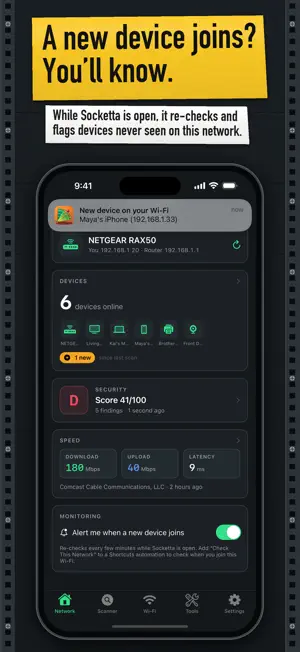
See who's on your Wi‑Fi, check your network's security and keep a speed history — plus a full network bench. Everything is worked out on your device. No ads, no account, no tracking. WHO'S ON YOUR WI‑FI • Finds the devices on your network and names them from what they announce (Bonjour, UPnP, NetBIOS, web pages) and from your router's DNS: name, maker, model and type. A device that announces nothing is shown by its address • Changes since the last scan: devices that appeared and devices no longer seen SECURITY CHECK • A read-only check of your router and devices: reachable remote-login, file-sharing, screen-sharing and camera services, ports forwarded from the internet (UPnP), an admin page without HTTPS, DNS that answers for names that don't exist, and certificate validation • A score and grade, what each finding means, and what was and wasn't checked. It checks network settings — it is not a virus scan, and it never logs in or changes anything MEASURE • Speed test (Cloudflare): download, upload, latency, jitter and loss, kept with your provider's name, looked up on your device • TCP ping to any host and port (not ICMP), batch ping, a path check showing the destination's network operator, quality score and network diagnosis SCAN & DEVELOPER BENCH • LAN scanner (every host that answers a TCP probe), topology map, port scanner, DNS lookup, mDNS and UPnP browsers, scan diff, SSL viewer, WHOIS, HTTP headers, subnet calculator • HTTP/REST client with cURL/Postman import and code generation, WebSocket, MQTT, UDP/TCP, precision send, BLE central & peripheral, macros, profiles, schedules (while Socketta is open), export HONEST NOTES • iOS doesn't let apps read MAC addresses; devices are recognized by name, UPnP identity or address. Devices that answer nothing (phones asleep, firewalled PCs) can be missed • Socketta doesn't have Apple's multicast permission, so the UPnP browser asks each address directly and Wake-on-LAN sends to the device's IP address; some devices can't be found or woken this way • Ping is TCP: a closed port counts as loss. Local-network features need the Local Network permission. The speed test and the certificate check contact Cloudflare, and the DNS check asks your network's own DNS about two made-up names; nothing is sent to us FREE & PRO Free: unlimited device identification, changes since the last scan, 20 remembered devices on one network, the security score with every finding explained, speed test with the last 10 results, and the scanning and network tools; advanced tools have trial uses and a daily send allowance. Pro adds: alerts when a device never seen on that network before joins (while Socketta is open, or from the "Check This Network" Shortcuts action), a trusted list, device names and history, unlimited devices on every network, the device, port and step-by-step fix for each finding, re-check history and a report, the full speed history with a time-of-day chart and CSV export, and the advanced tools without limits. Weekly, monthly or annual subscription (free trial for new subscribers: 7 days on annual, 3 days on monthly and weekly) or a one-time lifetime purchase, charged to your Apple ID. Subscriptions renew automatically unless cancelled at least 24 hours before the period ends; manage them in Settings > Apple ID > Subscriptions. Terms of Use (EULA): https://www.apple.com/legal/internet-services/itunes/dev/stdeula/ Privacy Policy: https://revot.jp/apps/netmaster/privacy.html Provider data: IP to ASN Lite by DB-IP.com (CC BY 4.0).
What’s new
Version 1.9.1 · Updated October 12, 2026
• Security check: corrected the note at the bottom of the screen. Only the certificate check contacts Cloudflare; the DNS check asks your network's own DNS server. • Counts of one now use the singular, for example “1 finding” and “1 device online”.
App privacy
The developer, REVOT, K.K., reported these privacy practices to Apple.
Data Not Collected
The developer does not collect any data from this app.
Alternatives to Socketta: Ping & SSL Checker
Looking for apps like Socketta: Ping & SSL Checker? Here are 6 similar apps on the App Store. The highest rated is DomainLens Pro (5.0/5), and all 6 are free to download.
-
 Domain Tracker & Uptime
-
 DomainLens Pro
5.0
DomainLens Pro
5.0
-
 PocketTerm SSH
-
 SubnetBuddy
-
 NetScanPro: Network Scanner
5.0
NetScanPro: Network Scanner
5.0
-
 ONWATT
| App | Rating | Price | Last updated | Compare |
|---|---|---|---|---|
| Socketta: Ping & SSL Checker | – | Free | October 12, 2026 | |
| Domain Tracker & Uptime | – | Free | Jul 26, 2026 | Compare |
| DomainLens Pro | 5.0 / 5 (1) | Free | Sep 30, 2026 | Compare |
| PocketTerm SSH | – | Free | Aug 6, 2026 | Compare |
| SubnetBuddy | – | Free | Oct 23, 2026 | Compare |
| NetScanPro: Network Scanner | 5.0 / 5 (3) | Free | Oct 21, 2026 | Compare |
| ONWATT | – | Free | Jun 29, 2026 | Compare |