

FileFit: Photo & PDF
Gokhan Oksak Utilities iPhoneiPadiPod touch
FileFit: Photo & PDF is a free Utilities app for iPhone and iPad by Gokhan Oksak. Requires iOS 15.0. Updated September 22, 2026.
- Price
- Free
- on the App Store
- Size
- 29 MB
- Age 4+
- Updated
- Sep 22
- 2026 · v1.2.0
Screenshots


About FileFit: Photo & PDF
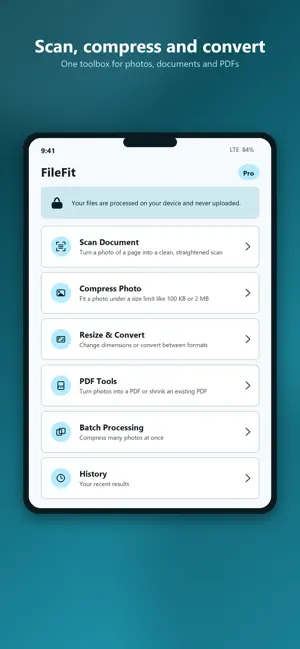
A website says "maximum 200 KB". A form rejects your PDF because it is over 2 MB. An application portal only accepts JPG. You have a photo of a document and it looks like a photo, not a scan. FileFit fixes exactly this. Pick your file, pick the size limit — FileFit finds the highest possible quality that fits under it. No guessing with quality sliders, no uploading your documents to someone else's server. SCAN DOCUMENTS - Turn a phone photo of any document into a clean scan - Shadows and uneven lighting removed, paper corrected to true white - Page edges found and the tilt straightened automatically - Colour, greyscale and black & white modes — ink stays readable - Works on photos you already took, not just fresh camera shots - Save as PDF or as an image COMPRESS PHOTOS TO A TARGET SIZE - Ready-made targets: 20 KB, 50 KB, 100 KB, 200 KB, 300 KB, 500 KB, 1 MB, 2 MB - Smart search finds the best quality under your limit - Honest results: you see the exact output size before saving RESIZE & CONVERT - Resize by pixels or percentage, aspect ratio preserved - Convert HEIC, JPG and PNG - Transparent PNG areas are flattened to white when converting PDF TOOLS - Combine photos into a single PDF (A4, Letter or photo size) - Shrink oversized PDFs below form limits like 1 MB or 5 MB PRIVATE BY DESIGN - Files are processed on your device and never uploaded - Scanning runs on your device too — no server sees your documents - Works completely offline — try it in airplane mode - Location and camera metadata (EXIF) removed by default - No account, no sign-up, no file tracking MORE - Clean, fast interface with dark mode - Processing history you control — disable or clear it anytime - Batch compression with FileFit Pro Perfect for passport, visa and exam applications, job portals, school uploads, email attachments and marketplace listings. FileFit Pro (optional) unlocks unlimited operations, multi-page scanning, batch processing, custom target sizes and removes ads. Subscriptions renew automatically unless cancelled in your App Store settings at least 24 hours before the period ends. The free version stays genuinely useful every day. Privacy policy: https://nodvera.io/filefit/privacy.html Terms of use: https://www.apple.com/legal/internet-services/itunes/dev/stdeula/
What’s new
Version 1.2.0 · Updated September 22, 2026
• Merge multiple PDFs into one (Pro) • Split a PDF — pick pages, reorder or delete them, and export a new PDF (Pro); text stays selectable since pages are copied, not re-rendered • Send photos and PDFs to FileFit from other apps, or use "Open in FileFit" in Files • Stability fixes
App privacy
The developer, Gokhan Oksak, reported these privacy practices to Apple.
Data Used to Track You
The following data may be used to track you across apps and websites owned by other companies:
- Identifiers: Device ID
- Usage Data: Advertising Data
Data Not Linked to You
The following data, which may be collected but is not linked to your identity, may be used for the following purposes:
- Identifiers: Device ID
- Usage Data: Advertising Data
Used for: Third-Party Advertising
Alternatives to FileFit: Photo & PDF
Looking for apps like FileFit: Photo & PDF? Here are 6 similar apps on the App Store. The highest rated is Photo Video Compressor KB (5.0/5), and all 6 are free to download.
-
 Photo Video Compressor KB
5.0
Photo Video Compressor KB
5.0
-
 Image to PDF Converter: Pagzi
-
 Color Timer - Visual Countdown
-
 Video Compressor: Reduce sizes
5.0
Video Compressor: Reduce sizes
5.0
-
 Color Screen Light - Tint
-
 Kbus Propietario
| App | Rating | Price | Last updated | Compare |
|---|---|---|---|---|
| FileFit: Photo & PDF | – | Free | September 22, 2026 | |
| Photo Video Compressor KB | 5.0 / 5 (1) | Free | Aug 11, 2026 | Compare |
| Image to PDF Converter: Pagzi | – | Free | Jun 26, 2026 | Compare |
| Color Timer - Visual Countdown | – | Free | Oct 10, 2026 | Compare |
| Video Compressor: Reduce sizes | 5.0 / 5 (2) | Free | Aug 14, 2026 | Compare |
| Color Screen Light - Tint | – | Free | Oct 12, 2026 | Compare |
| Kbus Propietario | – | Free | Aug 27, 2026 | Compare |