

My Reaction: Video Cutout
Lucas Messias Valerio Photo & Video iPhoneiPadiPod touch
My Reaction: Video Cutout is a free Photo & Video app for iPhone and iPad by Lucas Messias Valerio. Requires iOS 26.0. Updated October 11, 2026.
- Price
- Free
- on the App Store
- Size
- 13 MB
- Age 4+
- Updated
- Oct 11
- 2026 · v1.3.2
Screenshots
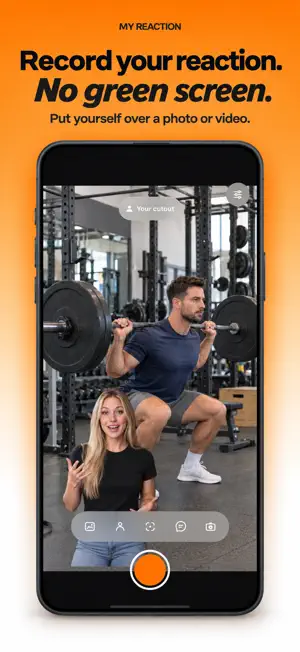

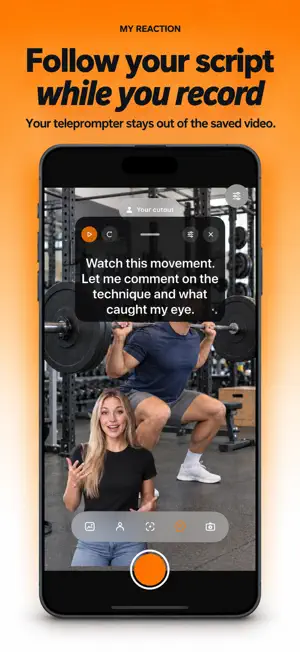

About My Reaction: Video Cutout
Create reaction videos on your iPhone or iPad without a green screen or desktop editor. CHOOSE YOUR REACTION STYLE • Person Cutout: remove your background live and place yourself over an imported photo or video. Before recording, switch between positioning your cutout and reframing the media. • Split Screen: show your full camera view and imported media together, separated by an adjustable soft gradient. Put your camera above or below the media, adjust or swap the halves, reframe the media, and move your camera vertically to keep your face in view. • Picture in Picture: keep media full-screen while your camera appears in a rounded overlay. Move it between four corners and choose three sizes or 1:1, 2:3, and 4:5 aspect ratios. Controls stay clear of the top toolbar and bottom menu as you move the camera. • Camera Spotlight: keep your camera full-screen while media appears above it in the source aspect ratio. Drag the media to position it and pinch to choose its size. FROM MEDIA TO FINISHED REACTION • Import a photo or video in any aspect ratio from Photos • Start with the full frame visible, use Fill when needed, then drag or pinch to reframe in compatible styles • Keep separate media framing in each compatible reaction style • Use the front or back camera and available lenses • Scrub the media timeline, pause playback, and adjust volume, including while recording; videos start at 20% to favor voice clarity • Record up to 10 minutes with digitally mixed stereo media audio and your microphone • Read from the built-in teleprompter; it stays out of the exported video • Review and save at maximum quality to Photos PRIVATE BY DESIGN Recording, person segmentation, compositing, and export happen on your device. Your media is not uploaded. No account is required, and the app has no third-party analytics. SUBSCRIPTION Minha Reação Premium unlocks unlimited recordings, maximum-quality export, available camera lenses, and ongoing updates. Monthly and annual plans include a 7-day free trial for eligible new subscribers. Both plans renew automatically unless canceled at least 24 hours before renewal. Prices are shown before purchase. Manage or cancel in Settings > Apple Account > Subscriptions. Requires an iPhone or iPad with iOS/iPadOS 26 or later and permission to use Camera, Microphone, and Photos. Privacy Policy: https://soumessias.com/minha-reacao/privacy Terms of Use: https://soumessias.com/minha-reacao/terms Terms of Use (EULA): https://www.apple.com/legal/internet-services/itunes/dev/stdeula/
What’s new
Version 1.3.2 · Updated October 11, 2026
• Bug fixes and improvements to audio capture. • Media volume now follows the level you choose, including lower settings. For clearer recordings without headphones or an external microphone, lower your phone’s volume while recording. This helps the microphone pick up less sound from the speaker so your voice comes through more clearly.
App privacy
The developer, Lucas Messias Valerio, reported these privacy practices to Apple.
Data Not Linked to You
The following data, which may be collected but is not linked to your identity, may be used for the following purposes:
- Purchases: Purchase History
Used for: App Functionality
Alternatives to My Reaction: Video Cutout
Looking for apps like My Reaction: Video Cutout? Here are 6 similar apps on the App Store. The highest rated is Ody: AI Video Editing Agent (5.0/5), and all 6 are free to download.
-
 Reacts: Reaction Video Maker
4.8
Reacts: Reaction Video Maker
4.8
-
 EZReact
3.3
EZReact
3.3
-
 Ody: AI Video Editing Agent
5.0
Ody: AI Video Editing Agent
5.0
-
 React - make reaction content
4.4
React - make reaction content
4.4
-
 ReactShow: Reaction Video
-
 Dual Camera: DuoTake
5.0
Dual Camera: DuoTake
5.0
| App | Rating | Price | Last updated | Compare |
|---|---|---|---|---|
| My Reaction: Video Cutout | – | Free | October 11, 2026 | |
| Reacts: Reaction Video Maker | 4.8 / 5 (17) | Free | Oct 23, 2026 | Compare |
| EZReact | 3.3 / 5 (3) | Free | Jun 5, 2026 | Compare |
| Ody: AI Video Editing Agent | 5.0 / 5 (33) | Free | Oct 22, 2026 | Compare |
| React - make reaction content | 4.4 / 5 (7) | Free | Apr 15, 2025 | Compare |
| ReactShow: Reaction Video | – | Free | Oct 15, 2026 | Compare |
| Dual Camera: DuoTake | 5.0 / 5 (3) | Free | Oct 15, 2026 | Compare |