

Simple Timer USA
Tom Molinaro Productivity iPhoneiPadiPod touch
Simple Timer USA is a free Productivity app for iPhone and iPad by Tom Molinaro. Rated 5.0/5 from 1 ratings. Requires iOS 26.5. Updated October 23, 2026.
- Rating
- 5.0
- 1 ratings
- Price
- Free
- on the App Store
- Size
- 5 MB
- Age 4+
- Updated
- Oct 23
- 2026 · v1.6.1
Screenshots
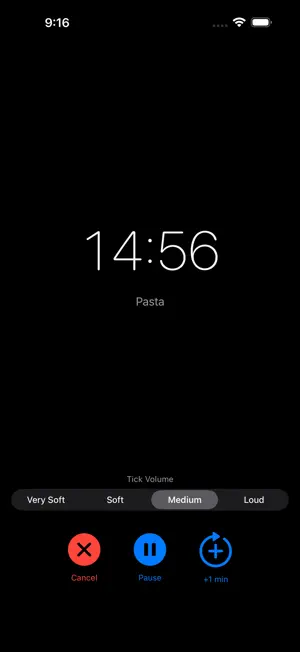


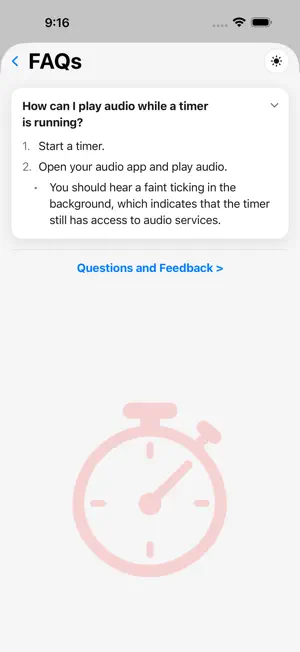
About Simple Timer USA
Simple Timer cuts out the friction between "I need a timer" and "the timer is running." Tap a preset or dial in a custom duration — hours, minutes, seconds — and go. No menus, no fuss. FEATURES • Quick One-Tap Start — tap a saved preset or dial in a custom duration and go • Reusable Presets — save your go-to timers by unique name and start them again with one tap; free tier saves 3, or go unlimited for $2.99/year • Past Timers — a history of every timer you've finished, grouped by month and year; tap one to run it again, or save it as a preset (included with the $2.99/year subscription) • Voice or Typed Labels — name any timer by typing or just speaking it, with a Voice Announcements toggle to choose whether it's spoken aloud at completion • Alerts You'll Actually Hear — a chime plus your label spoken aloud, playing right over silent mode, backed up independently by both a scheduled notification and a system-level alarm • Keeps Your Music Playing — audio only briefly ducks for the few seconds your alert speaks, then picks right back up • One-Tap Snooze — right from the Lock Screen or the completion screen • Lock Screen & Dynamic Island — watch your countdown without unlocking your phone • AirPlay & Bluetooth Output — switch your timer's audio to your speaker, AirPlay, or a Bluetooth device right from the app • Live Volume & Audio Status — see your current volume right on the running timer, with a gentle nudge when it's low and a heads-up if your alerts might route to a Bluetooth device you won't hear • Keep Screen Awake — a Lock Screen button on the running timer (on by default, adjustable in Settings) keeps the display on while you watch • Built-In FAQ — quick answers to common questions from the "?" on any screen, with a direct link to send feedback, or to leave an App Store review • Light, Dark, and Retro 16-bit Themes • No Account, No Data Collection — everything stays on your device Simple Timer doesn't collect your data. Everything stays on your device — no account, no sign-up, no tracking. Terms of Use (EULA): https://www.apple.com/legal/internet-services/itunes/dev/stdeula/ Privacy Policy: https://gist.github.com/tm4747/a6de81dd1764762b20c81358ee95f97a
What’s new
Version 1.6.1 · Updated October 23, 2026
- Refreshed app icon - Past Timers, new in 1.6, keeps a history of every timer you've finished — tap one to run it again or save it as a preset - Unlimited Presets and Past Timers are included with Premium, now $2.99/year - Small improvements and fixes
App privacy
The developer, Tom Molinaro, reported these privacy practices to Apple.
Data Not Collected
The developer does not collect any data from this app.
Alternatives to Simple Timer USA
Looking for apps like Simple Timer USA? Here are 6 similar apps on the App Store.
-
 Epic Habits
-
 Stopwatch Simpleton
-
 Vidalarm
-
 Pomica - Pomodoro Focus Timer
-
 Wane Timer
-
 Digital Tally Counter
| App | Rating | Price | Last updated | Compare |
|---|---|---|---|---|
| Simple Timer USA | 5.0 / 5 (1 rating) | Free | October 23, 2026 | |
| Epic Habits | – | Free | Aug 29, 2025 | Compare |
| Stopwatch Simpleton | – | Free | May 21, 2026 | Compare |
| Vidalarm | – | Free | Mar 31, 2026 | Compare |
| Pomica - Pomodoro Focus Timer | – | Free | Sep 16, 2026 | Compare |
| Wane Timer | – | Free | Jun 25, 2026 | Compare |
| Digital Tally Counter | – | Free | Apr 4, 2026 | Compare |
Compare Simple Timer USA with the top alternatives: ratings, updates, ASO score and keyword gaps →