

Blink Budget: Spending Log
HYUK MIN NAM Finance iPhoneiPadiPod touch
Blink Budget: Spending Log is a free Finance app for iPhone and iPad by HYUK MIN NAM. Requires iOS 15.0. Updated September 11, 2026.
- Price
- Free
- on the App Store
- Size
- 57 MB
- Age 4+
- Updated
- Sep 11
- 2026 · v1.5.0
Screenshots

About Blink Budget: Spending Log
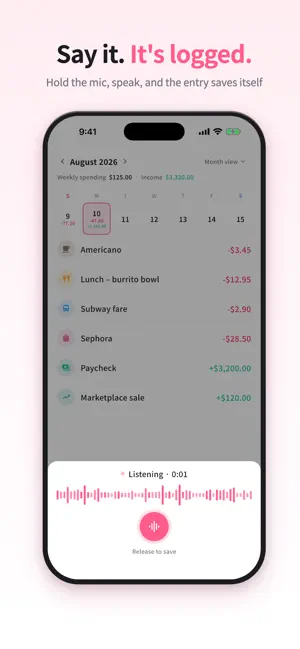
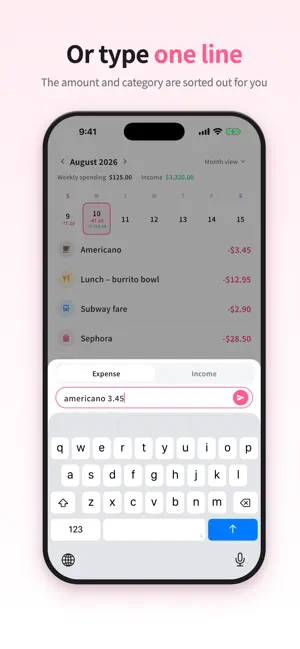
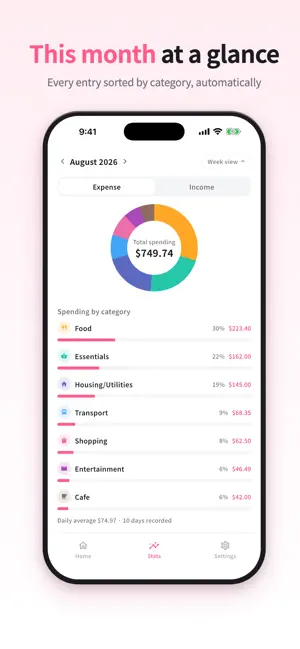
Blink Budget turns one sentence into a finished record. Type “lunch 9 dollars” or “salary 3000” and Blink Budget reads the amount, the item and the category, then saves it as an expense or income. When your hands are busy, hold the microphone and just say it. If full finance apps always felt like too much work, try a one-second-a-day habit instead. No ads Blink Budget has no ads. Nothing gets between you and your records. Features • Log expenses and income in plain language • Voice entry — hold the mic, speak, release to save • Enter several transactions at once • Weekly and monthly calendar with totals per period • Weekly and monthly category stats to see where money goes • Edit, delete and undo transactions • Turn default categories on or off and reorder them • Choose the currency you want • Sign in with Apple or Google for automatic server backup — your records come back after a reinstall or a new phone Premium • Monthly budgets and category limits to see what you can still spend • Recurring expenses with due-date reminders • Short reports comparing weekly and monthly spending • Unlimited voice entries (10 free entries to try) • Add, edit and delete your own categories • Monthly or annual auto-renewing subscription • The annual plan's free trial is offered to eligible users only Made for you if • You have tried expense trackers before and quit because logging felt like a chore • You want something as light as a pocket money notebook • You want budgeting to become a habit, not a project Transactions are stored on your device and backed up automatically once you sign in. Text you enter is sent to our server for category analysis. Voice is converted to text by iOS speech recognition and then handled the same way; the audio itself is never stored. See our Privacy Policy for details. Terms of Use: https://www.apple.com/legal/internet-services/itunes/dev/stdeula/
What’s new
Version 1.5.0 · Updated September 11, 2026
• See what is left to spend with monthly budgets and category limits. • Plan recurring expenses with due-date reminders. • Compare weekly and monthly spending with short reports. • Explore budgets and reports with sample data before subscribing.
App privacy
The developer, HYUK MIN NAM, reported these privacy practices to Apple.
Data Linked to You
The following data, which may be collected and linked to your identity, may be used for the following purposes:
- Usage Data: Advertising Data, Product Interaction
- Identifiers: Device ID, User ID
- Purchases: Purchase History
- Financial Info: Other Financial Info
- Contact Info: Email Address, Name
- User Content: Other User Content
Used for: Developer’s Advertising or Marketing, Analytics, App Functionality
Data Not Linked to You
The following data, which may be collected but is not linked to your identity, may be used for the following purposes:
- Purchases: Purchase History
- Identifiers: User ID
Used for: Analytics
Alternatives to Blink Budget: Spending Log
Looking for apps like Blink Budget: Spending Log? Here are 6 similar apps on the App Store.
-
 家計簿アプリ マネトナリ|かけいぼ 無料
-
 SnapSpend: AI Expense Track
-
 あといくらメーター
-
 EasyMoney
-
 Expense Tracker - Daily Log
-
 모아모아 - 축의금, 조의금 기록 앱
| App | Rating | Price | Last updated | Compare |
|---|---|---|---|---|
| Blink Budget: Spending Log | – | Free | September 11, 2026 | |
| 家計簿アプリ マネトナリ|かけいぼ 無料 | – | Free | Oct 14, 2026 | Compare |
| SnapSpend: AI Expense Track | – | Free | Aug 24, 2026 | Compare |
| あといくらメーター | – | Free | Aug 2, 2026 | Compare |
| EasyMoney | – | Free | Aug 30, 2026 | Compare |
| Expense Tracker - Daily Log | – | Free | Jul 16, 2026 | Compare |
| 모아모아 - 축의금, 조의금 기록 앱 | – | Free | Jun 15, 2026 | Compare |