

OneBoat - all in one
海洋 杨 Utilities iPhoneiPadiPod touch
OneBoat - all in one is a free Utilities app for iPhone and iPad by 海洋 杨. Requires iOS 16.0. Updated August 30, 2026.
- Price
- Free
- on the App Store
- Size
- 5 MB
- Age 4+
- Updated
- Aug 30
- 2026 · v1.0.4
Screenshots


About OneBoat - all in one
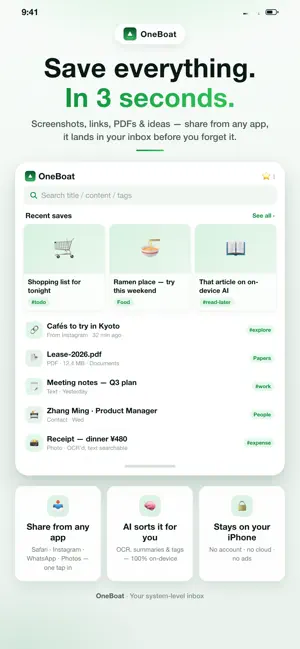
Apple Notes gets messy and Reminders was never built for saving — OneBoat is your local-first, private inbox for everything you find. Share from any app and it's saved in seconds; on-device AI auto-sorts, summarizes, and tags it — with no account and nothing uploaded to our servers. Slurp it in from anywhere, one tap: • Found a great article? Hit Share → OneBoat. Title + link, saved before you forget. • A photo you absolutely must keep? Share it over — image and original file archived together, like a tiny museum. • A 2am brain-wave? Paste your clipboard, or just type it in. • Important file landed? PDF / Word / Excel → OneBoat files it away and even sorts it for you. Tame the bookmark chaos: • Auto-spots where stuff came from (Safari, WeChat, Photos…) so nothing wanders off. • Tags that actually make sense: tag one thing ten ways, filter in a blink. • Full-text search: titles, bodies, summaries, tags — all fair game. • Star the keepers. Hide the rest. • Folders your way: Tech, Life, Work, Design… or whatever your brain demands. AI that actually tidies up (totally optional, fully on-device): • Runs on Apple's on-device Foundation Model. Nothing leaves your phone. Yes, really. • Auto-sorts each item into a category (To Read, To Visit…), writes a summary, and dreams up tags — so you skip the busywork. Nudges that aren't noise: • A calm daily digest at 9am: "You've got 3 unread long-reads, 2 spots to check." Tap to jump right in. • Location reminders: get pinged near a saved place, when it's actually useful. • All on-device. No spam, no "we missed you" guilt-trips. Widgets & Siri, because taps get old: • One-tap save straight from your home screen. • Wire OneBoat into your shortcuts and let the robots do it. Yours, and only yours: • Your data is local-first and private. • iCloud keeps it in sync across your own Apple devices — end-to-end, with no company server in between. • Zero ads. Zero stalkers. Zero nonsense. Stop losing the good stuff. Let OneBoat catch it for you. One-time purchase and subscription support plans available — choose what works for you. No ads, no tracking, your data stays yours. Terms of Service (EULA): https://www.apple.com/legal/internet-services/itunes/dev/stdeula/ Privacy Policy: https://lanceryoung.github.io/policy/oneboat/privacy.html
What’s new
Version 1.0.4 · Updated August 30, 2026
What's New in 1.0.4: • Control Center & Action Button: save your clipboard to OneBoat with a single tap — no need to open the app • Lock Screen widgets: save clipboard and jump into the app right from your Lock Screen • Share cards: turn any item into a beautiful card and share it anywhere • First-save guide & rating prompt: a quick tip after your first save, plus a gentle nudge to rate • Fix: favorited / collected items now appear correctly in Spotlight search • Fix: various stability improvements
App privacy
The developer, 海洋 杨, reported these privacy practices to Apple.
Data Not Collected
The developer does not collect any data from this app.
Alternatives to OneBoat - all in one
Looking for apps like OneBoat - all in one? Here are 6 similar apps on the App Store.


| App | Rating | Price | Last updated | Compare |
|---|---|---|---|---|
| OneBoat - all in one | – | Free | August 30, 2026 | |
| FileGuru - Scanner and manager | – | Free | Sep 1, 2026 | Compare |
| 萌派健康 | – | Free | Aug 31, 2026 | Compare |
| PlantGuard - Smart Watering | – | Free | Mar 3, 2025 | Compare |
| Swipe Photo Clean | – | 0.99 USD | Jun 11, 2026 | Compare |
| iWake+ | – | Free | Sep 30, 2025 | Compare |
| 咔咔删除-相册整理 | – | Free | Aug 11, 2026 | Compare |