

Mimu: Sax Practice & Record
tomonori shirasaki Music iPhoneiPadiPod touch
Mimu: Sax Practice & Record is a free Music app for iPhone and iPad by tomonori shirasaki. Requires iOS 17.0. Updated October 20, 2026.
- Price
- Free
- on the App Store
- Size
- 5 MB
- Age 4+
- Updated
- Oct 20
- 2026 · v1.2.1
Screenshots


About Mimu: Sax Practice & Record
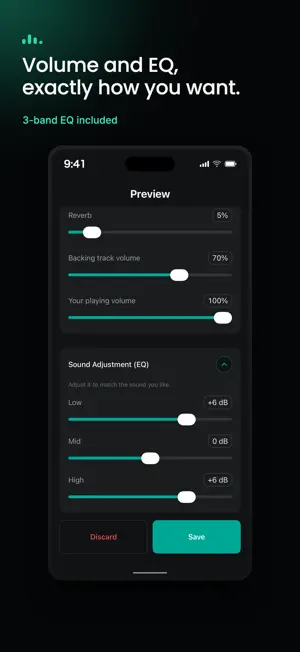
Mimu is a recording and playback app built for practicing saxophone and other wind instruments — "Record, listen, repeat." Recording your own playing and listening back is the fastest way to improve. Mimu captures your practice sessions in high quality, in sync with a backing track or metronome, and lets you review them with the timing as accurate as possible. Key Features - Record along with a backing track Import MP3 files, songs from your Apple Music library, or audio-only MP4 files as a backing track, and record your performance right alongside it. * Apple Music streaming-only tracks and DRM-protected files can't be imported. - Practice with a metronome Record your practice with a metronome even without a backing track. Fine-tune the BPM in increments of 1. - Tuner with transposition Open the tuner from the "Tuner" button on the recording screen to tune up before you practice. Set a transposition (for tenor sax, alto sax and more) to see note names as written in your sheet music. - Sound and timing adjustments in preview Add natural reverb when reviewing your recording. If the timing is off, you can manually correct it right from the review screen. - Automatic gain correction Acoustic instruments often record too quietly — Mimu automatically adjusts the volume to a comfortable listening level. - Practice mode & loop playback Loop just the phrase you're working on and repeat it as many times as you need. - Favorites & rename Name and organize your recordings, and star your favorites so you can find them anytime. - Mimu Pro (in-app purchase) Unlock unlimited saved recordings and a 3-band EQ to fine-tune the low, mid, and high frequencies. Mimu is a practice partner for anyone who loves playing an instrument and wants to get better.
What’s new
Version 1.2.1 · Updated October 20, 2026
- The tuner now opens only when you need it, from the "Tuner" button at the top right of the recording screen. You can also change the transposition right below the tuner - The speaker volume no longer drops while you practice with a backing track or metronome (the recording-optimized setting is used only while recording) - When you start recording with a backing track or metronome without earphones connected, Mimu now recommends using earphones (with a "Don't show this again" option) - The zoomed waveform in the backing library and recording list is now an easier-to-read size, with the same playback controls as the preview screen (5-second skip back/forward and back to the start)
App privacy
The developer, tomonori shirasaki, reported these privacy practices to Apple.
Data Not Linked to You
The following data, which may be collected but is not linked to your identity, may be used for the following purposes:
- Usage Data: Product Interaction
- Diagnostics: Crash Data
Used for: Analytics, App Functionality
Alternatives to Mimu: Sax Practice & Record
Looking for apps like Mimu: Sax Practice & Record? Here are 6 similar apps on the App Store. The highest rated is Simple Saxophone (4.8/5), and 4 of the 6 are free to download.
-
 音感サプリAs
-
 Metronome: Time Signature, BPM
-
 PocketJam: Music Sketchpad
-
 Jazz Licks
3.7
-
 Simple Saxophone
4.8
-
 WaveTuner
| App | Rating | Price | Last updated | Compare |
|---|---|---|---|---|
| Mimu: Sax Practice & Record | – | Free | October 20, 2026 | |
| 音感サプリAs | – | 3.99 USD | Aug 29, 2026 | Compare |
| Metronome: Time Signature, BPM | – | Free | Oct 25, 2026 | Compare |
| PocketJam: Music Sketchpad | – | Free | Sep 13, 2026 | Compare |
| Jazz Licks | 3.7 / 5 (6) | 12.99 USD | May 17, 2025 | Compare |
| Simple Saxophone | 4.8 / 5 (8) | Free | Jan 15, 2026 | Compare |
| WaveTuner | – | Free | Jan 12, 2025 | Compare |