

MotherBot - Customer Chat CRM
Ankit Agrawal Business iPhoneiPadiPod touch
MotherBot - Customer Chat CRM is a free Business app for iPhone and iPad by Ankit Agrawal. Requires iOS 16.4. Updated October 27, 2026.
- Price
- Free
- on the App Store
- Size
- 84 MB
- Age 4+
- Updated
- Oct 27
- 2026 · v2.0.4
Screenshots

About MotherBot - Customer Chat CRM
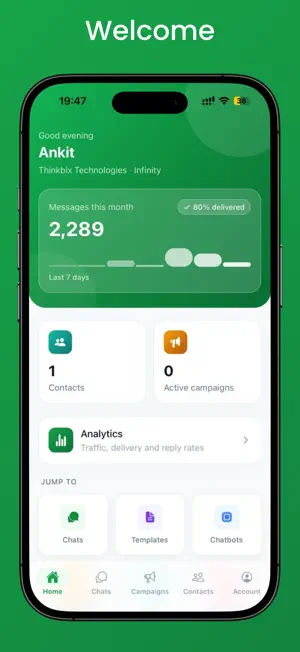
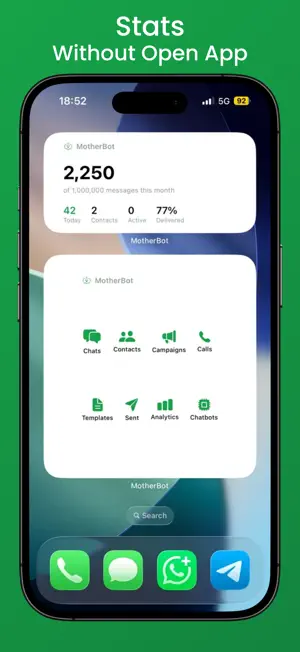
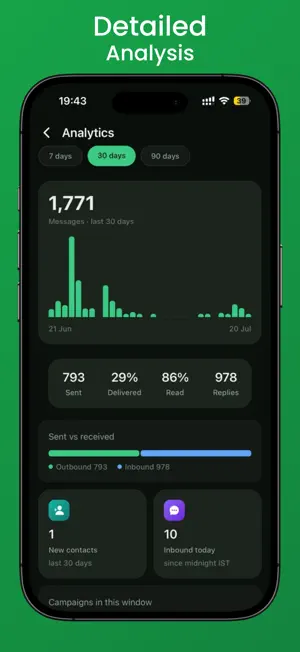
MotherBot puts your entire business messaging operation in your pocket. Built for teams that talk to customers on the WhatsApp Business Platform, MotherBot brings your live chat inbox, broadcast campaigns, automated chatbots and contact CRM into one fast, native app. Reply to a customer while you're in a cab, launch a campaign from the shop floor, and watch the numbers land in real time. LIVE CHAT INBOX Every customer conversation in one shared team inbox, with real-time delivery and instant push notifications. Send text, images, documents, voice notes and location. Assign chats to teammates, leave internal notes, and fire off saved quick replies. A live countdown shows exactly how long your 24-hour reply window has left, so you never miss one. CONTACTS & CRM A full customer database with custom fields and tags. Import contacts from a file or straight from your phone's address book. Every contact carries its complete conversation and order history, so anyone on your team can pick up where the last person left off. BROADCAST CAMPAIGNS Create and launch template campaigns from your phone. Schedule sends for the right moment, then track delivered, read, replied and failed as the results come in. Pause, resume or review any running campaign without opening a laptop. CHATBOTS & AUTOMATION Switch your automated flows on or off from anywhere, watch bot conversations happen live, and step in to take over from the bot with a single tap. MESSAGE TEMPLATES Create, edit and submit message templates for approval, check their status at a glance, and preview exactly what the customer will receive. ANALYTICS Messages sent, delivered and read. Campaign performance, contact growth, team activity and response times. Add a Home Screen widget to keep your key numbers one glance away, and follow running campaigns from the Lock Screen with Live Activities. TEAM MANAGEMENT Invite staff, set role-based permissions, and see who's handling which conversation. Reach our support team from inside the app whenever you need us. BUILT FOR BUSINESS • Secure sign-in with two-factor authentication • Face ID and Touch ID app lock • Multiple business numbers in a single account • Full parity with the MotherBot web dashboard • Beautiful light and dark themes • iPhone widgets and Live Activities WHO IT'S FOR E-commerce stores, agencies, clinics, real-estate teams, education providers, travel companies — any business that treats messaging as a real sales and support channel. GETTING STARTED MotherBot is a companion app for MotherBot accounts. You'll need an active MotherBot account and a connected business number. Create your account and connect your number at https://motherbot.io, then sign in here. Questions? Reach us at [email protected] or https://motherbot.io/contact Terms of Use: https://motherbot.io/terms Privacy Policy: https://motherbot.io/privacy MotherBot is an independent product and is not affiliated with, endorsed by, or sponsored by Meta Platforms, Inc. WhatsApp is a trademark of Meta Platforms, Inc. MotherBot connects to the official WhatsApp Business Platform (Cloud API).
What’s new
Version 2.0.4 · Updated October 27, 2026
What's new in MotherBot • Broadcasts on Telegram: With your Telegram bot connected, choose Telegram under "Send on" when you create a broadcast. You can add a picture or file and link buttons. • Notes that mention you: Tap the new @ button at the top of Chats to see every note where a teammate tagged you. Tap one to open that chat. • Consent history: Open a chat's actions and choose Consent history to see each time that person opted in or out, how, and when. • Templates look as they will on WhatsApp: Bold, italics, strikethrough, lists and quotes now show properly in template previews, instead of the * and _ symbols. • Mix buttons in one template: Choose "Both" under Buttons to add quick replies together with link, call or offer code buttons. • Drafts keep all their buttons: Saving a draft template in the app no longer removes quick replies or buttons the app can't show. For those, the app asks you to edit the draft on the web. • Edited messages: Messages that were edited show "Edited", and an open chat updates by itself when a message is edited or deleted. • Past chats: WhatsApp Accounts now shows how far along your past chats are in coming over from the WhatsApp Business app. • The right number: Replies and scheduled messages go out from the number the chat was last active on, the same as on the web. • Your business time everywhere: Chat times, broadcasts, appointments and other screens now use the time zone set for your business, wherever your phone is. • Restaurant floor: Move a party to another table, or give a table to a booking that doesn't have one, right from the Floor screen. • New notification: "Contact import finished" tells you when your contact file has been added. You can turn it off in Notifications. • Clearer broadcast results: Telegram and SMS broadcasts show "—" for reads instead of a misleading 0%. • A smaller app, with parts nobody used removed, plus many small fixes.
App privacy
The developer, Ankit Agrawal, reported these privacy practices to Apple.
Data Not Collected
The developer does not collect any data from this app.
Alternatives to MotherBot - Customer Chat CRM
Looking for apps like MotherBot - Customer Chat CRM? Here are 6 similar apps on the App Store.
-
 Picky CRM
-
 Woloo Smart Hygiene
-
 SuperSplit: Split Bills
-
 GM Partners
-
 Restaurant POS Billing App
-
 MyCallGenie: AI Call Assistant
| App | Rating | Price | Last updated | Compare |
|---|---|---|---|---|
| MotherBot - Customer Chat CRM | – | Free | October 27, 2026 | |
| Picky CRM | – | Free | May 19, 2026 | Compare |
| Woloo Smart Hygiene | – | Free | Aug 11, 2026 | Compare |
| SuperSplit: Split Bills | – | Free | Oct 23, 2026 | Compare |
| GM Partners | – | Free | Apr 25, 2025 | Compare |
| Restaurant POS Billing App | – | Free | May 14, 2026 | Compare |
| MyCallGenie: AI Call Assistant | – | Free | Jun 24, 2026 | Compare |