

Pixeroom: Bulk Image Editor
Amir Gelman Graphics & Design iPhoneiPadiPod touchMac
Pixeroom: Bulk Image Editor is a free Graphics & Design app for iPhone and iPad by Amir Gelman. Requires iOS 26.0. Updated September 5, 2026.
- Price
- Free
- on the App Store
- Size
- 6 MB
- Age 4+
- Updated
- Sep 5
- 2026 · v1.6.0
Screenshots

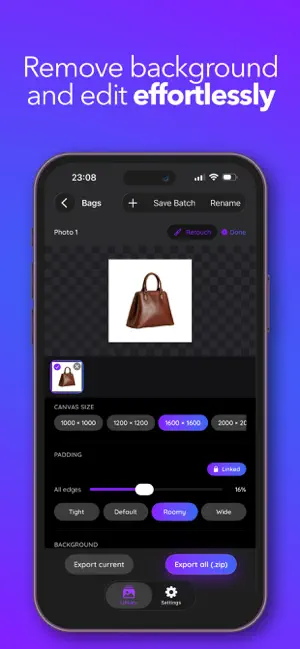

About Pixeroom: Bulk Image Editor
Pixeroom makes bulk product-photo editing fast. Remove backgrounds, auto-center your products, and apply consistent templates across an entire batch — then export everything at once, ready for Shopify, Etsy, Amazon, and other marketplaces. Built for sellers who process dozens or hundreds of photos at a time, Pixeroom replaces slow, one-by-one editing with a streamlined batch workflow: • Automatic background removal — no manual masking • A magnetic eraser for the shots that need a hand — zoom in and brush along an edge, and it clings to what you started on instead of eating into your product • Auto-centering to keep products consistently framed • Reusable templates for a uniform, on-brand look across your catalog • Batch export, so a whole shoot is ready in one pass • Background removal runs entirely on your device — your photos are never uploaded • Available on iPhone and Mac Whether you're a solo seller or run a growing store, Pixeroom cuts editing time down to minutes so you can get your listings live faster. Look around for free — you'll only need a plan when you import or export. PIXEROOM PREMIUM Premium unlocks unlimited exports, unlimited batch sizes, every export format, and unlimited saved templates. There are three ways to get it: • Monthly — an auto-renewing subscription, starting with a 7-day free trial • Yearly — an auto-renewing subscription, starting with a 7-day free trial • Lifetime — a one-time purchase. Pay once and keep Premium forever, with nothing to renew and nothing to cancel. For the two subscriptions, payment is charged to your Apple Account at purchase confirmation, and the subscription renews automatically unless canceled at least 24 hours before the end of the current period. Manage or cancel anytime in your Apple Account settings. The Lifetime purchase does not renew and is not a subscription. Terms of Use (EULA): https://www.apple.com/legal/internet-services/itunes/dev/stdeula/ Privacy Policy: https://pixeroom.com/privacy-policy
What’s new
Version 1.6.0 · Updated September 5, 2026
A much better eraser, and a gentler way in. • Magnetic eraser — pinch to zoom right into a cutout, then brush along an edge. The brush clings to whatever you started on, so you can clear a stubborn fringe without slipping onto the product itself. • Retouching no longer slows down the more edits you make. • Pixeroom now opens straight to your library. You'll only see plans when you actually import or export something. • New Lifetime plan — pay once, keep Premium forever. • Mac: import straight from Photos, and a real File menu with a New Batch shortcut. • You can now manage or cancel your subscription from inside the app.
App privacy
The developer, Amir Gelman, reported these privacy practices to Apple.
Data Linked to You
The following data, which may be collected and linked to your identity, may be used for the following purposes:
- Purchases: Purchase History
- Contact Info: Email Address, Name
- Identifiers: User ID
Used for: App Functionality
Alternatives to Pixeroom: Bulk Image Editor
Looking for apps like Pixeroom: Bulk Image Editor? Here are 6 similar apps on the App Store. The highest rated is Decorly Design (5.0/5), and all 6 are free to download.
-
 BrandShots: AI Product Photos
-
 Decorly Design
5.0
Decorly Design
5.0
-
 AI Interior Design - Arch Pro
1.0
AI Interior Design - Arch Pro
1.0
-
 Ultimate Background Eraser
-
 Remove BG~AI Background Eraser
-
 Memelord: Meme Library & Maker
4.8
Memelord: Meme Library & Maker
4.8
| App | Rating | Price | Last updated | Compare |
|---|---|---|---|---|
| Pixeroom: Bulk Image Editor | – | Free | September 5, 2026 | |
| BrandShots: AI Product Photos | – | Free | Sep 16, 2026 | Compare |
| Decorly Design | 5.0 / 5 (1) | Free | Feb 21, 2026 | Compare |
| AI Interior Design - Arch Pro | 1.0 / 5 (1) | Free | Jan 6, 2026 | Compare |
| Ultimate Background Eraser | – | Free | Feb 6, 2024 | Compare |
| Remove BG~AI Background Eraser | – | Free | Jan 7, 2025 | Compare |
| Memelord: Meme Library & Maker | 4.8 / 5 (65) | Free | Oct 26, 2026 | Compare |