

Open Book: Content Blocker
Reno Labs, LLC Lifestyle iPhoneiPadiPod touch
Open Book: Content Blocker is a free Lifestyle app for iPhone and iPad by Reno Labs, LLC. Requires iOS 17.0. Updated October 22, 2026.
- Price
- Free
- on the App Store
- Size
- 10 MB
- Age 4+
- Updated
- Oct 22
- 2026 · v1.0.4
Screenshots



About Open Book: Content Blocker
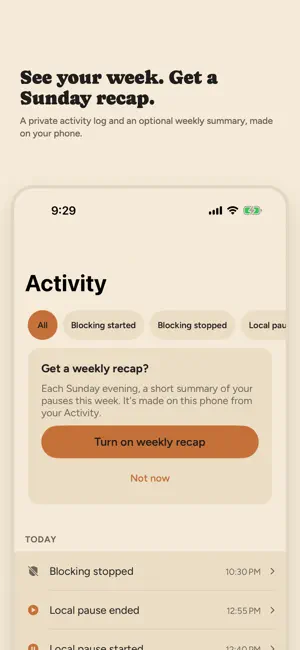
Open Book blocks adult content and the apps that pull you off track, using Apple's built-in Screen Time controls. You set it up, you manage it, and your choices stay on your iPhone. 30-DAY CHALLENGE Start a 30-day challenge from Home. Every day that blocking stays on with no pause counts as a kept day. See all 30 days at a glance, get a short note after days 7, 14, 21 and 30, and start over whenever you want. Your challenge is kept on your iPhone. NATIVE BLOCKING. NO VPN. Open Book uses Apple's Screen Time framework, not a VPN or traffic inspection. When blocking is on, Safari's adult-content filter turns on automatically. Use Apple's own picker to choose apps, app categories and websites to block. KEEP THE APPS YOU NEED Blocking a whole category? Add app exceptions so a work chat app or another app you rely on keeps working. SHORT PAUSES ON YOUR TERMS Need a break? Pause blocking for 15, 30 or 60 minutes. Blocking is scheduled to resume when the pause ends, and you can resume it sooner. iOS may delay the resume while your phone is idle. YOUR ACTIVITY, PRIVATELY The Activity tab lists when blocking started or stopped and when pauses began and ended. Filter it by type. It records event types and times only, never websites, app names or browsing history. WEEKLY RECAP Turn on the weekly recap from Activity to get a short notification each Sunday evening. It counts your pauses for the week and the days you had none. The recap is built on your iPhone from your Activity log. PRIVATE BY DESIGN Your blocking choices, activity log, challenge and recaps stay on your device. Open Book never sees your browsing and doesn't share your activity with anyone. To improve the app, it sends a few anonymous usage events, such as starting or finishing a challenge. They never include websites, app names or Screen Time data, and they aren't linked to your account. A minimal account, created without an email or password, supports purchase restore and account deletion. You can delete it anytime in Settings. YOU'RE IN CONTROL Stop blocking whenever you want. You can also turn off Screen Time access in iPhone Settings at any time. Open Book is for managing your own iPhone. It is not a parental-monitoring tool. Existing subscribers can restore or manage their subscription in Settings > Account & subscription. Privacy Policy: https://useopenbook.com/privacy Terms of Use: https://useopenbook.com/terms Support: https://useopenbook.com/support
What’s new
Version 1.0.4 · Updated October 22, 2026
Tap Open on the 30-day challenge's App Store event, and Open Book takes you straight to the challenge.
App privacy
The developer, Reno Labs, LLC, reported these privacy practices to Apple.
Data Linked to You
The following data, which may be collected and linked to your identity, may be used for the following purposes:
- Purchases: Purchase History
- Identifiers: User ID, Device ID
Used for: Analytics, App Functionality
Data Not Linked to You
The following data, which may be collected but is not linked to your identity, may be used for the following purposes:
- Usage Data: Product Interaction, Other Usage Data
Used for: Analytics