

Chronoburn: Video Stopwatch
永 张 Utilities iPhoneiPadiPod touch
Chronoburn: Video Stopwatch is a free Utilities app for iPhone and iPad by 永 张. Requires iOS 26.0. Updated September 24, 2026.
- Price
- Free
- on the App Store
- Size
- 1 MB
- Age 4+
- Updated
- Sep 24
- 2026 · v1.0.2
Screenshots
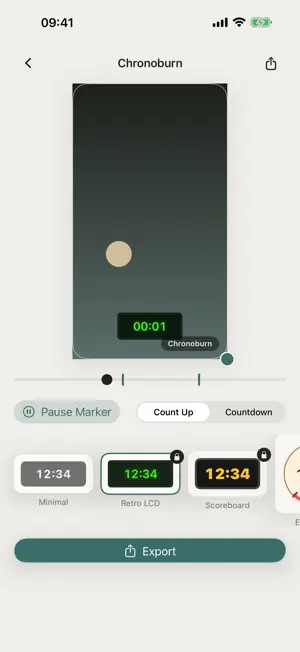
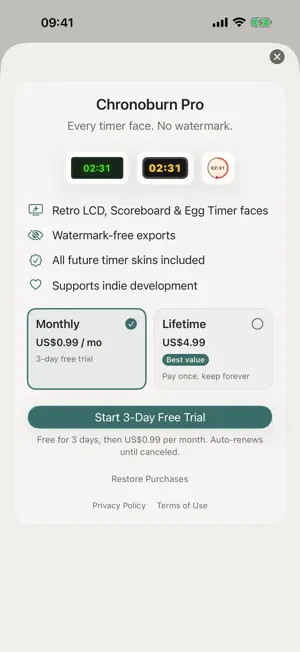


About Chronoburn: Video Stopwatch
Chronoburn burns a running stopwatch or countdown timer directly into your video — permanently, at export, so the clock is baked into the footage itself. Built for anyone reviewing workout sets, timing a recipe, or logging a timed practice drill who wants the time visible in the clip afterward, not just on-screen while filming. Position the timer by dragging it right on the video preview. Resize it with a pinch. Pick a start point and tap the timeline to freeze the clock exactly when you rest between sets or cut between takes, then let it run again. What you see in the live preview is exactly what gets burned into the exported video. Included — Drag-to-place, drag-to-resize timer overlay with a live scrubbing preview — Count-up (stopwatch) and countdown modes — Tap-to-freeze markers on the timeline — pause and resume the clock with no keyframe editor — Four timer faces: Minimal, Retro LCD, Scoreboard, and Egg Timer dial — One-tap export to your Photos library WHAT MAKES CHRONOBURN DIFFERENT Most video editors treat a clock as a text overlay buried in a timeline. Chronoburn makes the timer the whole product: drag, pinch, and tap-to-freeze — and the live preview is exactly what gets burned in, frame for frame. Fully offline. No account, no sign-in, no data collection, no ads. PRICING Chronoburn works out of the box with the Minimal timer face; exports carry a small Chronoburn watermark until you upgrade. Chronoburn Pro unlocks every timer face and removes the watermark — choose the monthly subscription (3-day trial, cancel anytime) or a one-time lifetime purchase. Prices are shown in your local currency in the app. FEEDBACK Chronoburn is indie-built, and your feedback shapes the roadmap. Questions, ideas, or a timing use case we should support? Email [email protected]. Terms of Use (EULA): https://obelisk.club/videostopwatchtimerburn/terms
What’s new
Version 1.0.2 · Updated September 24, 2026
This release makes the Pro paywall more reliable: prices now retry automatically on slow connections instead of failing, and Restore Purchases is always reachable. The timer face can also be resized with a two-finger pinch, and the app is now fully localized in Chinese.
App privacy
The developer, 永 张, reported these privacy practices to Apple.
Data Not Collected
The developer does not collect any data from this app.
Alternatives to Chronoburn: Video Stopwatch
Looking for apps like Chronoburn: Video Stopwatch? Here are 6 similar apps on the App Store. The highest rated is 1Stopwatch (5.0/5), and 5 of the 6 are free to download.
-
 HH:MM:SS
-
 Adiction Media Manager
-
 Countdown Timer: Days & Events
-
 NanoStopWatch byNSDev
-
 TimePeak: Countdown & Counter
-
 1Stopwatch
5.0
1Stopwatch
5.0
| App | Rating | Price | Last updated | Compare |
|---|---|---|---|---|
| Chronoburn: Video Stopwatch | – | Free | September 24, 2026 | |
| HH:MM:SS | – | 0.99 USD | Sep 27, 2026 | Compare |
| Adiction Media Manager | – | Free | Jul 9, 2026 | Compare |
| Countdown Timer: Days & Events | – | Free | Jul 26, 2026 | Compare |
| NanoStopWatch byNSDev | – | Free | Jul 21, 2025 | Compare |
| TimePeak: Countdown & Counter | – | Free | Jul 23, 2026 | Compare |
| 1Stopwatch | 5.0 / 5 (2) | Free | Oct 17, 2025 | Compare |