

Clarity: Consumption Tracker
Daniel Oberlechner Health & Fitness iPhoneiPadiPod touch
Clarity: Consumption Tracker is a free Health & Fitness app for iPhone and iPad by Daniel Oberlechner. Requires iOS 26.0. Updated August 22, 2026.
- Price
- Free
- on the App Store
- Size
- 9 MB
- Age 17+
- Updated
- Aug 22
- 2026 · v1.2
Screenshots

About Clarity: Consumption Tracker
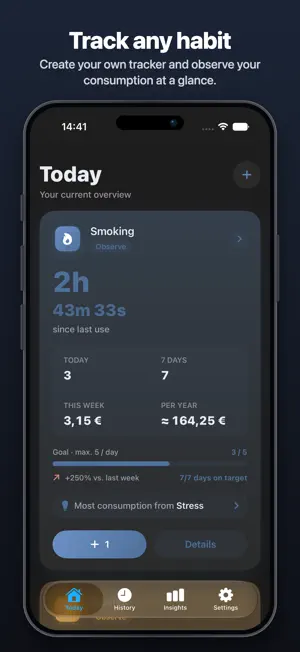
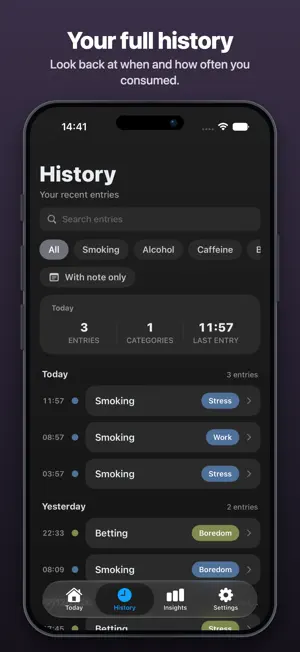
Most consumption trackers just count. Clarity helps you understand what's behind it: when, how often, and above all why you consume. Whether it's smoking, alcohol, cannabis, caffeine or your own tracker — you decide what to observe. An entry takes seconds. Over time, Clarity reveals the patterns behind it. Understand your triggers See which situations go with your consumption — stress, downtime, certain moments. That's the heart of it: not just that, but why. Two paths, one goal "Observe" for a calm overview. "Pause" for staying on track — with a fixed duration or open-ended. When observing, you can set a daily limit. Quiet numbers Trend, average, and — if you like — what your habit costs you or what you save by pausing. Numbers that inform without pushing. Your history grows with you Every entry stays searchable. The longer you're at it, the clearer the patterns become. Gentle milestones For "Pause" trackers, Clarity reminds you after 7, 30, 180 and 360 days without an entry. No daily nagging. Private by design No account, no login, no backend. Your data stays on your device and syncs — if you want — to your other devices via your own iCloud. Clarity is not a medical tool and not a coach. It doesn't judge. It shows you what is — so you can draw your own conclusions. Start observing today.
What’s new
Version 1.2 · Updated August 22, 2026
Automatic backups Clarity now saves a backup to your own iCloud Drive once a day and keeps the last 30. If something goes wrong, you can restore an earlier state in the settings. The backup stays with you and is never sent to a server. Type of consumption For each tracker you can record what it actually was – coffee, espresso or Red Bull, for example. Insights then shows you how it breaks down. Add no types and nothing changes for you. Renaming without losing data Triggers, types and a tracker's name can be changed later on. Existing entries are renamed along with them instead of being left behind with the old wording.
App privacy
The developer, Daniel Oberlechner, reported these privacy practices to Apple.
Data Not Linked to You
The following data, which may be collected but is not linked to your identity, may be used for the following purposes:
- Identifiers: User ID, Device ID
- Usage Data: Product Interaction
- Diagnostics: Crash Data, Performance Data, Other Diagnostic Data
Used for: Analytics, App Functionality
Alternatives to Clarity: Consumption Tracker
Looking for apps like Clarity: Consumption Tracker? Here are 6 similar apps on the App Store.
-
 DTR: Die Nichtraucher-App
-
 NIX: Quit Zyn & Pouch Tracker
-
 X-COACHING
-
 Unsmoke
-
 Quit Smoking: CalmCrisis
-
 PouchDown: Zyn & Pouch Tracker
| App | Rating | Price | Last updated | Compare |
|---|---|---|---|---|
| Clarity: Consumption Tracker | – | Free | August 22, 2026 | |
| DTR: Die Nichtraucher-App | – | Free | Aug 12, 2026 | Compare |
| NIX: Quit Zyn & Pouch Tracker | – | Free | Sep 27, 2026 | Compare |
| X-COACHING | – | Free | Aug 22, 2026 | Compare |
| Unsmoke | – | Free | Jul 16, 2026 | Compare |
| Quit Smoking: CalmCrisis | – | Free | Jan 28, 2026 | Compare |
| PouchDown: Zyn & Pouch Tracker | – | Free | Oct 12, 2026 | Compare |