

MotionEdge Golf Swing Analyzer
MotionEdge Sports iPhoneiPadiPod touchMacApple Watch
MotionEdge Golf Swing Analyzer is a free Sports app for iPhone and iPad by MotionEdge. Rated 5.0/5 from 6 ratings. Requires iOS 26.0.
- Rating
- 5.0
- 6 ratings
- Price
- Free
- on the App Store
- Size
- 202 MB
- Age 4+
- Updated
- Oct 6
- 2026 · v2.2
Screenshots

About MotionEdge Golf Swing Analyzer
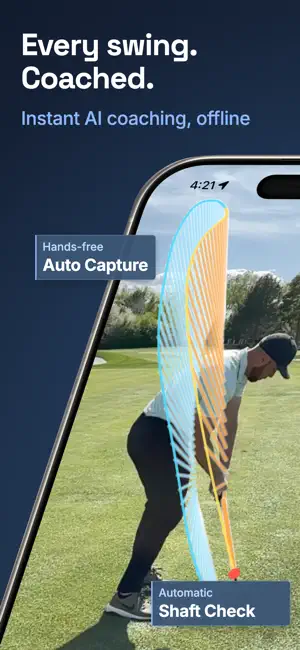
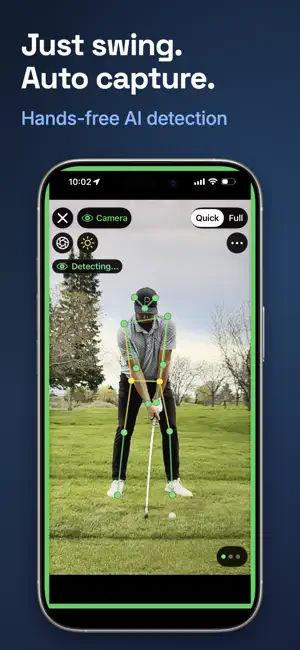
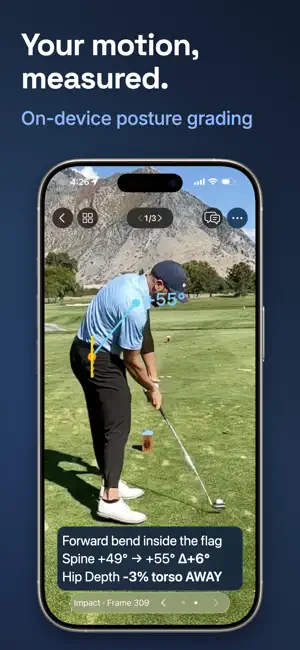
MotionEdge is a golf swing analyzer for iPhone, iPad and Mac. Record or import swing video, review posture, hand path and shaft plane, and compare swings side by side. Start with free on-device analysis. Pro adds AI coaching, TrackMan integration and iCloud sync across your devices. ANALYZE YOUR SWING See your movement with frame-by-frame pose overlays. The 10-position Filmstrip brings key moments from address to finish together for review. Posture Check compares address and impact, while hand-path grading helps you review your path into the ball. Shaft Check shows the club against your setup plane from takeaway to release, face-on and down-the-line. Draw lines, arrows and angles, and compare up to 10 swings at once to see what changed between practice sessions. These analysis and drawing tools are free. Keep up to 25 active swings and save up to 10 a day from live capture at no cost. CAPTURE HANDS-FREE Set your phone on a tripod and practice. Automatic swing detection captures swings without starting and stopping each recording. Use Quick Review for a glance-and-save at the range, or Full Review for a closer look. Import existing videos and trim them to the swing. Apple Watch lets you start and stop capture, control the phone camera and practice tempo with haptics. Apple Watch features are included free. REVIEW ON IPHONE, IPAD AND MAC Review your swing on the screen that suits you. MotionEdge runs natively on Mac, with multiple windows for reviewing your practice. With Pro, your swing library syncs through iCloud across iPhone, iPad and Mac: capture at the range and review at home. GET AI COACHING WITH PRO Ask questions about your swing and get feedback based on the evidence you share. The AI Coach uses swing frames, pose measurements, your golfer profile and available supporting data to help explain what to work on. Browse Coach's Corner for guided lessons on common swing faults. CONNECT TRACKMAN DATA WITH PRO No launch monitor is required for video analysis. If you use TrackMan, import a stroke file (.tms), paste a shared TrackMan Report link, or connect live to pair video and radar data. Review ball speed, launch, spin, carry and club path alongside your swing. FREE AND PRO Free includes capture, pose overlays, Posture Check, hand-path grading, Shaft Check, drawing tools, swing comparison, multi-panel review and Apple Watch, within the library and daily-save limits above. Pro adds an unlimited swing library and daily saves, AI Coach conversations, TrackMan integration, Remote Camera for another camera angle, iCloud sync and sharing. Group sessions and invite your coach or playing partners to view, add swings and comment using Apple's share sheet. Everyone sharing needs Pro. You can also export a session as a MotionEdge File (.mef). An eligible 7-day free trial lets you try Pro. Choose a monthly or annual auto-renewing subscription, billed to your Apple ID. It renews automatically unless canceled at least 24 hours before the period ends; manage or cancel in Settings > Apple ID > Subscriptions. An optional, one-time AI Coach Pack adds conversations after your monthly Pro allowance runs out and is valid for one year. One Pro subscription supports up to six people through Apple Family Sharing, with AI Coach quota included. Terms of Use: https://motionedge.ai/terms Privacy Policy: https://motionedge.ai/privacy
Ratings & reviews
5.0
6 ratings
What’s new
Version 2.2 · Updated October 6, 2026
MotionEdge 2.2 • Smarter AI coaching: clearer, more focused feedback on what to fix in your swing. • Faster, more reliable conversations with your AI Coach. • Bug fixes and performance improvements. Thanks for the feedback. [email protected]
App privacy
The developer, MotionEdge, reported these privacy practices to Apple.
Data Linked to You
The following data, which may be collected and linked to your identity, may be used for the following purposes:
- Location: Precise Location
Used for: App Functionality
Data Not Linked to You
The following data, which may be collected but is not linked to your identity, may be used for the following purposes:
- Identifiers: Device ID
- Usage Data: Product Interaction
- Health & Fitness: Fitness
- Purchases: Purchase History
- User Content: Photos or Videos
- Diagnostics: Crash Data, Performance Data, Other Diagnostic Data
Used for: Analytics, App Functionality
Alternatives to MotionEdge Golf Swing Analyzer
Looking for apps like MotionEdge Golf Swing Analyzer? Here are 6 similar apps on the App Store. The highest rated is Golf Montage (5.0/5), and all 6 are free to download.
-
 Golf Montage
5.0
Golf Montage
5.0
-
 MotionMark
-
 Golfora: AI Golf Swing Coach
-
 Golf Apps - Swing Tracker
-
 Golf Lab AI
-
 BaGSS Flash Cards
| App | Rating | Price | Last updated | Compare |
|---|---|---|---|---|
| MotionEdge Golf Swing Analyzer | 5.0 / 5 (6 ratings) | Free | October 6, 2026 | |
| Golf Montage | 5.0 / 5 (2) | Free | Oct 17, 2026 | Compare |
| MotionMark | – | Free | Sep 8, 2026 | Compare |
| Golfora: AI Golf Swing Coach | – | Free | Jul 5, 2026 | Compare |
| Golf Apps - Swing Tracker | – | Free | Oct 18, 2026 | Compare |
| Golf Lab AI | – | Free | Aug 3, 2026 | Compare |
| BaGSS Flash Cards | – | Free | Aug 27, 2026 | Compare |