

PinchPath
Julius Evans Education iPhoneiPadiPod touch
PinchPath is a free Education app for iPhone and iPad by Julius Evans. Requires iOS 18.5. Updated August 27, 2026.
- Price
- Free
- on the App Store
- Size
- 18 MB
- Age 4+
- Updated
- Aug 27
- 2026 · v1.0
Screenshots
About PinchPath
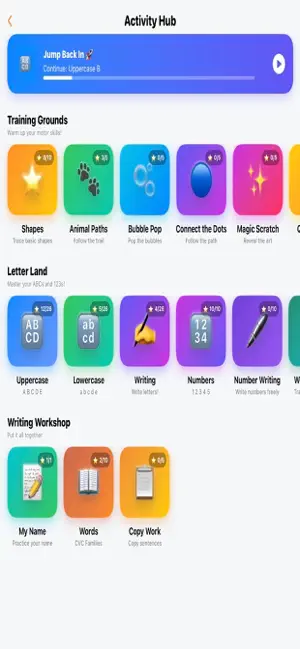
PinchPath helps kids build handwriting and fine motor skills through guided practice. It follows the exact progression an occupational therapist would use, all in an app a child can actually enjoy. How it works Kids trace letters, numbers, shapes, and words with real time feedback on stroke formation. The app does not just check if they colored inside the lines, but whether each stroke was actually formed correctly. Every letter is built from proper stroke order, so kids learn the correct motion, not just the shape. The Adventure Map Pick your child's grade from kindergarten to fifth grade, and PinchPath lays out a guided path. They will tackle warm ups first, then shapes, uppercase letters, lowercase letters, writing practice, numbers, and words. Everything is sequenced the exact way handwriting is taught, rather than thrown at kids all at once. What is inside -Uppercase and lowercase letter tracing with stroke by stroke guidance - Number formation practice -Shape and pre writing warm ups -Word tracing and independent word writing -Name practice -Visual motor and fine motor mini games led by our friendly robot guide -Creative drawing activities Built for grown ups too Track progress per child with accuracy scores, session history, and performance data. This is incredibly useful whether you are a parent watching for improvement, a teacher managing a classroom, or a therapist tracking clinical goals. Multiple child profiles are fully supported. Settings that actually matter Left handed layout. Adjustable stroke width, guide opacity, and tracing difficulty. Sound, haptics, and animation intensity controls for kids with sensory sensitivities. High contrast mode. Privacy Everything stays on your device. No accounts, no cloud, no tracking, and no ads. Your child's name and progress never leave the iPad. Free to start All uppercase letters, tracing shapes, and connect the dots are free, plus a sample of lowercase letters and numbers. Unlock everything with a single one time purchase and absolutely no subscription.
Play today's Sudoku puzzle
A quick 6×6 Sudoku every day; levels grow to the classic 9×9. A free daily puzzle from Fiplay, same board for everyone. It plays right here, no download.
App privacy
The developer, Julius Evans, reported these privacy practices to Apple.
Data Not Collected
The developer does not collect any data from this app.
Alternatives to PinchPath
Looking for apps like PinchPath? Here are 6 similar apps on the App Store. The highest rated is Otto the OTter Autism App (5.0/5), and all 6 are free to download.
-
 MiniMinds: Toddler Skills
-
 Otto the OTter Autism App
5.0
-
 Now and Next Lite
-
 Sign & Say
-
 Toddler Puzzles: Ages 2-5
4.1
-
 Elephant Learning Math Academy
3.5
| App | Rating | Price | Last updated | Compare |
|---|---|---|---|---|
| PinchPath | – | Free | August 27, 2026 | |
| MiniMinds: Toddler Skills | – | Free | Sep 21, 2026 | Compare |
| Otto the OTter Autism App | 5.0 / 5 (3) | Free | Sep 23, 2026 | Compare |
| Now and Next Lite | – | Free | Oct 22, 2026 | Compare |
| Sign & Say | – | Free | Jul 2, 2026 | Compare |
| Toddler Puzzles: Ages 2-5 | 4.1 / 5 (87) | Free | Oct 11, 2026 | Compare |
| Elephant Learning Math Academy | 3.5 / 5 (2) | Free | Oct 7, 2026 | Compare |
Compare PinchPath with the top alternatives: ratings, updates, ASO score and keyword gaps →