

Fast Compressor : Shrink video
Majid Mushtaq Photo & Video iPhoneiPadiPod touch
Fast Compressor : Shrink video is a free Photo & Video app for iPhone and iPad by Majid Mushtaq. Requires iOS 26.0. Updated September 14, 2026.
- Price
- Free
- on the App Store
- Size
- 5 MB
- Age 12+
- Updated
- Sep 14
- 2026 · v1.0.3
Screenshots


About Fast Compressor : Shrink video
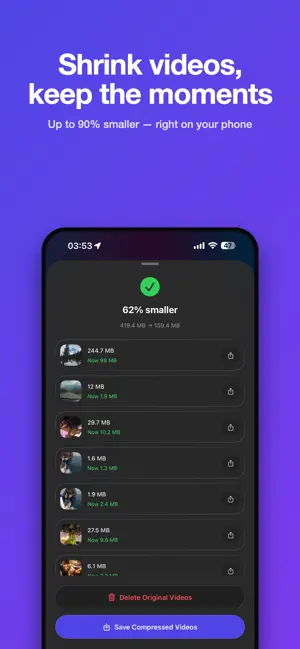
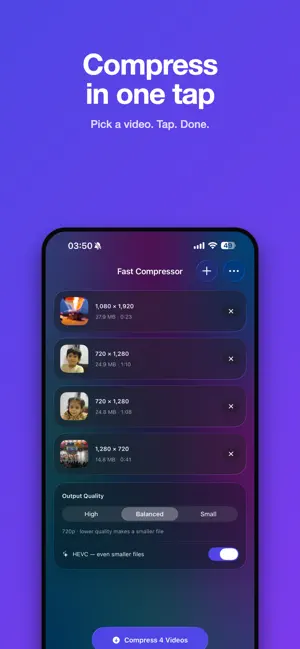
Smaller videos. Same moments. A few phone videos can swallow half your storage. Fast Compressor shrinks them on your iPhone, in seconds, and gives the space back. No sign-up. No upload. No watermark. SEE THE SIZE BEFORE YOU PICK Most pickers hide the one number that matters. Ours puts the file size on every thumbnail. Sort your library biggest-first, hide anything under 200 MB, or search by file name — then compress the videos that are actually costing you space. THREE QUALITY LEVELS • High — 1080p, for videos you want to keep looking sharp • Balanced — 720p, the sweet spot for sharing (default) • Small — 540p, for the tightest possible file HEVC ON BY DEFAULT H.265 encoding squeezes out another 25–40% at the same quality. Turn it off in one tap if you need maximum compatibility. FREE UP THE SPACE FOR REAL Compressing only helps if the big original goes away. After compressing, one button saves the small version to Photos and another deletes the originals — so the gigabytes actually come back. SHARE STRAIGHT FROM PHOTOS Found a video in Photos? Tap Share, choose Fast Compressor, and carry on in the app. EVERYTHING STAYS ON YOUR PHONE Compression runs on your device, offline, with no servers and no account. Your videos are never uploaded. Compressed files are cleared from the app when you close the results, so nothing piles up behind your back. BUILT FOR iOS 26 Native SwiftUI with Liquid Glass throughout. Live progress per video and for the whole queue. The screen stays awake while a long video finishes. WHAT YOU GET FREE • Compress videos, one at a time • All three quality levels and HEVC • Save to Photos and delete originals • Supported by a small banner ad FAST COMPRESSOR PRO — ONE-TIME PURCHASE • Compress a whole batch in one go • No ads • Pay once, no subscription
What’s new
Version 1.0.3 · Updated September 14, 2026
- Improved gallery picker - Improved visibility across multiple screen sized
App privacy
The developer, Majid Mushtaq, reported these privacy practices to Apple.
Data Used to Track You
The following data may be used to track you across apps and websites owned by other companies:
- Location: Coarse Location
- Identifiers: Device ID
- Usage Data: Product Interaction
Data Not Linked to You
The following data, which may be collected but is not linked to your identity, may be used for the following purposes:
- Location: Coarse Location
- Identifiers: Device ID
- Usage Data: Product Interaction, Other Usage Data
- Diagnostics: Crash Data, Performance Data
Used for: Third-Party Advertising, Analytics, App Functionality
Alternatives to Fast Compressor : Shrink video
Looking for apps like Fast Compressor : Shrink video? Here are 6 similar apps on the App Store. The highest rated is Video Compressor: Keep Quality (5.0/5), and all 6 are free to download.
-
 Snapvia
-
 Video Compressor: Keep Quality
5.0
-
 MeWe Camera: Fun Dual-Camera
4.7
-
 FilmLab Pro
-
 TunCam・Record with music mideo
4.0
-
 Compress Video: Resize, Shrink
4.5
| App | Rating | Price | Last updated | Compare |
|---|---|---|---|---|
| Fast Compressor : Shrink video | – | Free | September 14, 2026 | |
| Snapvia | – | Free | Aug 7, 2026 | Compare |
| Video Compressor: Keep Quality | 5.0 / 5 (2) | Free | Aug 6, 2026 | Compare |
| MeWe Camera: Fun Dual-Camera | 4.7 / 5 (15) | Free | May 22, 2025 | Compare |
| FilmLab Pro | – | Free | Sep 18, 2026 | Compare |
| TunCam・Record with music mideo | 4.0 / 5 (4) | Free | Oct 6, 2026 | Compare |
| Compress Video: Resize, Shrink | 4.5 / 5 (14) | Free | Aug 24, 2026 | Compare |