

Network-Doctor
Konrad Kern Utilities iPhoneiPadiPod touch
Network-Doctor is a paid Utilities app for iPhone and iPad by Konrad Kern. Requires iOS 18.0. Updated August 12, 2026.
- Price
- 4.99 USD
- on the App Store
- Size
- 1 MB
- Age 4+
- Updated
- Aug 12
- 2026 · v1.0
Screenshots

About Network-Doctor
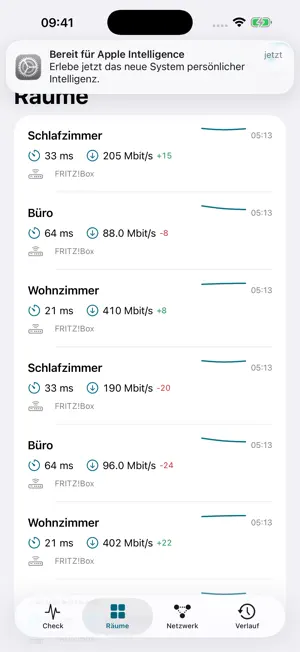
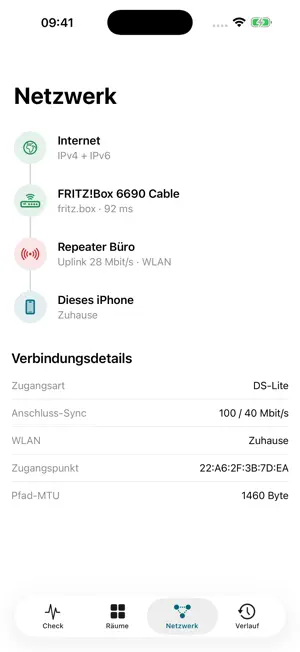
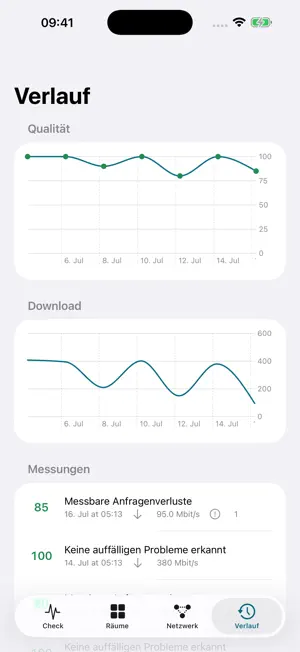
Network Doctor finds out why your home network feels slow — and shows the evidence behind every conclusion. WHAT IT MEASURES Every check runs a fixed, deterministic sequence: idle latency, latency under load in both directions (bufferbloat), request loss, time-boxed saturation download and upload throughput, and server-assisted path MTU — which detects the reductions typical of DS-Lite and PPPoE lines. ROUTER INTELLIGENCE, NO CREDENTIALS NEEDED Network Doctor auto-detects FRITZ!Box, Telekom Speedport, Vodafone Station/EasyBox, O2 HomeBox, and any UPnP-capable router. It classifies your line as native dual stack, DS-Lite, carrier-grade NAT, or double NAT from the WAN address, reads the line sync rates, and compares them with the Wi-Fi throughput it actually measured: your line delivers 100, your WLAN delivers 31. FRITZ!BOX DEEP EVIDENCE (OPTIONAL) With optional credentials — strictly read-only — Network Doctor maps your mesh: which repeater serves your phone, the backhaul medium and its bottleneck rate (Wi-Fi, Ethernet, or Powerline, including devolo), 100-Mbit cable detection, channel utilization, and topology loops. FINDINGS YOU CAN CHECK Every finding names the measurements behind it and states a confidence. Typical findings: weak mesh backhaul, bufferbloat, congested channel, recurring evening losses, double NAT. GUIDED A/B TESTS Is it your home network or your provider? Compare WLAN against cellular. Is it coverage? Compare where you are against next-to-router. SAFE REMEDIATION Every suggested change comes with a preview and a rollback path, is confirmed explicitly, and is validated by the next measurement: resolved, improved, unchanged, or regressed. Router access is strictly read-only — Network Doctor never changes router settings. HISTORY AND TRENDS Every check is stored locally, with trends and per-room sparklines. History-based rules catch patterns a single check misses, such as losses that recur every evening. PRIVACY Local-first by design: no account, no tracking, no third-party SDKs, and a privacy manifest. Optional cloud analysis (Claude) is off by default, never sends network names or addresses, and the exact payload can be previewed in the app before anything leaves your device. A support report can be exported via the share sheet. A NOTE ON LANGUAGE Network Doctor is developed German-first. The user interface is available in English, but the diagnostic finding texts currently appear in German. Requires iOS 18 or later. For iPhone and iPad.
App privacy
The developer, Konrad Kern, reported these privacy practices to Apple.
Data Not Collected
The developer does not collect any data from this app.
Alternatives to Network-Doctor
Looking for apps like Network-Doctor? Here are 6 similar apps on the App Store. The highest rated is Network Hamster (5.0/5), and all 6 are free to download.


| App | Rating | Price | Last updated | Compare |
|---|---|---|---|---|
| Network-Doctor | – | 4.99 USD | August 12, 2026 | |
| DOBI Pay | – | Free | Oct 14, 2026 | Compare |
| Network Hamster | 5.0 / 5 (2) | Free | Aug 30, 2026 | Compare |
| Yotta Installer | – | Free | Oct 5, 2026 | Compare |
| OpticsOS | – | Free | Mar 17, 2026 | Compare |
| WiFi Devices Quick | – | Free | Oct 13, 2026 | Compare |
| HomeNetworkTesting | – | Free | Apr 9, 2026 | Compare |
Compare Network-Doctor with the top alternatives: ratings, updates, ASO score and keyword gaps →