

LiLiCal
ShaoKai Zheng Productivity iPhoneiPadiPod touchMac
LiLiCal is a free Productivity app for iPhone and iPad by ShaoKai Zheng. Rated 5.0/5 from 4 ratings. Requires iOS 17.0. Updated October 27, 2026.
- Rating
- 5.0
- 4 ratings
- Price
- Free
- on the App Store
- Size
- 20 MB
- Age 4+
- Updated
- Oct 27
- 2026 · v3.2.0
Screenshots

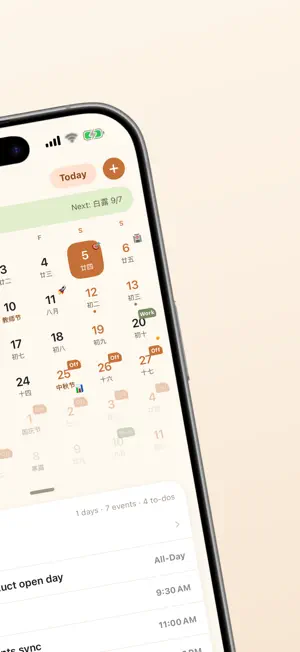


About LiLiCal
LiLiCal is a calendar and task app that works with the system apps you already use. Your events come from Calendar, your tasks from Reminders, and the days you care about get their own countdown. HOLIDAYS FOR ANY REGION · Public holidays for 37 countries and regions, ready to subscribe · Each subscription gets its own color; one day can carry marks from several regions · Chinese lunar dates, the 24 solar terms, traditional festivals, and mainland China's statutory holidays with make-up workdays — always on WORKS WITH CALENDAR AND REMINDERS · Events and tasks are read and written straight to the system apps — no separate silo · The week ahead grouped by date; show only the calendars you pick · Pre-meeting notifications with one-tap join for online meetings MAKE THE DAYS COUNT · Birthdays, anniversaries, project milestones — with yearly lunar repeat and custom cycles · Grouped by urgency, with milestones that tell you where the next one worth marking is · Syncs with the Mac app through your own iCloud, in real time WIDGETS ON HOME SCREEN AND LOCK SCREEN · Four widgets — month, agenda, tasks, countdown — in small, medium and large · A countdown for the Lock Screen too · Tap any row on a widget to open that item THOUGHTFUL TOUCHES · Turn tabs on or off and drag them into the order you want · Start the week on Sunday, Monday or Saturday; show week numbers; choose how many weeks the month view shows · A Pomodoro focus timer (off by default, switch it on in Settings) · iPad and landscape iPhone use a two-column layout: list on the left, editor on the right PRIVACY FIRST No personal information is collected. Events and reminders are read and written on your device only; Days sync through your own iCloud. The only network requests fetch public holiday data.
What’s new
Version 3.2.0 · Updated October 27, 2026
Repeating events and days • Events can now repeat on your own schedule: choose the interval, the weekdays where they apply, and how the series ends — never, on a date, or after a set number of times • The editor previews the next few occurrences at the bottom, and saving a change to a repeating event asks whether it applies to this one or the whole series • An occurrence you edited on its own still belongs to the series, and changing its calendar moves the whole series • Days can now stop repeating too: never, on a date, or after a set count • Repeating rules are written out in event details and in task lists • Fixed: all-day events no longer end a day late, and when a repeating task's due date can't be cleared, the app now says why Batch actions • Select multiple items in Agenda, Tasks and Days — tap Select, or drag across rows • Agenda: change calendar or delete in bulk. Tasks: complete, reschedule, move to another list or delete. Days: complete, postpone, move to another group, pin or delete • Every action can be undone; the undo bar clears when its time is up but leaves VoiceOver users enough time to reach it • Read-only calendars — birthdays from Contacts and subscriptions — no longer offer editing or deletion Sharing • Events and tasks can be shared as cards too, and selecting several makes one summary card • Fixed the meeting number and dial-in number missing from share cards • A failed save now tells you instead of failing silently Widgets • Rows show more: repeats, online meetings, "Awaiting reply", task priority and notes, and the weekday and milestone of a day • The extra-large vertical Days and Up Next widgets now use a full-color hero style, switching automatically between two columns, three columns and a dense layout; long names no longer overflow • The month widget can page through months; the week widget returns to today a minute after you page it • The Up Next Lock Screen widget can hide its countdown from the editor • Up Next no longer lists solar terms as events, and tasks without a due date sort by priority the right way round • Fixed the large and extra-large almanac widget sometimes drawing blank Agenda and tasks • Invitations you haven't answered are marked "Awaiting reply" • Events that ended earlier today are dimmed, and when space runs short they fold into "Ended N" instead of pushing out tasks you still need • All-day events no longer gain or lose a day, and changing only their calendar no longer creates an exception • Reminders on repeating tasks now follow each occurrence, and undoing a completion returns to the right one • Confirmation dialogs now grow out of the row or button you tapped Days • Birthdays for children under 10 show years and months • When a row runs out of room, the days-so-far count is dropped first so the birth date stays
App privacy
The developer, ShaoKai Zheng, reported these privacy practices to Apple.
Data Not Collected
The developer does not collect any data from this app.
Alternatives to LiLiCal
Looking for apps like LiLiCal? Here are 6 similar apps on the App Store. The highest rated is Cairn: Countdown & Days Since (5.0/5), and all 6 are free to download.
-
 PinNote - Notes Always Visible
4.7
-
 Near: Private Action Hub
4.9
-
 AppBlocker-Block Apps & Focus
4.0
-
 FacilityLog
-
 AuthGuard - PA Records
-
 Cairn: Countdown & Days Since
5.0
| App | Rating | Price | Last updated | Compare |
|---|---|---|---|---|
| LiLiCal | 5.0 / 5 (4 ratings) | Free | October 27, 2026 | |
| PinNote - Notes Always Visible | 4.7 / 5 (6) | Free | Oct 23, 2026 | Compare |
| Near: Private Action Hub | 4.9 / 5 (7) | Free | Oct 15, 2026 | Compare |
| AppBlocker-Block Apps & Focus | 4.0 / 5 (1) | Free | Oct 5, 2026 | Compare |
| FacilityLog | – | Free | Sep 28, 2026 | Compare |
| AuthGuard - PA Records | – | Free | Sep 23, 2026 | Compare |
| Cairn: Countdown & Days Since | 5.0 / 5 (1) | Free | Oct 24, 2026 | Compare |
Compare LiLiCal with the top alternatives: ratings, updates, ASO score and keyword gaps →