

ShareBalance: Fair Chores
RIN OHUCHI Lifestyle iPhoneiPadiPod touch
ShareBalance: Fair Chores is a free Lifestyle app for iPhone and iPad by RIN OHUCHI. Requires iOS 14.0. Updated November 4, 2026.
- Price
- Free
- on the App Store
- Size
- 28 MB
- Age 4+
- Updated
- Nov 4
- 2026 · v1.4.0
Screenshots
Save to Pinterest


About ShareBalance: Fair Chores
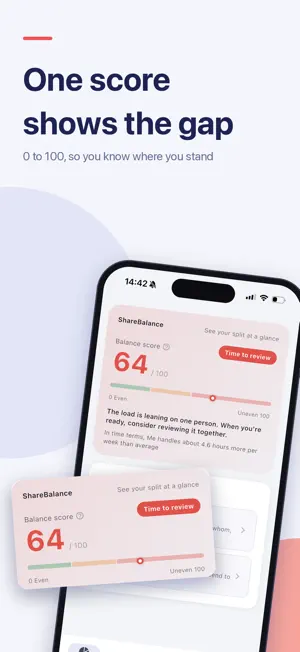
Do chores and childcare ever feel like "somehow it's always on me"? ShareBalance turns the burden of tasks between family members, partners, and teams into numbers. Set how long each task takes, how often it happens, and how physically and mentally demanding it is, and the app scores each person's burden so you can see who carries how much. ----- See the imbalance at a glance ----- The dashboard shows a balance score (0–100) and a pie chart. Closer to 0 means fair; closer to 100 means the load sits on one person. Break it down by category, time of day, and weekday/weekend, and tap any row to see the tasks behind it. It even puts the gap in hours per week. ----- Share it with your family ----- Send an invite code and your partner or family can view and edit the same members, tasks, and split on their own phone. No account needed. Changes sync automatically, even if you rarely open the app, and you can see who changed what. Get notified when someone thanks you, and remove a lost phone from sharing. ----- Not just numbers: thank-yous ----- Numbers alone can start arguments. Thank someone for a chore with a stamp like "That helped!" or "That was tasty." If you share with your family, it shows up on their phone. ----- "I do more than you" — is it true? ----- In the perception check, everyone answers what share of the load they think they carry, then compares it with the actual share calculated from your tasks. When sharing, each person answers on their own phone, and nobody sees the others' answers until everyone is done. ----- Review weekly, get fairer over time ----- Your balance score is recorded every week, with a chart and the change from last week. Get a Sunday-evening reminder (optional) to review this week's score, the most time-consuming tasks, and the thank-yous you received. A Home Screen widget shows your score without opening the app, and you can share your results as an image (names can be hidden). ----- Estimates tuned to your home ----- "Making dinner" means something different depending on your kids' ages, how you cook, and your home's size. Tell ShareBalance about your household and AI uses it as the basis for every estimate. Re-estimate all existing tasks at once and apply only the ones you agree with. ----- AI helps you build a fair split ----- - Task estimation: enter a task name and get duration, burden, and category - Rebalance suggestions: which task to move, from whom to whom, with the effect calculated - Bulk add: turn everyday sentences into multiple tasks at once - Discussion messages: draft an easy-to-raise message about a chore's real workload ----- Assignments that fit real life ----- Split by weekday/weekend or by day of the week: Mom on weekdays, Dad on weekends, trash only on Mondays and Thursdays. You can also adjust how strongly each member feels physical and mental load. ----- Get started fast with templates ----- Pick how you'll use the app, add members, and choose from 10 templates, including a "1-minute quick check," "Invisible chores," homes with kids of different ages, dual-income and caregiving households, and work teams. ----- About your data ----- No account needed. Members and tasks are stored on your device. Only when you use "Share with family" is the data stored on our server so your family can see it (including device info used to deliver notifications). You can delete it from the server when you stop sharing, and shared data no device has opened for a year is deleted automatically. Your input is sent for processing only when you use an AI feature. ----- Good to know ----- - Free to use. The app shows ads (a banner, and a video ad when you use an AI feature) - AI estimates and suggestions are guidance. Adjust them to fit your household - Dark mode, English & Japanese Chores and childcare are a pile of invisible work. Turn the burden into numbers, and find a split everyone can agree on.
What’s new
Version 1.4.0 · Updated November 4, 2026
Sharing with your family just got better. [Always up to date] When someone in your family makes a change, it reaches your phone automatically. Even if you haven't opened the app in a while, you'll see the latest split when you open it or on the Home Screen widget. [Notifications] Get notified when someone thanks you or when everyone has answered the perception check. Tap to jump straight there. [See who changed what] You'll see who made a change and what it was, like "Hana updated (2 tasks added)." [Manage shared devices] See every device that's sharing, and remove one you've lost. You can also disable an invite code before it expires. [Also new] - The key used for sharing is now stored more securely in the Keychain - Getting started with sharing is easier to find - Bug fixes
App privacy
The developer, RIN OHUCHI, reported these privacy practices to Apple.
Data Used to Track You
The following data may be used to track you across apps and websites owned by other companies:
- Usage Data: Product Interaction, Advertising Data, Other Usage Data
- Diagnostics: Crash Data, Performance Data, Other Diagnostic Data
Data Not Linked to You
The following data, which may be collected but is not linked to your identity, may be used for the following purposes:
- Identifiers: Device ID
- Usage Data: Product Interaction, Advertising Data, Other Usage Data
- Diagnostics: Crash Data, Performance Data, Other Diagnostic Data
Used for: Third-Party Advertising, App Functionality
Alternatives to ShareBalance: Fair Chores
Looking for apps like ShareBalance: Fair Chores? Here are 6 similar apps on the App Store. The highest rated is WhoDidIt: Family Chore Tracker (5.0/5), and all 6 are free to download.
-
 MenKaji(メンカジ)- 家事分担
-
 TallyHome: Household Balance
-
 FairShare: Home Chores
-
 FairFlow 家事育児の分担
-
 WhoDidIt: Family Chore Tracker
5.0
-
 家事分担 カジワリ - 偏りを見える化
| App | Rating | Price | Last updated | Compare |
|---|---|---|---|---|
| ShareBalance: Fair Chores | – | Free | November 4, 2026 | |
| MenKaji(メンカジ)- 家事分担 | – | Free | Oct 10, 2026 | Compare |
| TallyHome: Household Balance | – | Free | Nov 18, 2026 | Compare |
| FairShare: Home Chores | – | Free | Aug 3, 2026 | Compare |
| FairFlow 家事育児の分担 | – | Free | Aug 31, 2026 | Compare |
| WhoDidIt: Family Chore Tracker | 5.0 / 5 (1) | Free | Aug 31, 2026 | Compare |
| 家事分担 カジワリ - 偏りを見える化 | – | Free | Jul 6, 2026 | Compare |