

Scan & Organize: PDF Scan
BE PLUS S.R.L. Productivity iPhoneiPadiPod touch
Scan & Organize: PDF Scan is a free Productivity app for iPhone and iPad by BE PLUS S.R.L. Requires iOS 17.0. Updated September 19, 2026.
- Price
- Free
- on the App Store
- Size
- 3 MB
- Age 4+
- Updated
- Sep 19
- 2026 · v1.0.2
Screenshots


About Scan & Organize: PDF Scan
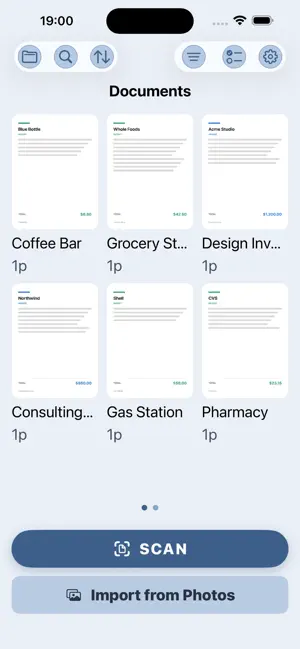
Scan once, find it forever. Scan & Organize turns any document into a crisp PDF and keeps your paperwork sorted, searchable and always with you. WHY SCAN & ORGANIZE • Automatic edge detection — point at a page and it finds the borders, straightens and cleans it. • Smart folders — sort receipts, contracts and IDs so you find them in seconds. • Cash Flow — track receipts and expenses as you scan, without a spreadsheet. • iCloud Sync — start on your phone, finish on your iPad. Your own iCloud, no account. WHAT YOU CAN DO • Scan documents, receipts and IDs with auto edge detection and clean-up. • Save straight to PDF, multi-page in one file. • Organize into smart folders and find scans fast. • Track receipts and expenses in the Cash Flow view. • Batch export and share PDFs anywhere. • Lock a PDF with a password before you send it. • Sync across your devices with iCloud. • Pick a theme that suits you. PRO • Unlimited scans and folders. • Cash Flow expense tracking. • Batch export. • Password-protected PDFs. • Themes. PRIVATE BY DESIGN Scanning, edge detection and organizing all run on your device. We have no servers, no accounts, no ads and no tracking, so we never see your documents. Sync uses only your own private iCloud, so your scans follow you to a new device and no one else can reach them. SUBSCRIPTION Scan & Organize is a monthly or annual subscription with a free trial. Payment is charged to your Apple ID at confirmation of purchase. It renews automatically unless canceled at least 24 hours before the current period ends. Manage or cancel anytime in your Apple ID settings. Terms of Use: https://beplus.plus/terms Privacy Policy: https://beplus.plus/privacy/scan-organize Scan it once. Find it forever. That's the whole idea.
What’s new
Version 1.0.2 · Updated September 19, 2026
Fixed a crash that could close the app when text recognition failed on a page. Deleting a document no longer risks closing the app. If the local database is ever damaged, the app now opens with a fresh one instead of refusing to start, and leaves the old file untouched. iCloud sync picks up changes from your other devices sooner. Questions or ideas: [email protected]
App privacy
The developer, BE PLUS S.R.L., reported these privacy practices to Apple.
Data Not Linked to You
The following data, which may be collected but is not linked to your identity, may be used for the following purposes:
- Purchases: Purchase History
- Identifiers: Device ID
- Usage Data: Product Interaction
- Diagnostics: Other Diagnostic Data
Used for: Analytics
Alternatives to Scan & Organize: PDF Scan
Looking for apps like Scan & Organize: PDF Scan? Here are 6 similar apps on the App Store. The highest rated is Yearli – Yearly Calendar (4.6/5), and all 6 are free to download.
-
 Holidaily
-
 Filedra: PDF Scanner & OCR
-
 PageFlow: PDF Rearrange
-
 MaxScan: Receipt & PDF Scanner
-
 Nurse Shift Planner: Nursly
-
 Yearli – Yearly Calendar
4.6
Yearli – Yearly Calendar
4.6
| App | Rating | Price | Last updated | Compare |
|---|---|---|---|---|
| Scan & Organize: PDF Scan | – | Free | September 19, 2026 | |
| Holidaily | – | Free | Aug 13, 2026 | Compare |
| Filedra: PDF Scanner & OCR | – | Free | Oct 7, 2026 | Compare |
| PageFlow: PDF Rearrange | – | Free | Mar 14, 2026 | Compare |
| MaxScan: Receipt & PDF Scanner | – | Free | Aug 28, 2026 | Compare |
| Nurse Shift Planner: Nursly | – | Free | Sep 1, 2026 | Compare |
| Yearli – Yearly Calendar | 4.6 / 5 (5) | Free | Oct 2, 2026 | Compare |