

TradeLog: Tranche Journal
Byung Kwon Jeon Finance iPhoneiPadiPod touch
TradeLog: Tranche Journal is a free Finance app for iPhone and iPad by Byung Kwon Jeon. Requires iOS 15.0. Updated September 12, 2026.
- Price
- Free
- on the App Store
- Size
- 34 MB
- Age 4+
- Updated
- Sep 12
- 2026 · v1.0.1
Screenshots

About TradeLog: Tranche Journal
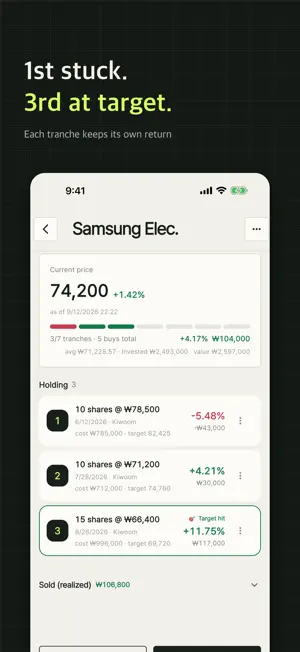
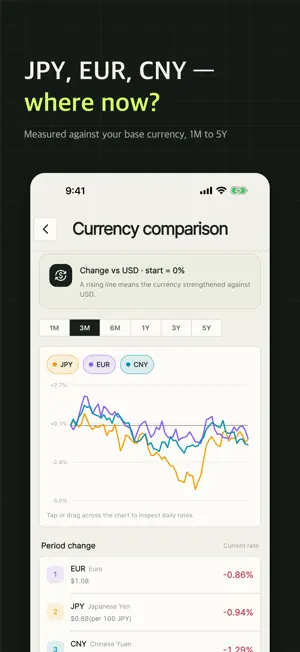
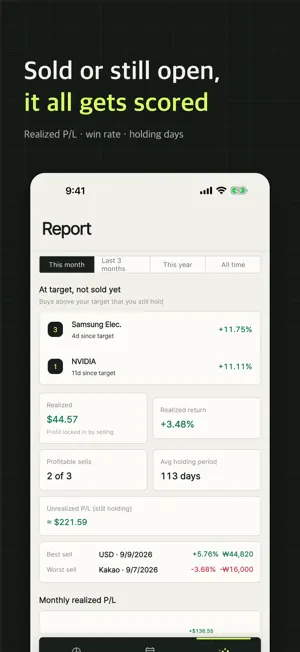
"What's your average price?" has an answer. "Was your second buy any good?" usually doesn't. TradeLog is a trading journal for people who buy in tranches instead of all at once. Every buy is logged as its own tranche and scored on its own. Nothing gets folded into a single average cost. ■ Per-tranche returns — the whole point Buy the same stock three times and you see three separate results: 1st -5.5% / 2nd +4.2% / 3rd +11.8%. A single average price would have flattened all of that into "+4%". Here you can see which buy actually worked and where you got stuck. ■ Currency comparison Overlay USD, JPY, EUR and CNY against the Korean won on one chart. Switch the range from one month to five years, and compare today against your own average entry rate before you buy again. ■ Base currency Show your totals on Home, History and the Report card in USD, JPY, EUR or CNY instead of KRW. ■ Stocks and currency, both in tranches Korean stocks, US stocks — and USD, JPY, EUR and CNY currency buys too, each split into tranches with its own exchange-rate gain. Register a ticker and your unrealized P/L follows Naver Finance quotes on its own. ■ Bring the spreadsheet you already keep Import and export CSV, so an existing history moves in and your records can always move out. ■ Report card Realized P/L, realized return, win rate and average holding days by period. Realized P/L by month, by asset and by broker, a cumulative curve, and a breakdown of which buy number tends to work out best for you. ■ Calendar and timeline Look back at what you bought and sold, and when. ■ Target alerts Set a target return per tranche and get notified during market hours. Buys that passed their target but are still open are collected in one list. ■ Your records stay on your device No account, no login. Trades are never sent to a server — they are stored on your device. Lock the app with Face ID or your fingerprint. ■ Also Home screen widget · light and dark mode · tablet layout · Korean and English ――― Quotes come from Naver Finance (unofficial) and may be delayed. Base-currency conversion is an approximation at the current rate; stock splits and dividends are not applied automatically. Realized P/L is shown before fees and taxes. This app is a record-keeping tool. It does not place orders and does not provide investment advice.
What’s new
Version 1.0.1 · Updated September 12, 2026
■ Currency comparison Overlay USD, JPY, EUR and CNY against the won on one chart — from one month to five years, with your own average entry rate marked for comparison. ■ Base currency Totals on Home, History and the Report card can now be shown in USD, JPY, EUR or CNY. ■ Display mode Follow your device setting, or pick light or dark yourself. Also — EUR and CNY currency buys, a reorganized Settings screen (display, rules, alerts and security, data), better tablet and large-screen layouts, and a refined lock screen.
App privacy
The developer, Byung Kwon Jeon, reported these privacy practices to Apple.
Data Not Collected
The developer does not collect any data from this app.
Alternatives to TradeLog: Tranche Journal
Looking for apps like TradeLog: Tranche Journal? Here are 6 similar apps on the App Store. The highest rated is TradingNote - DailyProfit (5.0/5), and all 6 are free to download.




| App | Rating | Price | Last updated | Compare |
|---|---|---|---|---|
| TradeLog: Tranche Journal | – | Free | September 12, 2026 | |
| 주식샀다치고 | – | Free | Sep 28, 2026 | Compare |
| 맴매일지 | – | Free | Jun 16, 2026 | Compare |
| TradingNote - DailyProfit | 5.0 / 5 (1) | Free | Aug 14, 2026 | Compare |
| 쓰론 Throne | – | Free | Oct 1, 2026 | Compare |
| 개미의 투자일기 - 직접 작성하는 매매일지 | – | Free | Sep 15, 2026 | Compare |
| 투자특공대 | 1.0 / 5 (1) | Free | Sep 15, 2026 | Compare |